Showing posts with label Android. Show all posts

Thursday, March 04, 2021

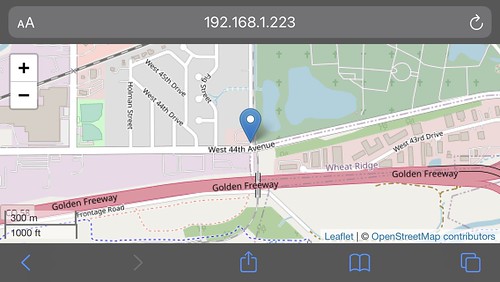
The OpenStreetMap Moving Map on Mobile Devices

One of the advantages of implementing tools as web applications is that it opens the possibility of running them on a wide variety of platforms, with browsers that support JavaScript and HTML5, with little or no additional effort. I'm a little embarrassed to admit that it just recently occurred to me that I should be able to run my OpenStreetMap (OSM) Moving Map web app on my iPad and iPhone. So I did. It worked fine.

Here is a screen snapshot from my iPad using Safari.

Untitled

Here is one from my iPhone 7, also using Safari.

Untitled

And for good measure, here is a screenshot from my Google Pixel 4 development phone using Chrome under Android 11. It worked fine too.

2021-03-04_12-44-59

I routinely run the web app on Safari, Firefox, and Chrome on my desktop Mac or my Mac laptop, and on Firefox and Chrome on an x86_64 Linux server. Now I can add genuine mobile devices to that list.

But wait! There's more!

I described in prior articles about this project, code-named Tesoro, how the server-side JavaScript program channel.js serves as a conduit between my Hazer C-based GPS software in the field, which forwards geolocation data in JSON over UDP, and my web application whose OSM-based moving map is steered by that incoming data stream. Alas, channel.js only services a single data source at a time (although you can run several instances simultaneously using different UDP port numbers).

Tesoro now includes another server-side JavaScript program, controller.js, that can handle an arbitrary number of geolocation data sources concurrently, all using the same UDP port number, and provide an individual URL for each one for the Tesoro web application. I have an instance of controller.js executing now on one of the Raspberry Pis that runs 24x7 at the Palatial Overclock Estate, serving as the sink for any geolocation project in the field (or for a playback of the dataset collected from any such project), and as the source of that same data for any moving map displays on my internal network.

Tuesday, May 30, 2017

Stranger Android Things

As far back as 2011 I was talking up using Android as a Linux-based embedded operating system. In those days I was running it on a BeagleBoard. I liked that idea then and I still like it now.

BeagleBoard xM Rev C

Android has a rich set of features, many of which would be really useful in an embedded product at the higher end. It is architected to make use of multiple network devices - for example, WiFi and a cellular modem - which is becoming common in the kinds of things I work on. Android has a mature tool chain and development infrastructure that includes stuff like a graphical IDE and a debugger. It is a well understood platform on which to deploy third-party applications, which at least one of my clients is eyeing as a business model for one of their products. And best of all, Android has enormous market forces incentivizing other folks to do a lot of the work for you.

I never got any traction on that idea. But maybe now that Google is promoting Android Things - as in Android for the Internet of Things - that will change. Android Things (formerly the platform known as "brillo") is a stripped down version of Android that can be run headless. It has the usual Android Run Time (ART) Java Virtual Machine (JVM) plus support for native C and C++ code, so you can port your legacy drivers and libraries, but do your new application development in an object oriented language that has first-class built-in support for threading, synchronization, and lots of other useful stuff.

Or will. Currently Android Things is just a pre-built developer preview that you can load on a selection of inexpensive development boards like the Raspberry Pi 3. It includes drivers and Java APIs for common embedded hardware interfaces like an Inter-Integrated Circuit (I2C) bus, a Serial Peripheral Interface (SPI) bus, Pulse-Width Modulation (PWM) output, and General Purpose Input/Output (GPIO) pins.

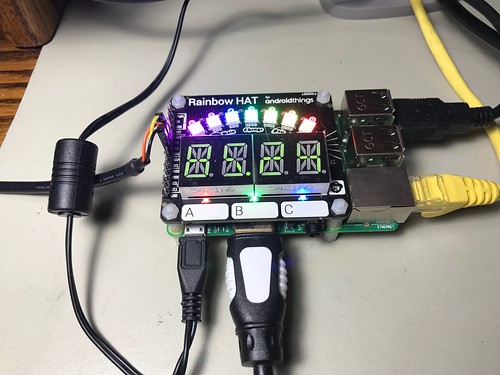
Third-party developers have in turn written higher level drivers and Java APIs on top of these for a selection of peripherals on commercially available expansion boards. For the Pi, that would be the Pimoroni Rainbow Hat. The Rainbow Hat has an APA102 LED strip (SPI), a BMX280 temperature and pressure sensor (I2C), two two-character HT16K33 alphanumeric segments (also I2C), a piezoelectric buzzer (PWM), and some discrete LEDs and buttons (GPIO). Below is a photograph of a Rainbow Hat on a Pi running my single threaded RainbowHatDemo application.

Untitled

The source for Android Things hasn't been released yet, so porting any of my C or C++ libraries will have to wait. But the developer preview, with a Raspberry Pi and the Rainbow Hat, is a great way to see where this is all going. I wrote some toy applications using Android Studio just to try to remember how to use Java, which I haven't done anything serious with in a decade. You can find the repository, code-named Deringer, with all my source code as Android Studio projects, on GitHub. Below is a little code snippet from my multi-threaded RainbowHatThing application that reads the temperature and pressure sensor and logs the results.

    public void run() {
        Log.i(getClass().getSimpleName(), "begin");
        while (!lifecycleDone()) {
            try {
                float[] readings = sensor.readTemperatureAndPressure();
                float centigrade = readings[0];
                float fahrenheit = (centigrade * 9.0f / 5.0f) + 32.0f;
                float hectopascals = readings[1];
                float inches = hectopascals * 0.02953f;
                Log.i(getClass().getSimpleName(), centigrade + "C " + fahrenheit + "F " + hectopascals + "hPa " + inches + "in");
                pause(1000);
            } catch (IOException e) {
                // Do nothing.
            }
        }
        Log.i(getClass().getSimpleName(), "end");
    }

Here is a little video (with audio) of the RainbowHatThing application running many threads concurrently on my tiny test system.


Will Android Things take off as a platform for the more capable IoT targets? No clue. But for sure there are many economic reasons to take this very seriously.

Wednesday, May 14, 2014

Revealing Developer Options on Android Jelly Bean

Oh, fer Pete's sake. Upgrade your Android device and now can't find the menu item Developer options? It's an Easter egg in Android 4.2.2 (Jelly Bean). From the home screen: Settings -> About device -> Build number and (srsly) click on Build number seven times. The Developer option menu item suddenly appears.

A big Thank You to http://gs4.wonderhowto.com/how-to/enable-hidden-developer-options-your-samsung-galaxy-s4-0146687/ .

Update (2014-05-15)

The original article I cited was specific to the Samsung Galaxy S4, but its technique worked on my Samsung Galaxy Tab 2 7.0. I now believe this behavior is universal to Jelly Bean and independent of the vendor. I've tweaked this article to reflect that.

Update (2014-05-19)

I had unrelated reasons to revisit the Android page on hardware devices and indeed this is clearly documented there (and probably elsewhere) for devices using Android 4.2 or newer.

Wednesday, July 11, 2012

Embassykernel: Overlaying GNU on Android on the ODROID-A4

In The System & The System: Overlaying GNU on Android on the Beagle Board I described my Contraption project where I ran both the Android Frozen Yogurt (FroYo) software stack and a small GNU software stack side by side on the BeagleBoard-xM. Both stacks ran under on a common Linux 2.6.32 kernel on a TI OMAP system-on-a-chip with an ARM Cortex-A8 core. It was a hack, no doubt about it, but for me it was a useful one. I'll go into why in a bit.

For my Conestoga project, I have worked the same hack: this time running both the Android Ice Cream Sandwich (ICS) software stack and a small GNU software stack side by side on the ODROID-A4. The A4 is a Samsung platform reference device made by Hardkernel with the same form factor as the Samsung Galaxy Android smartphones. Both stacks run under a common Linux 3.0.15 kernel on a Samsung Exynos system-on-a-chip with dual ARM Cortex-A9 cores.

You can see the A4 below displaying the time (as it happens, while I am SSHed into it from my desktop Mac), with a debug board attached to its TTA20 debug port. The debug port has a USB cable attached at its bottom providing access for the Android Debug Bridge (adb), and a cable attached to its console serial port at its left. Also visible to the upper right of the A4 is the all important reset tool (a bent paperclip).

ODROID-A4 with Reset Tool and Debug Board

Below is a screen snapshot of a terminal window on my desktop Mac through which I SSHed into the A4, logging in with a guest account with a password just as if the A4 were a server. My first ssh attempt was before I started the dropbear SSH server on the A4.

Mac Terminal: ssh to ODROID_A4 as guest

Below is a screen snapshot of the Android serial console in which a ps command shows the dropbear SSH server running along with the login bash shell used by a guest account. (You can click on the image to see a larger version.)

Android Debug Console: ps output

In China Miéville's Hugo-nominated novel Embassytown, he weaves a tale of a small human colony on a distant planet attempting to live among a race whose entire approach to language is so alien that neither individual humans nor their machines can be understood by the Arikei even when it sounds as if we speak their language perfectly. The cognitive barrier between the humans and the Arikei reminded me of the separation between the Android and GNU software stacks, living side by side on the same Linux kernel but for the most part unable to communicate.

This hack on Conestoga differed substantially from the same one on Contraption, not just because the former was running the ICS Android release instead of FroYo, but because the underlying A4 platform  was quite different from that of the BeagleBoard.

The BeagleBoard uses a two-stage boot process, starting with X-Loader loaded from flash on-board the OMAP chip itself, then to U-Boot. U-Boot booted up and ran Linux and the Android stack (and eventually the GNU stack) directly off its microSD card containing an EXT3 file system.

The A4 boots U-Boot from its microSD card, then loads the Linux kernel and a RAM-resident disk image from the microSD card. This ramdisk has most of the files needed by the platform layer that sits below Android and is mounted read-only. The A4 separates Android into two separate EXT4 file systems, system and userdata, and mounts the former read-only. There is also an EXT4 cache file system, and a FAT32 (a.k.a. VFAT) file system for user media like music, videos, and ringtones.

Because of the way I plumbed Conestoga into Android, I had to reverse-engineer, modify, and repackage the ramdisk and system filesystems, and push (via adb) an overlay (really: a tarball) onto the userdata file system which is created by the target itself when necessary (for example, on a new microSD card on which it does not already exist). There was a lot of web searching, lengthy sessions of source code pondering, and a few hex dumps. In the end, most of the changes to ramdisk and system were merely adding soft-links; the bulk of Conestoga resides in the read-write userdata file system under the directory /data/conestoga.

One piece of useful collateral was a tool I wrote to unpack the compressed EXT4 file system format generated by the A4 software build process. Files in this format are what is transmitted to the A4 via the fastboot mechanism, a way to download and install new file system images to the microSD card on the A4 via USB using only U-Boot. Below is a snippet of commands illustrating how decompressext4 might be used on the system.img produced by the A4 build.


decompressext4 -v < system.img > system.ext4
fsck.ext4 system.ext4
mkdir mnt
sudo mount -o loop system.ext4 mnt
ls -lR mnt
sudo make_ext4fs -s -l 524288000 system-new.img mnt
sudo umount mnt
rm -rf mnt
fastboot flash system system-new.img


The C source code for decompressext4 is open source and is included in the Conestoga distribution (which otherwise is not much more than a big Makefile), a link to which can be found on the project web page.

Why Android?

For reasons of cost and schedule you must to work as high on the abstraction ladder as possible, even when you are working in embedded systems. This means you don't write in assembler when you can use C. Don't use C when you can use more advanced languages like C++. Don't use compiled languages at all when you can use managed languages like Java or scripting languages like bash, perl or even python.

The fact that a high-capability open-source software stack like Android, mostly written in Java, can run on a pocket-sized smartphone makes it a potential framework for other embedded applications, mobile or not. It's also why I build the bash shell as part of both Contraption and Conestoga: not so much for its use as an interactive shell, but to use as a scripting language.

Why GNU?

There is a wealth of software written for the GNU environment. GNU is in fact the API against which developers are writing when they say they are writing for Linux. Maybe porting C and C++ GNU code to the Android Native Development Kit (NDK) is what you want to do in the long run. But the NDK environment, with its bionic C library, is quite different from GNU. The ability to quickly sling some existing legacy GNU code onto an Android-based project for purposes of prototyping is a big win in my book. Once you prove it can work, you can look at the cost of the NDK port.

Example: I got my GNU-based memtool application built and running on the A4 in just a few minutes using Conestoga. memtool is a command line tool that makes it easy to read and modify the memory mapped registers of hardware devices. I've written about its use in my own Linux/GNU-based embedded systems and on Android on the BeagleBoard. It's found its way into a number of products I've worked on for paying clients.

Tools like memtool are a huge win for debugging, integrating, and even for production use in system control and maintenance scripts. Using utilities like memtool and leveraging the tighter iteration cycle affording by scripting using bash, I've slung together scripts in an afternoon that would have taken days to develop, test, and debug in C, and produced utilities that I was later able to modify and adapt to changing circumstances while testing in the field. If you've never done this kind of work, you might be surprised how many times you want to read or set a bit in a register in an FPGA if only you had access to it somehow from the command line.

Why the ODROID-A4?

The A4 has much of the same hardware as the Samsung Galaxy Android smartphones; it's the platform reference device recommended by Samsung on their web site. To say that the Galaxy smartphones are popular is putting it mildly; let's just say that when another manufacturer of a popular smartphone tries to suppress your device, you just can't buy that kind of advertising. Samsung might as well have ads saying "Endorsed by Apple, manufacturer of the iPhone".

The A4 has a dual-core ARM-based processor. I've written before how important I think it is that all developers, including embedded developers, get on the multi-core train as quickly as possible. We all need to get experience with developing multi-threaded (concurrent) software on true multi-processing (parallel) hardware. Writing multi-threaded software for uni-processor systems opens the doors for race conditions that may never be detected. Multi-core is clearly the future, even in the embedded realm, as processor manufacturers try to continue climbing up the legacy performance curve by any means necessary.

The A4 runs Ice Cream Sandwich and the Linux 3.0.15 kernel. This was my first experience with both the ICS Android release and with the Linux 3.0 kernel. It was a useful learning experience to build, modify, and run both of them, as well as the A4's unique flavor of U-Boot, from scratch.

Oh, and the ODROID-A4 is a pretty usable Android mini-tablet all by itself.

Why me?

I make a good living mostly down in the platform layer. Application developers routinely depend on me to help them port and debug their code. I am often called upon to reverse engineer systems about which I formerly knew nothing, and to play a key role in hardware-firmware-software integration and testing.

This is the kind of stuff I get paid to do, and undertaking projects like Contraption and Conestoga keeps my skills up to date and gives me an opportunity to test my hypothesis about using Android as an embedded framework.

Wednesday, June 20, 2012

Welcome to the Major Leagues

I'm not the only person to have recognized that the skill sets for doing embedded development are the same as for developing for large distributed systems and multicore/multiprocessor architectures. And I'm sure I'm not the only one to have built a career on that common skill set based on dealing with concurrency and parallelism (and understanding why those are two different things), frequently working close to bare metal, developing scalable solutions, worrying about real-time and emergent behavior, and needing to understand what goes on under the hood.

But despite having spent decades on and off doing it, when I'm asked to define embedded development, I'm at a bit of a loss. Ask this question in an internet forum, and you will be surprised to find that there is no real consensus even among those who describe themselves as embedded developers.

Part of this is because the hardware target for which an embedded developer writes software ranges from a tiny inexpensive low-power eight-bit microcontrollers (which in fact may not even be independent chips themselves but cores implemented inside of another chip like an FPGA or some other surface-mounted device) with kilobytes of memory to a thirty-two-bit microprocessor with multiple cores and megabytes or even gigabytes of memory. The developer may code in assembler, C, C++, Java, or even scripting languages like Python and Perl. The underlying software platform that runs on the so-called embedded system ranges from none (remarkably, it is not uncommon to have no OS-like layer at all), to a simple task scheduler like FreeRTOS or even home grown, to a large commercial RTOS like VxWorks, to a full blown multi-user GNU/Linux or even Windows operating system.

This uncertainty about how to describe what we do for a living to our friends, children, spouses, and even colleagues is just going to get worse.

Yesterday I successfully built the entire Android "Ice Cream Sandwich" (a.k.a. ICS) software stack for my ODROID-A4 platform as part of my Conestoga project. It took awhile. I'm used to that, having built other Android releases like "Frozen Yogurt" and "Gingerbread" for the BeagleBoard as part of Contraption. While I was watching the build process scroll along in a window, I began to idly wonder just how big this software distribution was. So in another window I unloosed some of my favorite commands like find, wc, and awk.

ICS consists of 25,410 files ending in .java containing 5,325,103 lines of what is presumably Java code. It also includes 62,861 files ending in .cpp, .c, .hpp, or .h, containing 13,225,200 lines of presumed C or C++ code. This is just the Android stack. The same statistics for the Linux kernel and the U-Boot boot loader would make these numbers significantly larger.

To be fair, the ICS counts include some stuff that may not run on the Android target itself. Much of the code that does run on the target is what we would normally associate with the standard underlying C and C++ libraries on any other system. And one of the reasons not to count the Linux and U-Boot code bases is that they each contain vast amounts of code for targets completely unrelated to Android or the ODROID-A4 target. But even so, those are still big numbers, and developers working in the lower levels of Android close to bare metal may still end up indexing and searching all those unrelated files because there is no easy way to exclude them.

So just a naive census of the Android ICS code base for the ODROID-A4 yields 18,550,303 lines of code in 88,271 source files.

Surprised? Do you think those numbers are too big or too small? The answer may depend on whether or not you see Android as an embedded system. The A4 runs on a battery, connects wirelessly to a network, fits in my shirt pocket, and has tightly integrated hardware components. Any embedded developer would be completely at home perusing its circuit board. But it implements a complex user-facing graphical user interface and a bunch of applications. So desktop developers see a lot of stuff they recognize as well.

For sure these are pretty naive numbers. And I would be the first to say that lines of code is a kind of useless metric of just about anything. But if you are a developer tasked with working in this code base, then part of your job may be to reverse engineer portions of this code to understand it and to integrate with it, which means you'll be indexing, searching through, and reading this code, whether it's blank lines, comments, or the implementation of a cryptographic hash function.

What does this mean? I'm not sure. But I do believe that product and project managers who are looking at using Android, whether it's for a small embedded device or a large complex system, may need to recalibrate the mental models they carry around in their heads regarding the complexity of the tasks they are asking developers to take on. If you spend most of your time in the embedded world, or if you don't but you see shirt-pocket-sized mobile wireless devices as embedded systems, then the idea of a code base of more than eighteen million lines of code might seem surprising, not to mention a little daunting.

It's not as bad as I may make it sound. The Android APIs are well documented (albeit a moving target with each new release), and tools like the Android SDK and its Eclipse plug-in are very good.

But Android is not Minor League.

Tuesday, June 19, 2012

ODROID-A4, Mac OS X, USB, ADB

The latest Digital Aggregates project to show up on my radar screen uses the ODROID-A4, an Android reference and development platform from Hardkernel for mobile devices based on the Samsung Exynos family of processors. The A4 uses an Exynos 4210 system-on-a-chip that features dual one gigahertz ARM Cortex-A9 cores, has one gigabyte of memory, and a microSD card slot for its persistent storage. As you can see in the photograph below, the A4 is a handheld battery-powered mobile device the size of a largish smartphone or a smallish tablet. (I believe it's form factor is the same as the Samsung Galaxy S Android smartphone.)

This project is code-named Conestoga. This project is so new, there's no web page for it yet.

(Update 2012-07-06: the Conestoga web page exists now and has a link to the tarball for what I'm working on. Warning: it's definitely a work in progress.)

Here's a photograph of the A4 on my development bench fixture. Clockwise from top: amplified speakers (because my ears are old), blue HDMI cable to an external display (because my eyes are old), the ODROID-A4 and an unconnected accessory I/O board just above it, the debug board with TTA20 debug cable, USB cable, and DB9 serial cable, and a powered USB hub.

ODROID-A4: Bench Fixture

I'm no stranger to Android, having previously worked with several different releases of it on a couple of BeagleBoards for my Contraption project in which I ran a GNU software stack along side the Android software stack on a common Linux kernel. I'm a big believer in working as high as you can on the abstraction ladder even on embedded systems, which makes frameworks like Android of interest in me in a broader context than just mobile devices like smartphones and tablets.

But I blew nearly half a day trying to get the USB-based Android Debug Bridge (adb) to recognize the A4 on my Mac Mini desktop system running OS X 10.6.8.

I found some useful background on the web on Stack Overflow, Intohand, and this discussion on Goggle Code. As usual, software development is a team effort, even when you've never met any of the other team members.

What finally worked for me was two-fold.


  1. I used a separate powered USB hub (visible in the photograph above) instead of connecting the A4 to the hub built into the Cinema Display on my Mac Mini (no clue why, but that's what worked for others too).
  2. I did not use a USB cable to the mini-USB port on the debug board, connecting only the USB-to-TTA20 debug cable and a DB9 serial cable. The TTA20 port on the debug board provides USB access for the Android Debug Bridge. The DB9 port provides console access with a root shell.


To be clear, here's a photograph of both of the A4 and the debug board on the left with all three cables connected, which did not work.

ODROID-A4: Console, USB, and TTA20

Here's a photograph of just the debug cable and the serial cable, which did work.

ODROID-A4: Console and TTA20

Here's a screen snapshot of how the device enumerates on OS X.

ODROID-A4 USB Enumeration on Mac OS X

And here's the results of asking the Android Debug Bridge to list all the visible devices.

$ adb devices
List of devices attached
BABABEEFBABABEEF device

Here's hoping this saves others some time.

Update (2012-06-03)

While adb on the Mac works just fine, I've had no consistent success getting fastboot, the interface that allows you to communicate with the U-Boot boot loader over USB, to work on the Mac. Web perusal has led me to believe this is a common issue with later versions of Mac OS X. (I'm running 10.6.8 a.k.a. "Snow Leopard".)

After blowing an entire day trying various strategies including enabling USB debugging on OS X and writing my own OS X codeless kernel extension, I finally gave up and attached the A4 to my Ubuntu server (which, for unrelated reasons, I had recently moved from the vast subterranean catacombs to my office on the second floor of the Palatial Overclock Estate), where within an hour or two everything worked just fine.

The weird part is that fastboot devices on the Mac actually worked once out of dozens of tries. What I saw logged by the USB stack in OS X smells like some kind of race condition.

For now I'm sticking with Ubuntu for platform work on the A4, and will return to the Mac (which now entails just a cable swap at the powered USB hub) when and if I do application development in Java on the A4 using the Eclipse Android plug-in.

Wednesday, February 08, 2012

Arduino to Android on BeagleBoard via Zigbee

It eventually became clear that it was time to combine two projects, Contraption, in which I run Android overlaid with GNU on the BeagleBoard, and Amigo, my latest effort in which I build a wireless sensor platform using Arduino and Zigbee radios. Now I have Amigo reporting sensor readings to Contraption via a wireless serial connection using XBee Series 1 radios from Digi.

Here's an aerial view. Up at the top you can see the LCD monitor for the BeagleBoard running Android FroYo. Below is my tiny Mac Mini desktop system and it's huge Cinema display. To the right is the explosion of boards and cables.

Aerial View: Android on BeagleBoard, Arduino Sensor Platform

Here's a closeup of the boards. To the left is the BeagleBoard xM Revision C inside its clear plastic case festooned with cables. To its right is the Arduino with two shields stacked on top of it, an Ethernet shield and a Xbee shield. In front of them is the tiny Xbee Explorer board connected via USB to the BeagleBoard.

BeagleBoard running Android, Arduino Sensor Platform

I had budgeted a couple of days to getting this working. It took a couple of hours. I had to rebuild the Linux 2.6.32 kernel used by FroYo to include the ftdi_sio driver (kernel option CONFIG_SERIAL_FTDI_SIO). This supports the FTDI USB-to-serial chip used on the Explorer board, and whose driver has been part of the mainline Linux kernel distribution since 2.6.31. Once Android was booted up on the BeagleBoard, I plugged in the Explorer and was greeted by a new serial device /dev/ttyUSB0. I set the serial baud rate via

stty -F /dev/ttyUSB0 9600

using BusyBox running on the GNU layer in Contraption. Then I just did a

cat /dev/ttyUSB0

on the BeagleBoard serial console and saw the CSV output of the Amigo sensor platform wirelessly over Zigbee.

Android Serial Console

Amigo implements a tiny web server through which its sensors can be interrogated across its Ethernet connection. It seemed like a moral imperative to try this from the Android browser.

Android Web Browser Interrogating Arduino Web Server

I'm eventually going to migrate to XBee Series 2 radios, which are capable of much more complicated topologies than the wireless serial link provided by Series 1. I'm playing with Series 2 radios right now. But this was a useful first step.

Monday, June 13, 2011

Android FroYo on the BeagleBoard xM Rev C

There's a lot to like about the BeagleBoard xM compared to the BeagleBoard C4 I had been using for Contraption, my project to broker peace between the Android and GNU peoples. The xM has twice as much RAM: half a gigabyte. It has a built-in USB hub and four USB ports, eliminating the need for a separate USB hub, simplifying the attachment of a USB keyboard and mouse. It has a built-in RJ45 Ethernet port, eliminating the need for a USB Ethernet adaptor or, as I used, an expansion board like the Zippy2. And best yet, the price of the tiny xM board has come down to be the same as what I originally paid for the C4 board. This makes the xM a great platform for Contraption and for the kinds of things for which I use it.

At the time I chose to move off the C4, the currently shipping xM was the revision C board. The pre-built binaries available in the Rowboat validation port of Android FroYo to the xM did not support the rev C. In fact, neither the X-Load stage one loader, nor the U-Boot boot loader, nor the 2.6.32 Linux kernel with Android modifications, recognized the rev C board. Because the xM differed significantly in many ways from prior BeagleBoards (most significantly, in how the USB components were configured and powered), this made using the pre-built binaries from the developer's kit a non-starter.

Fortunately, I poked around and found Robert C. Nelson's patch to adapt the kernel's board support package (BSP) for the BeagleBoard to the rev C hardware. (Thank You, Robert!) And while I didn't find similar patches for X-Load or U-Boot, it was a simple thing to make the required changes to those packages as well using Robert's changes as a model. The patch files I used are now all part of the latest tarball available on the Contraption web page. As I've done in the past, I rebuilt all of the Android software and the root file system from scratch, because the graphics engine on the xM Rev C had to be built a little differently as well. This change has been incorporated into the make file.

Here's the BeagleBoard xM Rev C. Moving to the xM really cleaned up my workbench by eliminating a lot of cables and clutter. (You can click on any of the images below to open larger sizes.)

BeagleBoard xM Rev C

Here you can see the BeagleBoard xM rev C running Android FroYo. My desktop on the left is displaying an SSH window to Android (black on white) and a console window to the serial port on the xM board (green on black). The LCD monitor on the right is hooked to the xM and is displaying the Android browser.

Android on BeagleBoard xM Rev C

Here's a photograph of the xM LCD display.

Android Browser on BeagleBoard xM Rev C

Here's a screen snapshot of the serial console. If you look closely you can see one of the things I did was change the root password using the /bin/busybox passwd applet. SSH doesn't seem happy with an empty root password.

BeagleBoard xM Rev C Serial Console

After I SSHed into Android from my desktop and got a bash prompt, I ran the top command just to see who was doing what.

SSHed into Android using Contraption

I'd like to move to the port of Android Gingerbread. But if I'm interpreting what I'm reading correctly (and please, someone, tell me I'm not), I have to run the 64-bit version of Java to build the Android software, and to do that I have to migrate to the 64-bit version of Linux on my build server. That's a pretty big leap. Might be a while.

Monday, March 28, 2011

Contraption and Horsefly: Beagle Board, Android, AR.drone

Readers who have followed my articles on my Contraption project, a hack that allows a GNU software stack to run along side the Android software stack under a common Linux kernel on the Beagle Board, may have been wondering about my sudden turn into the world of remote controlled helicopters with the AR.drone, a project I call Horsefly. Here's where I tie it all together.

Step one: I hacked the /bin/wifi_setup.sh script on the AR.drone so that it uses a different IP subnet, 192.168.2.0/24, than that of the Palatial Overclock Estate (a.k.a. the Heavily Armed Overclock Compound), 192.168.1.0/24. I described how to do this in Deconstructing the AR.drone: Part 3. Yes, this almost certainly voids the warranty on my drone. Given what violence and indiscretions I've already committed on my unit, I was hardly worried about that at this point. Your mileage of course may vary.

Step two: I dug an old Linksys WET54G WiFi-Ethernet bridge out of the vast Estate storeroom (imagine if you will those last scenes from Raiders of the Last Ark or perhaps Citizen Kane). I configured it to work using my AR.drone's SSID and the new IP subnet, and plugged this bridge into the Estate LAN. This creates a bridge between the Estate subnet and the dedicated AR.drone subnet. The former is a crazy quilt mixture of infrastructure WiFi, PowerLine Ethernet over electrical wiring, and CAT5 directly to the router. The latter is the ad hoc WiFi network for which the AR.drone itself serves as a DHCP server.

Step three: I connected to the Beagle Board running Android via its serial console and configured it to support both IP subnets over a single Ethernet port by just doing an ifconfig eth0:1 192.168.2.1 command. Indeed, I could have configured a USB WiFi dongle on the Beagle Board, but using the WiFi-Ethernet bridge allows any device on the Estate LAN to access the ad hoc network. Below is a screen snapshot of the Android console, made somewhat noisy by the Android stack logging stuff while I was typing.

Configuring Second IP Subnet for Android on Beagle Board

Step four: I brought up the web control panel for the WET54G bridge using the Android browser on the Beagle Board, just as a sanity check.

Linksys WET54G Bridge Configured via Android Browser on Beagle Board

Step five: I powered up the AR.drone, ssh-ed to the Beagle Board from my Mac mini desktop, and from there telnet-ed into the AR.drone, as another sanity check.

SSH to Android on Beagle Board then Telnet to AR.drone

Step six: from my desktop I used adb, the Android Debug Bridge tool that is part of the Android SDK, to install AR.Pro Lite onto the Beagle Board. AR.Pro Lite is an Android app developed by Shell Shrader that controls the AR.drone in a manner very similar to the standard Free Flight iDevice app developed by Parrot, the company that manufactures the AR.drone, and which I have used on my iPad. The Beagle Board was already recognized by the Android SDK USB driver on my desktop, so the install was simply a matter of adb -s 20100720 install 5036861.apk, where 20100720 is the Android serial number of my Beagle Board (which looks suspiciously like a date), and 5036861.apk is the AR.Pro Lite app from the Android App Store.

Installing AR.Pro Lite Android App on Beagle Board from Desktop

Here you can see the AR.Pro Lite icon now in the upper right-hand corner of the Android display.

AR.Pro Lite Android App on Beagle Board

Step seven: I brought up the AR.Pro Lite app on the Beagle Board and administered it to see the AR.drone at its address on the new subnet, 192.168.2.1, by using the app's Preferences menu whose icon is visible in the lower center of the Android display. (This is a feature the Free Flight iDevice app sadly lacks.) I then used the Connect to Drone button whose icon is visible in the lower left of the Android display.

AR.Pro Lite Android App Running on Beagle Board

Step eight: the AR.Pro Lite app almost immediately showed the cockpit view from the AR.drone through the drone's forward camera. I hit the Take Off button at the bottom of the display and (somewhat to my surprise I must admit), my AR.drone spun up its engines and leaped into the air. Below on the Android display you can see the cockpit view showing an aerial shot of the hallway outside my office, along with the ground view from the ventral camera showing the AR.drone cardboard box I was using as a landing pad, as well as an altimeter, a WiFi signal strength gauge, and a fuel (battery) gauge. Between the big Mac Cinema Display and the Android display you can see the WET54G bridge and the Beagle Board. The AR.drone was hovering just outside the door at the right hand edge of the photograph.

AR.drone in Flight via AR.Pro Lite Android App from Beagle Board

Step nine: celebrate!

Contraption and Horsefly are part of my effort to demonstrate that learning real-time and embedded software development can be exciting, using popular software stacks such as Linux, GNU, and Android, and inexpensive, using platforms like the Beagle Board and the AR.drone. This milestone has been a great proof of concept towards that goal.

(A big Thank You to Shell Shrader, of Shellware, for his support of this project!)

Friday, February 18, 2011

Getting to Hello World on Android in About Five Minutes

Back when I started getting paid real money to make computers do things in the 1970s, I was called a systems programmer. That job description has fallen by the wayside. Now I'm just known to my co-workers as that fat old guy.

But my compulsion to peak under the hood of things has served me well career-wise over the past three plus decades, most recently earning me a very good living doing embedded Linux development. Maybe that's why I spent most of my early time with Android figuring out what violence had been done to the underlying platform (a lot) and seeing if my skills were actually transferrable (they were).

But I figured it was finally time to actually try the traditional Hello World program using the Eclipse-based Android SDK. I'd been using Eclipse for years, both in the embedded domain and in the enterprise Java domain (where I was still a systems programmer). But I didn't expect to have the sample Android Hello World up and running, not only in the emulator that is part of the SDK, but on the actual Beagle Board, about five minutes after reading the first few pages of Ed Burnette's book Hello, Android from The Pragmatic Programmers. The hardest part was finding the tiny USB OTG port on the Beagle Board to connect it to my desktop.

I know there's going to be a lot more to it than this to accomplish what I want to do. But still, I can't help but be impressed with the tool chain and its level of integration. A lot of things have changed since the IBM 029 keypunch.

Friday, February 11, 2011

The System & The System: Overlaying GNU on Android on the Beagle Board

One of the best novels I read last year was The City & The City by China Miéville. This police procedural set in the present day takes place in the fictional European city-states of Beszel and Ul Qoma. What places this novel squarely in the realm of weird fiction is that Beszel and Ul Qoma occupy the same geographical space. Citizens of one city must unsee the citizens and features of the other city even as they live among them. This seperation extends even to buildings, where some floors or even rooms are in Beszel while others are in Ul Qoma. Citizens of each city must ignore the other lest they fall prey to Breach, a secret police whose operatives are apparently the only ones who can cross from one city to the other at will. It is a tribute to Miéville's ability that this bizarre concept is carried off without calling upon the reader to assume any supernatural agency; it is an act of perception and conditioning on behalf of the inhabitants of both cities.

And so it is with Contraption, my project to overlay a GNU environment on top of the otherwise very un-GNU-like Android on the Beagle Board. Like the citizens of Beszel and Ul Qoma, the GNU and Android environments co-exist in close proximity, within the same geographic file system and random access memory, yet kept separate through the auspices of the Breach-like Linux kernel. You can interact with Android from one one screen while running GNU-based software from a bash shell inside an ssh session from another. For the most part the two systems simply unsee one another by virtue of using different PATH and LD_LIBRARY_PATH environmental variables and by being dynamically linked to different shared objects. The Linux kernel and the dynamic loader keep it all separate.

This isn't some kind of virtual machine magic. It's just a trick of engineering. GNU software lives in /usr/sbin, /usr/bin, and /bin. Android software lives in /sbin, /system/sbin, /system/bin, and /system/xbin. GNU shared objects live in /lib, necessary because some GNU software ignores LD_LIBRARY_PATH. Android shared objects live in /system/lib. Android doesn't use /etc at all, opting instead for /system/etc. While Android forgoes all the usual user-level authentication mechanisms like /etc/passwd, GNU has full access to all of it, enabling for example the dropbear ssh server and the busybox telnet daemon to run unmodified. GNU software dynamically links to the GNU-based shared objects from the Sourcery G++ Lite ARM tool chain from CodeSourcery. Android software dynamically links to the shared objects from the Android ARM tool chain (which is a modified version of the CodeSourcery toolchain) from the FroYo release of the Rowboat port of Android to the Beagle Board.

The only directory conflict was /sbin, which on Android contains only adbd, the Android debugging daemon that serves as a proxy on the target (the Beagle Board) for a development environment running on the host (my desktop). To allow Android to unsee the executables that would normally have been in GNU /sbin, I moved them to /usr/sbin where there were no conflicts with other GNU-based executables.

The utilities, shared object, and memory mapped device driver from my Diminuto project that I described in Memory Mapped Devices on the Beagle Board with Android live in /usr/local/bin, /usr/local/lib, and /lib/modules respectively. They work just as before, except the Android insmod and the busybox insmod have slightly different syntax!

The Contraption project consists almost solely of a single Makefile that configures and builds the necessary software, including the modified Linux kernel, the Android root file system, and the various GNU-based packages such as busybox, bash, strace, and dropbear, creates an SD card of the Android system that can be booted on the Beagle Board, then overlays Contraption on top of it.

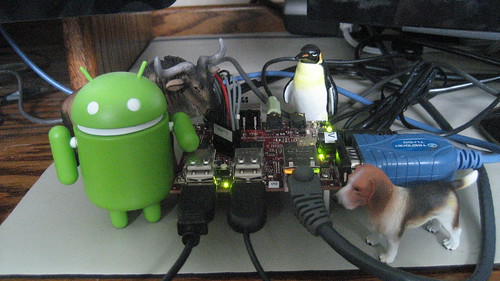
Here is the cinema display showing an Eclipse IDE with the Contraption Makefile, a bash shell running via an ssh session on Beagle Board, a serial console to Beagle Board; a little green Android figure standing next to the Beagle Board; a second display showing a web browser running on Android on the Beagle Board.

The System & The System

Here's a screen snapshot of a of the Beagle Board serial console. I booted up Android and fired up the dropbear ssh server from the command line. (See below for some notes on how to automate this.)

macwise console android

Here's a screen snapshot of a bash session via ssh to the Beagle Board. I ran the busybox ps command and used grep to pick out some processes.

ssh bash android

And here is a close up of the second display.

Android Browser on the Beagle Board

Here's a close up of the Beagle Board sitting between the two displays.

Beagle Board and Zippy2 Expansion Board

As I worked on the design of this, I began to realize the architects of Android must have wanted it to be possible for their system to be used this way, probably to make Android easier to integrate with existing Linux-based mobile phone platforms. Even though I've worked in the telecommunications field for most of the past fifteen years, my inspiration for this project wasn't smart phones. It was the student paper "Using Android in Industrial Automation" by Manuel Di Cerbo and Andreas Rudolf at the University of Applied Sciences at Northwestern Switzerland that impressed me with the possibilities of using Android in other embedded domains.

To make the Android platform really usable in this way I felt it had to be able to easily exploit the huge volume of GNU-based software. Even if one had to reside in Beszel and the other in Ul Qoma.

(You can find a link to a tar ball containing the Contraption distribution on the project web page at the Digital Aggregates Corporation web site.)

Update (2011-02-18)

I added some screen snapshots since I originally published this article.

Update (2011-02-25)

I modified the /init.rc boot script to automate some of the stuff described here.

In the on boot section I changed

hostname localhost

to

hostname contraption

and added

setprop net.dns1 8.8.8.8
setprop net.dns2 8.8.4.4

where 8.8.8.8 and 8.8.4.4 are Google's public DNS servers.

At the bottom I added

service dropbear /usr/sbin/dropbear
oneshot

to start the ssh server automatically. The oneshot option is important: the server is a daemon which appears to Android to exit, and you don't want Android to continuously restart it, otherwise wackiness will ensue.

Saturday, January 08, 2011

Cohabiting with Android on the Beagle Board

I recently migrated Contraption, my Android platform, from version 1 of the TI Android development kit for the Beagle Board, which was based on the Eclair Android release, to version 2 of the kit, based on the Froyo release. Both development kits run on top of the 2.6.32 Linux kernel. As before, I configured and built a custom version of the Android Linux kernel to support the additional hardware of the Zippy2 expansion board. The Zippy2 gives you a second SD card slot and an RJ45 Ethernet port.

I used the pre-built root file system, although I've also had good luck building the Android port to the Beagle Board from the Rowboat distribution sources. Note that the Rowboat distribution requires the older Java 1.5 JDK, so you might not want to delete it quite yet from your system.

I also got busybox, bash, dropbear, and strace running with Android on the Beagle Board, which simplified a lot of things. busybox is a very commonly used (one might say: indispensable) utility for embedded Linux-based systems that includes a boat load of commonly used commands and utilities all in one executable binary. It's your one stop shopping source for embedded Linux goodness. Although busybox implements a quite usable shell itself, porting bash gives me a more complete scripting capability. dropbear is a secure shell server that provides SSH and related services. strace (different from the Android strace) is a Linux system call tracing utility that makes it much easier to figure out why things aren't working.

Below you can see my set up. On the big display on the left, connected to my desktop system, you can see a small white window to the left where I have SSHed into the Beagle Board, and a small black window on the right where I am connected to the Beagle Board through its serial port and am running bash. On the smaller display on the right, connected to the Beagle Board, I am web cruising using the Android web browser. The tiny red Beagle Board sits barely visible in between.


Configuring and building tools based on Linux and GNU in a cross-compilation environment can be a little challenging. I was able to leverage a lot of prior work porting tools to the Atmel evaluation board for my Diminuto and Arroyo projects. Because Android and its C/C++ tool chain doesn't include the normal GNU libraries, I had to use the excellent CodeSourcery GCC tool chain and statically link the resulting executable binaries. (In the near future, I'll look at dropping the GNU libraries on the Beagle Board and going back to dynamic linking.) Because Android lacks all the usual Linux and GNU password and user identification infrastructure, dropbear required patches developed by Jakob Blomer at CERN. (A big Thank You to Jakob.)

I probably could have used the native Android utility adb to push binaries to the Beagle Board, but that would have been too easy. Instead, I built busybox, then dropped it into the Android root file system that I built on an SD card. Once I had Android running, I used the tftp function in busybox to copy over the other binaries. Once that was done, it was easy to get a dropbear SSH server running, and from there I had ssh and scp.

Was all this really necessary? Probably not. But I earn a good living in product development as a systems programmer, and that means I am interested with how systems work under the hood.

Most of this effort is captured in a single Makefile that can be found in the Contraption release. If you want to duplicate it, you'll also need to download a ton of other software distributions off the web, the URLs for which are in the Makefile comments.

The Froyo release on the Beagle Board seems to take a little longer to come up than Eclair. USB devices sometimes come and go. And once in a while the Java stack seems to get stuck coming up. But if it were easy, anyone could do it, and it wouldn't be any fun. Once I get over these minor hurdles, I'll be back into the Android software development kit and trying to remember how to write in Java.

Update (2011-01-24)

I've successfully built Android from the Rowboat sources, instead of using the pre-built root file system from the developer's kit. It installed and came up. There are a few elements of weirdness, but not nearly as many as I expected. I'm impressed.

Update (2011-01-31)

I've had some luck running dynamically linked executable binaries built with the standard Code Sourcery tool chain (as opposed to Android's modified version of it) under Android on the Beagle Board. It was fairly straightforward. I haven't tried it yet with the utilities I described here, but I have done so with my Diminuto library and toolkit, the porting of which to Android I have described in another article.

I had to copy all the requisite shared objects to the Beagle Board. For me, that meant /lib/ld-linux.so.3, libgcc_s.so.1, and libc.so.6 from the arm-none-linux-gnueabi/libc/lib directory of the Code Sourcery tool chain, plus my own libdiminuto.so.4.2.0. For all but the first one I was able to put the shared objects in a new directory and point the LD_LIBRARY_PATH environmental variable to it from my bash session. For the first one, which had an absolute path name embedded in the resulting binary executables, I had to create a /lib directory in the Android file system and placed it there. (I'm trying not to unduly contaminate the Android file system, keeping all my own stuff under my /Contraption directory; sometimes that's not possible.) I also had to make all the shared objects executable, which is required by the dynamic loader.

Tuesday, October 19, 2010

Android and Contraption

Back in July I wrote briefly about Cascada, my little project to move my software developed as part of my Diminuto project from the AT91RM9200-EK board (which uses the Atmel AT91 ARM9 processor) to the smaller, much cheaper, and more powerful BeagleBoard (which uses the TI OMAP 3530 ARM11 processor) with the TinCanTools Zippy2 expansion board. Cascada turned out to be so straightforward, I was a little disappointed. I didn't really feel like I'd gotten the learning experience I'd expected.

So I evolved the project into Contraption, where I run the "Rowboat" port of Android, the Google mobile device environment, to the BeagleBoard. This would have been a no-brainer too had I not insisted on getting the Zippy2 Ethernet port working. That required I reverse engineer the configurations of the Angstrom U-Boot bootloader and Linux kernel for the BeagleBoard that support the Zippy2, use what I learned to build the Linux that come with Android (which is slightly different), substitute in the U-Boot that initializes the Zippy2, and get the whole mess running on my hardware.

A few evenings of head scratching, and the next thing you know I'm displaying my blog on the Android browser.

Contraption

Scattered around my tiny lab bench is (roughly left to right) a WiFi to Ethernet bridge (which will play a role in a later article), the tiny BeagleBoard, an Ethernet switch, a BDI3000 JTAG debugger (mostly unnecessary), a fan (also mostly unnecessary except to keep me cool), and a powered USB hub. The keyboard and mouse on the left are connected to an ancient ThinkPad I use as a window and TFTP server, and the smaller keyboard and mouse on the right are connected to the BeagleBoard. Below is the Android home screen running on the BeagleBoard.

Google Android ("Rowboat") on BeagleBoard

Why Android? Lots of reasons, but the most compelling was that I had come across a technical report written by some students at the University of Applied Sciences Northwestern Switzerland about using Android in industrial automation. I'm all about frameworks for real-time software design, and this was right up my alley. It will also be an excuse to brush up my Java skills and learn how to develop in the Android environment.

Somewhat ironically, since I've spent the past nearly fifteen years working for one Bell Labs spin-off or another, my interest in Android is not really related to mobile phones. I have a whole other project in mind. But that will have to wait for a future article.