Showing posts with label Storage. Show all posts

Wednesday, January 27, 2021

1995

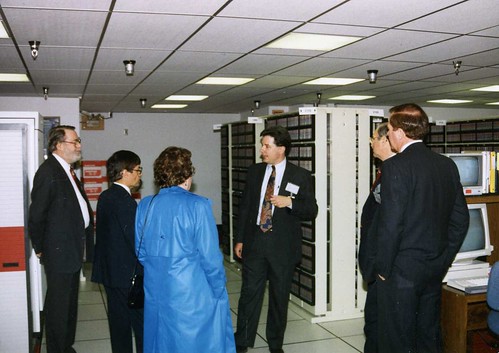
 Back around 1995 I was a section head in the Scientific Computing Division at the National Center for Atmospheric Research (NCAR) in Boulder Colorado, a national lab sponsored by the U.S. National Science Foundation. Besides leading VIPs around on tours, at that time I was involved in helping write proposals, papers (one of which was the featured article in the Proceedings of the IEEE), patent applications, and design documents for a terabyte hierarchical Mass Storage System, the next generation of NCAR's groundbreaking data storage architecture. The existing NCAR MSS had a floor-full of offline tapes and tape drives, several robotic tape silos, and a pile of disk drives. That is what it took to feed data to NCAR's several supercomputers and to soak up the results. A terabyte was an almost unbelievable amount of storage at the time.

Manager

This morning I'm continuing to work on my latest project, which incorporates a two terabyte Solid State Disk - no moving parts - so small it would easily fit in my shirt pocket. I bought it off Amazon because our local office supply store only had the one terabyte model of the same drive, and I needed something larger. The SSD is USB attached to an equally pocket-sized US$75 Raspberry Pi 4B Single Board Computer, which also provides all of the SSD's power.

Untitled

1995 just doesn't seem that long ago.

Saturday, April 04, 2020

Meet the new bug. Same as the old bug.

The Guardian in the U.K. reports on an FAA Airworthiness Directive that requires Boeing 787 aircraft be power cycled every fifty-one days to prevent "several potentially catastrophic failure scenarios".

From the AD:
The FAA is adopting a new airworthiness directive (AD) for all The Boeing Company Model 787–8, 787–9, and 787–10 airplanes. This AD requires repetitive cycling of the airplane electrical power. This AD was prompted by a report that the stale-data monitoring function of the common core system (CCS) may be lost when continuously powered on for 51 days. This could lead to undetected or unannunciated loss of common data network (CDN) message age validation, combined with a CDN switch failure. The FAA is issuing this AD to address the unsafe condition on these products.  
My friend and colleague Doug Young, who knows a thing or two about aircraft and avionics, brought this to my attention. I find fifty-one to be an interesting number, because unlike a lot of this class of bugs, it doesn't map quite so obviously into some kind of power-of-two/number-of-bits/frequency issue.

I tried to talk Doug into it being related to the number of bits (nineteen) in the data field of an ARINC 429 message (A429 being a common avionics bus that he and I have worked with), but even I thought it was a bit of a stretch, since it would require some system clock maintaining a frequency of 10000 ticks per day, causing the data field to overflow after 52.4287 days.

Both Doug and I independently arrived at the possibility of a uint32_t value in units of milliseconds, but that overflows after 49.71 days, a discrepancy that I find makes it unlikely.

As I've mentioned before, I ran into stuff like this all the time in my Bell Labs telecommunications days. Occasionally - alas - it was in code I wrote, definitely making for a learning experience.

Oh, and by the way, just last month HP announced yet another firmware bug in which some of their disk drives stop working after 40,000 hours of operation, also not an obvious power-of-two issue.

We will get fooled again.

Wednesday, November 27, 2019

32,768

In yet another example of the class of bugs my old Bell Labs colleagues refer to as counter rollover - in this instance apparently an int16_t (signed sixteen-bit integer) variable used to count hours - Hewlett-Packard warns that some of their solid state drives will fail at 32,768 hours of use.
HP Warns That Some SSD Drives Will Fail at 32,768 Hours of Use
Bulletin: HPE SAS Solid State Drives - Critical Firmware Upgrade Required for Certain HPE SAS Solid State Drive Models to Prevent Drive Failure at 32,768 Hours of Operation
That's an MTBF of 32,767 hours, or 0x7FFF in hexadecimal, the largest signed integer you can fit into sixteen bits. That works out to short of four years, far less than the five year warranty offered on such drives.

Some users report several drives - presumably installed at the same time - all failed within a fifteen minute window. Bet we can guess how long it took the sysadmin to install those drives in a RAID (and so much for redundancy).

HP is providing a firmware update. (I've never updated the firmware on a solid state drive. I'm a little surprised it's even possible.)
The fact that this catastrophic rollover event only occurs between the third and fourth years of operation makes you appreciate the difficulty in testing such firmware. You can't run the devices for four years before you ship them. You have to find another way to ferret out bugs of this nature, such as code inspections, white box unit testing, simulation, effectively an accelerated wear testing of the firmware algorithms.

In the words of my former office mate at the Labs:
They missed a cardinal rule: when implementing a counter or timestamp, ensure its rollover happens only after your anticipated career EOL1.
To which I replied:
The advent of an efficient uint64_t data type on embedded processors was a huge boon to my apparent career success!
Footnotes

1 End Of Life

See Also

C. Overclock, "Time Flies", 2015-05-09

C. Overclock, "Time Flies Again", 2019-07-27

Updates

2019-11-28: minor edits, corrections, and reformatting.

Thursday, March 10, 2016

Hard Power Off, Solid State Disks, and Flash Memory: The Story Continues

Two more articles have come to my attention on the reliability of flash-based mass storage devices, from two organizations that should have some experience with such devices under their collective belts: Facebook and Google.

From Carnegie Mellon University and Facebook, Inc.:

J. Meza, Q. Wu, S. Kumar, O. Mutlu, A Large-Scale Study of Flash Memory Failures in the Field, ACM SIGMETRICS '15, June 15-19, 2015, Portland, OR, USA

Snippet:
Sparse data layout across an SSD's physical address space (e.g., non-contiguously allocated data) leads to high SSD failure rates;  dense data layout (e.g.,  contiguous data) can also negatively impact reliability under certain conditions, likely due to adversarial access patterns.
From University of Toronto and Google, Inc:

B. Schroeder, R. Lagisetty, A. Merchant, Flash Reliability in Production: The Expected and Unexepected, USENIX FAST '16, February 22-25, 2016, Santa Clara, CA, USA

Snippet:
In summary, we find that the flash drives in our study experience significantly lower replacement rates (within their rated lifetime) than hard disk drives. On the downside, they experience significantly higher rates of uncorrectable errors than hard disk drives.
Nearly five years after writing the first of the articles cited below regarding my own experience with incorporating SSDs and other flash-based mass storage in products, I continue to find challenges with their application. Not that I don't use them myself; semiconductor-based mass storage has replaced magnetic media in virtually all of the more recent systems that I deal with on a regular basis. But I find that the design practices of both hardware and software architects still haven't caught up with the implications of their use.

References

C. Overclock, Data Remanence and Solid State Drives, 2011-06-20

C. Overclock, The Death of Hard Power Off, 2012-07-17

C. Overclock, Hard Power Off Is Dead But Not Buried, 2013-03-04

Monday, March 04, 2013

Hard Power Off Is Dead But Not Buried

In The Death of Hard Power Off I talked about how the use of persistent flash-based read-write storage -- flash file systems and solid state disks -- had led to the systems using those technologies requiring soft power off: software mechanisms that implement an orderly shutdown of the device before power is actually removed. The failure to quiesce flash-based read-write storage before cycling power will eventually lead to file system corruption. Do it enough, and you have a high likelihood of bricking the entire device.

Just the other day, my occasional colleague Paul Gross passed this very recent gem of a paper along to me, for which I am grateful.
Mai Zheng, Joseph Tucek, Feng Qin, Mark Lillibridge, "Understanding the Robustness of SSDs under Power Fault", 11th USENIX Conference on File and Storage Technologies (FAST '13), San Jose CA USA, February 12-15, 2013
It's worth a read. Here's just a brief section from the abstract.
Applying our testing framework, we test fifteen commodity SSDs from five different vendors using more than three thousand fault injection cycles in total. Our experimental results reveal that thirteen out of the fifteen tested SSD devices exhibit surprising failure behaviors under power faults, including bit corruption, shorn writes, unserializable writes, meta-data corruption, and total device failure.
These researchers from the Ohio State University and H-P Labs take the same approach as unpublished (and kinda clever) work done by my occasional colleague Julie Remington, a hardware engineer who hooked up a system we were troubleshooting that had a surface-mount SSD to a computer-controlled power supply and proceeded to cycle power on the system in a controlled, scripted fashion. Each power cycle waited until the system under test was up and stable, and logged all of the results from the system's serial console. Her results: after a few iterations, the system had to use fsck to repair the EXT3 file system on the SSD (file system corruption, not unexpected under the circumstances); after a few more, the SSD began reporting a bogus device type and serial number to hdparm (internal meta-data corruption); after just a few more, the device quit responding completely to I/O commands. It could only be recovered by removing the tiny flash chips from the top of the SSD chip itself and replacing them with uncorrupted chips from an identical SSD. Which one of Julie's colleagues did. Which is kinda, you know, hard core.

But it doesn't have to be an SSD. I've seen similar failure modes in embedded systems using JFFS2 (Journaling Flash File System version 2) under Linux. JFFS2 does all the same kinds of things behind the scenes that an SSD does, except its controller is implemented in software instead of hardware, on top of commodity NAND flash. Just as the controller inside an SSD is rewriting its flash behind the scenes, the JFFS2 garbage collector kernel thread (which will look something like [jffs2_gc_mtd2], interpreted as "JFFS2 Garbage Collector for Memory Technology Device partition 2", when you do a ps command) is rolling along its merry way, erasing and rewriting flash blocks with little or no regard to the fact that your finger is on the power switch.

But with JFFS2, at least you have some prayer of coming to an orderly stop if you do something like a shutdown -h now before turning off the power. Not that systems in the field with hard power off will have an opportunity to do so, of course. But at least you might save a system or two in the development lab.

The problem with SSDs is that they are not only asynchronous -- doing stuff behind the scenes -- but also autonomous -- doing stuff that you don't even know about and have no control over. The SSD controller continues to erase and rewrite flash blocks even if you unmount the file system. Even if you shut down the operating system. Even if you hold the damn processor in reset.

It's like the honey badger. Honey badger SSD don't care.

Tuesday, July 17, 2012

The Death of Hard Power Off

You've already noticed this: when you hit the power button, it takes several seconds for the device to go dark. If it has a display, your device might show a little spinning or blinking icon to indicate it is doing something. This is true for your hand-held mobile devices: your tablet, your mobile phone. It is also true for your laptop and your desktop, and for the rack-mounted servers at your data center. It is also the case for consumer devices you perhaps don't give that much thought to: your digital video recorder, your MP3 player, or, perhaps, even your automobile.

Increasingly, digital devices implement a soft power off. Which is to say, when you press the power off button, you are not turning the power off. You are informing a piece of software of your desire for it to turn the power off. A million lines of executed code later, the power turns off. Usually.

Compare this to a hard power off, which is more like a simple light switch: the instant the purely mechanical switch separates a set of metallic contacts, the electrical circuit is interrupted and power is immediately removed from the device.

Soft power off has permeated our digital devices, more or less without us users thinking about it, for one reason: the need to maintain a consistent state.

This state could be your device remembering your web page history. Or its position in your music play-list. Or where you paused your movie. Or the last number you dialed. But state can also be something a lot more abstract, data the device has to save as part of some function or service it is doing on your behalf, or even something in the realm of routine maintenance, the details of which might make your eyes glaze over if you actually had to know about it. For example, devices with global positioning system capabilities - which is nearly everything now - like to save information about the GPS satellites used during the last position fix because this can vastly speed up acquisition of the same satellites the next time you turn the device on, providing you haven't moved very far or it hasn't been turned off for very long. You appreciate this capability even if you don't know about it.

This state could be saved on a remote server for network attached devices, whether they are wireless or wireful. But more often than not these days, state is saved on a persistent  read-write storage drive embedded directly in your device. The growth of read-write storage in embedded devices has exploded in recent years. Very early mobile digital devices actually had tiny surface-mount spinning disk drives. But the introduction of less expensive flash memory, read-write persistent semiconductor memory with no mechanical parts, now dominates the mobile device market, and is beginning to dominate even the less mobile laptop market.

Sometimes this flash memory is used directly by the device; the operating system uses a file system implementation like Journalling Flash File System 2 (JFFS2) and Yet Another Flash File System (YAFFS) that makes the flash behave less like memory and more like a disk drive, and which provides the usual functional capabilities like directories and files and permission bits and the like.

Some read-write persistent storage devices, like a USB memory stick, or a microSD memory card, offer a slightly more disk-like hardware interface on top of the underlying flash, and the operating system conspires to make the storage device behave like a disk to the application software. My little shirt-pocket-sized ODROID-A4, a battery-powered and WiFi-connected platform reference device produced by Hardkernel for developers writing low level code for Samsung's Galaxy Android smartphones and tablets, uses a microSD card for its persistent storage. But the A4 layers on top of it disk partitioning and multiple EXT4 file systems, something you would have in the past expected to find on a server at the data center.

Solid state disks (SSDs) are storage devices which emulate a full blown disk hardware interfaces on top of the underlying flash memory. Not even the operating system may be able to tell the difference between the SSD and a spinning disk. I've built embedded products using SSDs that used the stock disk drivers in Linux. On these systems I had no choice but to use file system implementation tailored for disk drives, like EXT3, because that's the hardware interface I had to work with.

The introduction of read-write persistent disk-like semantics to mobile devices brings with it not just all the convenience and capabilities of having spinning disks, but all the issues the plague our mobile devices' bigger cousins that traditionally use those spinning disks. I've already written about issues of data remanence and solid-state storage devices. But here, I'm talking about basic reliability.

Perhaps you have learned the hard way to put your desktop system on an uninterruptible power supply. You may not appreciate the fact that your laptop has its own built-in UPS, but you depend on that fact just the same. And pulling the power cord out of a running server at your data center is a good way to get escorted to the door by your organization's security apparatus. There is a reason why all of these devices now implement soft power off. And why Google added a twelve volt battery to each individual server.

The reason is that as application software has become more and more complex, its demands of its underlying storage system has increasingly become more and more like a database transaction, either in fact (because it uses an actual database) or in function (because it requires atomically consistent behavior to be reliable). It is for this reason that, no matter what the nature of the underlying storage device, file system implementations like EXT3 and EXT4 have borrowed from the database world and are journalled file systems: a single atomic write to a sequential file or journal on the storage device is first done to record the intent of the following more complex multiple write operations which may be spread across the storage device. If a failure occurs during the multiple writes, the journal is consulted during the restart to repair the file system. (Log-structured file systems do away with the subsequent multiple write operations completely and merely reconstruct the vision of the file system as seen by the application software from the sequential log file as a kind of dynamic in-memory hallucination, with some performance penalty.)

Update 2016-03-09: Something I failed to make clear here is that in the case of journalled file systems, only the meta-data -- that is, only the writes done to modify the structure the file system itself -- are saved in the journal, not the writes of the data blocks. This allows the file system to be repaired following a power cycle, such that the file system structure is intact and consistent. But the data writes in progress at the time of the power cycle are lost. One of the symptoms I've seen of this is zero-length files. The file entry in the directory was completed from its record in the journal, but the actual data payload was not.

The need for consistent file system semantics has lead to a lot of research in file system architectures, because techniques like journalling are not perfect, and sometimes not adequate for applications software that have more complex consistency requirements than just knowing whether a particular disk block has been committed reliably to the storage device. But more practically, it has lead to the end of hard power off as a hardware design. Soft power off gives the software stack time to commit pending writes to storage to insure a consistent state on restart. (And for network connected devices which may depend on consistent state on remote servers, it allows for a more orderly notification of the far-end and shutdown of communication channels.)

The web is full of woeful tales of users who bricked their devices by cutting the power to them at an inopportune moment. And I have my own horror stories of products on which I've worked with read-write persistent storage but architected with only hard power off.

Hard power off is such an issue in maintaining the integrity of SSDs that the more reliable ones (by which I mean, the only ones you should ever use) implement their own soft power off, in the form of a capacitor-based energy storage system, to keep the device running long enough to reach a consistent internal state. There are a lot of SSDs that don't do this. Those SSDs are crap. As you will learn the hard way once you've cycled power on them just a few times. (If you are using SSDs in any context, adding a UPS to the system in which they are used is not sufficient. As long as power is applied, the tiny controller inside the SSD is doing all sorts of stuff, all the time, asynchronously, whether or not your system is using it, even if your system has been shutdown. Like garbage collecting flash sectors for erasure as a background task. Only the controller inside the SSD knows when it's reached a consistent state; neither the operating system nor even the BIOS has any visibility into that activity.)

This is just going to get worse. The decreasing cost of solid-state read-write persistent storage makes it more likely that it will be used in less and less expensive (and hence a greater and greater number of) small digital devices. Increasing memory sizes on digital devices allows more complex software, which places greater demands on the storage system. Larger memory also increases the amount of data cached there, typically for reasons of performance, which stretches the latency in committing the modified data to storage, and increases the likelihood that an inconsistency will happen should a failure should occur. (One of the principle differences between the EXT3 and the EXT4 file systems is the latter caches data more aggressively.) We should have expected this just by looking at the disparate technology growth curves.

As you consider expanding your product line to include more digital control in your embedded products, it will occur to you that adding some solid-state read-write persistent storage would be a really good thing: to store user settings, to allow firmware to be updated, to implement more and smarter features. Once you take that step, remember that you now face the issue of soft power off where perhaps you didn't before. Because with today's digital devices, hard power off is dead.

Update 2016-03-09: Nearly four years after having written this article, I am still trying to convince my clients that they cannot design their embedded products with a hard power off switch, even as the complexity of these products, in both software and hardware, evolves to look more and more like data center servers. And failing that, helping them try to figure out how to make their products more recoverable in the field when their file systems -- much much larger than they were four years ago -- are hopelessly scrogged.

Sunday, June 10, 2012

Going Gentle Into That Good Night

My master's thesis was published in 1983. The text of the digital version was written using a word processing program called WordStar that ran on a microcomputer using a Motorola 6800 processor running the CP/M operating system and stored on eight-inch floppy disks. The source code for my software that I was writing about was stored on eight-inch floppies in RT-11 format and ran on a Digital Equipment Corporation PDP-11 running the RSX-11M operating system. I'm pretty sure none of that exists now.

If you absolutely had to recover that digital information, it would require tens or even hundreds of thousands of dollars, in terms of hardware, software, and time, if it could be done at all. You'd have to find eight-inch floppy drives, devise a way to hook them up to some modern computer, track down the description of the CP/M and RT-11 file system formats and the WordStar and RSX-11M file formats, implement both their documented behavior and the undocumented behavior, pray that the floppies were still readable nearly thirty years later, and hope that I didn't use some compression and/or encryption algorithm that was in vogue at the time.

The effort would be made somewhat more complicated by the fact that I threw away those eight-inch floppy disks years ago. But I do have a hardcopy of my thesis, which includes the text and the complete source listings, printed on acid free paper, and hardbound. If this tome were to survive fires, floods, and the inevitable collapse of civilization, it would likely still be readable a thousand years from now. If anyone cared. Which is highly unlikely.

So it is with preservation of digital information. While I can actually read an original book by Galileo, and make out the icons on a shard of four thousand year old Greek pottery, digital data are ephemeral. My enormous collection of motion picture and television soundtrack music on compact disk, about two thousand of them, has a shelf life. Estimates range from 100 years to as few as two years. And what are my chances of buying a new CD player twenty years from now? Let's ask the people who invested in eight-track tapes, cassette tapes, or any number of other media technologies that have gone by the wayside. It is a similar story for DVDs, nine-track magnetic tape, flash memory, and anything else that stores bits magnetically, optically, or electronically.

What's worse, it's not just the physical bits, it's what the bits mean: encryption, compression, application file format, operating system file system format, all have something to do with how the ones and zeros are interpreted. So the problem just gets exponentially complicated, because information about all that stuff is stored digitally too. How much of it do you need to read the digital copy of my thesis? All of it. 

The general consensus is that there are two approaches to solving the long-term digital preservation problem: migration and emulation.

Migration is the act of more or less continually copying all archived digital information to the latest and greatest formats and technologies. This can work. Sorta. I once worked at a place that had to purchase every single used tape drive of the discontinued model they were using in order to keep enough working for long enough so that they could move their enormous tape archive containing the sole copies of historical climate data and archived output from climate simulations to a format and technology that might buy them another decade before panic sat in again. When you do this you hope you can get the migration competed before the new technology is obsolete.

Emulation is building a system using new technology that acts like old technology. This is non-trivial, for the reasons stated above: the documentation you need, if it exists at all, is also stored digitally. And there's the matter of the physical media and the devices to read it. This approach is the reason I was once tasked with writing UNIX code that grokked files stored in a variety of IBM VM/370 file formats. My software, which I designed by reverse engineering the original VM/370 system software written in IBM assembler, was used to access hundreds of thousands of files. Successfully, I'm told.

Barry Karafin, formerly the head of Bell Labs, once observed that most high technologies have a half-life of about five years. Some technologies, like C and TCP/IP, have done better. But for most of it, there is no long term. The need to migrate or emulate is, like adaptive maintenance, a continuous on-going process that never ends.

The definitive work on this topic in my opinion is

Jeff Rothenberg, "Ensuring the Longevity of Digital Documents", Scientific American, vol. 272, no. 1, January 1995

a digital copy of which, so far, can be found here, providing its still readable and you have software that understands Adobe's Portable Document Format. Just today I read another article on this topic written more recently

David Anderson, "Historical Reflections: The Future of the Past", Communications of the ACM, vol. 55, no. 5, May 2012

that I also recommend, and which, at least for now, can be found here. If the links are broken, or your browser can't render the text, well, then, welcome to the information age.

This is serious stuff. I'm not kidding. The value of information often can only be ascertained in hindsight once its historical context is known. We are contemporaneously the worst judges of the value of the data that we produce. We can still read the original letters John Adams wrote to his wife. But the chances that two hundred years from now anything that any of us may have written, important or not, will still exist and be readable are vanishingly slim.

Monday, June 20, 2011

Data Remanence and Solid State Drives

Deep in the subterranean bowels of the Palatial Overclock Estate (a.k.a. the Heavily Armed Overclock Compound) is a box containing every disk drive from every computer that has ever graced our home. There is another box containing every personal digital assistant, every mobile phone, and any other device featuring persistent read-write storage that may contain personal information about myself or Mrs. Overclock.

We're not paranoid. We're just thinking clearly.

The issue here is data remanence: how to insure that data has really been erased from a storage device. Data that may contain passwords, account numbers, records, schedules, notes, and anything else that could be used and misused by a miscreant, a competitor, or a court of law.

We're not the only ones concerned about this. Mrs. Overclock, a.k.a. Dr. Overclock, Medicine Woman, has to carefully conform to regulations and laws concerning the privacy of the personal medical records of her patients, and that includes computerized medical records. Several times I've been on site at a major financial firm back east whose privacy policies to deal with their clients' personal financial data required their security people to roam their multi-building campus and confiscate any device, ranging from laptop to thumb drive, that was left unsecured and unattended at some poor careless slob's desk. And it seems like every day brings another news story about someone who bought a used computer only to discover that it contained a fascinating wealth of personal data from the previous owner.

I'm writing this article on my beloved MacBook Air, a slim, light, beautifully designed laptop. It is the first laptop I've ever used that does not contain a rotating disk like my other laptops and desktops. I'm using the term "rotating" here quite deliberately to refer to traditional disk drives that have rotating platters that store information magnetically. Nor does it have flash memory, which is a semiconductor device that stores data even when powered off but unlike a rotating disk has no moving mechanical parts, like my personal digital assistants. Instead it has a hybrid device: a solid-state drive (SSD). An SSD stores data persistently in a semiconductor device with no moving parts but which emulates a traditional rotating disk drive. This allows the SSD to be used transparently (more or less, as we shall soon see) in applications which expect a disk drive.

SSDs offer extreme ruggedness, lower power consumption, and potentially much higher performance than rotating disk drives, albeit at a much higher price. This makes them attractive in applications ranging from hand-held portable devices such as mobile phones and laptops (where the attraction is principally the ruggedness and lower power consumption) to very high end servers (for the performance and lower power consumption). At the same time, SSDs bring exciting, some might say terrifying, new issues to the realm of data remanence. To understand why, we have to briefly look at other forms of digital storage, and kind of sneak up from behind on how SSDs actually work on the inside.

Rotating Disks and Tapes

Rotating disks and tapes are inherently mechanical devices that store data magnetically and have to go through a lot of drama involving moving parts which you never see to read and write your data. While they require power to read and write, when powered-off they are capable of storing data for a long long time, years or even decades, without significant degradation. With some extremely expensive equipment you can actually see the tiny magnetic dots that form the bits of your data. How tiny? Modern magnetic media store many gigabits per square inch. A single disk or tape that you can hold in your hand can store several terabytes of data. A terabyte is a million million bytes. That's a lot of bytes.

Both rotating disks and tapes store data in a chunk or block of bytes, and the disk or tape drive reads or writes an entire block at a time. A typical disk drive like you have in your laptop stores data in fixed sized blocks of 512 bytes each. Lots of software, including the operating system running on your laptop, was designed, implemented, and optimized under the assumption on the data being stored in 512 byte blocks. This assumption will become important when we look at SSDs.

Both rotating disks and tapes incur a lot of latency in both read and write operations. In the case of a random read or write to a rotating disk, a mechanical arm containing a read-write head has to swing laterally across the surface of the magnetic platter to be positioned over the correct cylinder where the data resides, and then wait for the correct sector where the data resides within the cylinder to travel beneath the head as the platter rotates. These two delays are referred to as the seek latency and the rotational latency respectively, and together can amount to several milliseconds. Tapes incur seek latency as well, but since tapes are typically used for strictly sequential reads and writes, and tape drive hardware and software is optimized to keep the tape moving, tape drives can and typically do out perform disk drives in terms of raw read and write performance. Only a mad man, or someone with lots of time on their hands, uses tapes for random reads and writes. I've done it.

With rotating disk drives and tapes, the issue of data remanence has been explored thoroughly since the 1960s. The gold-standard in paranoia is the U.S. National Security Agency (NSA), whose publicly available document on this topic, the Storage Device Declassification Manual, recommends degaussing a disk or tape, that is, using a strong electro-magnetic to disrupt the magnetic properties of the media, then physically damaging the drive so that it is a little more obvious to the casual observer that it cannot be used. In both cases, incineration is a second option. Other sources recommend dropping the disk drive in an industrial shredder that reduces it to tiny metal bits.

Note that merely deleting a disk file is entirely inadequate. As everyone who has not been living in a cave realizes, deleting a file merely deletes its metadata, its name and information about its location on the disk, from a directory that is also stored on the disk. It may not even do that; it may just mark the file as deleted, leaving all the metadata at least temporarily in place. Unless you are using some very clever software, the data bits in the original file are all still on disk, where they can be recovered by some even cleverer software, as a lot of crooked politicians, child pornographers, and bent accountants have all discovered to their woe.

To truly erase a file from disk or tape, you must write new bits directly over the old bits of the file. This will keep all but the most motivated and technically advanced individuals from recovering the data. But there as been a lot research that has shown that even then, some, many, or even most of the overwritten bits can be recovered, or at least inferred with a high degree of certainty, using devices like electronic microscopes. Which is exactly why the NSA requires destructive degaussing if not outright incineration. Nuke it from orbit. It's the only way to be sure.

Random Access Memory

Random access memory (RAM) is a semiconductor device, a hunk of metal and silicon, with no moving parts. It is used to store data and software temporarily while it is in active use. RAM is what software developers mean when they say "memory". RAM stores data reliably only as long as power is applied to it. Although we think of RAM as been read or written a byte at a time, modern memory systems only read and write a word at a time to a single RAM device, where a word might be two, four, or even eight bytes in width. There is a lot of hard-wired logic in current microprocessors to handle the conversion between byte access and word access.

The NSA seems quite confident that RAM data is not recoverable after loss of power. However, there has been some research regarding supercooling certain types of RAM right at power off, then using yet more extremely expensive devices to read or infer the bits from the deeply frozen device. As paranoid as I am, I can't say I'm concerned about data remanence in RAM. But people who are looking at the ability to extract secret keys from cryptographic devices that are used, for example, in automated teller machines, are.

Flash Memory

Like RAM, flash memory is also a semiconductor device with no moving parts. It stores your data at the atomic level, as electrons that are trapped in the physical material of the device. Like rotating disk drives, flash memory is persistent, maintaining its data after being powered off. Data storage in flash memory isn't permanent, and its longevity isn't measured in decades like that of the magnetic storage of rotating disks or tapes. But it takes years for the electrical charges stored in a flash device to bleed out, long after you have upgraded to a larger thumb drive.

There are broadly two kinds of flash memory: NOR flash and NAND flash. NOR (literally "not or") and NAND ("not and") describe the kinds of logical operations the device emulates in its very low level operation. That's of less interest to us here than the other properties that make NOR and NAND flash differ from one another, and that makes flash memory of either variety very different from rotating disks, tapes, or even RAM.

NOR flash can read just like like random access memory: data in memory are referenced directly using just an address and hence read by software without much drama. In fact, if the hardware and operating system is suitably designed, software programs can be executed directly out of NOR flash where the system is none the wiser as long as it doesn't try to write to the NOR flash as if it were RAM. This capability is called execute in place (XIP).

NOR flash is written more like a disk drive: commands are sent to a hardware controller implemented inside the NOR flash device that writes data a fixed-sized page at a time. The size of a single flash page depends on the specific flash device, but typical sizes are two or four kilobytes, or several times the size of a typical logical disk block. So you can't just write a single byte or even word of NOR flash. You have to write an entire page, and you have to go through a pretty arcane series of steps to do it. That's how NOR flash differs functionally from RAM, and is also why NOR flash is used as a read-only memory (ROM).

NAND flash extends this disk drive-like interface to both writing and reading. Writes and reads to and from NAND flash is done in a fixed sized page of bytes at a time. Unlike NOR flash, you can't just read a single word. That's how NAND flash differs functionally from NOR flash.

Now here's how both NOR and NAND flash differ from everything we've talked about so far. Whereas blocks on disk and tapes, and words on RAM, can be read, written and over-written, flash memory of either variety requires a third operation: erase. This isn't an optional operation like exists in some disk or tape drives that overwrites existing data. A write operation in flash can only change a binary one to a binary zero. That's how it works right down at the atomic level.

If you want to change the value of that bit, you first have to erase it, turning it back into a binary one. A virgin flash device right from the factory will read as all binary ones, because it arrives at your door in the fully erased state. When you write to it a page at a time, the silicon is selectively turning ones to zeros in the semiconductor media of the flash device. If you want to turn zeros back into ones, you must first erase. Furthermore, an erase operation is done not a page at a time, but a block at a time. The size of a flash block again depends on the specific flash device, but a typical size is 128 kilobytes, many times the size of a flash page.

You can see this is getting complicated. You read and write pages, but you erase blocks, and you must erase an entire block in order to write over even a single page within that block. But it gets worse. Erases don't come for free. Every time you erase a block in a flash device, you are actually permanently altering the device. Do enough erases and eventually the flash device quits working. Unlike RAM and other semiconductor devices, flash wears out. And yes, this applies to consumer devices that use NAND flash, like a USB thumb drive or your tiny digital music player.

Again broadly speaking, flash memory is manufactured in two basic flavors: single-level cell (SLC), and multi-level cell (MLC), depending on how many bits are stored in each flash cell, the basic unit of flash storage. SLC stores a single bit, MLC more than one bit. SLC can endure about a hundreds of thousand erase cycles of each block before it quits working. MLC can endure about a tenth of that amount. On a price per bit, SLC is much more expensive, so most of the flash you find in consumer devices is MLC.

In terms of data remanence, both the NSA and I are pretty confident that when you erase a flash block, whether it be of the NOR or NAND variety, you run very little risk of that data ever being recovered.

Solid State Drives

Flash memory, and in particular NAND flash, fills in interesting niche in the ecosystem of persistent digital storage devices. A read of a page of NAND flash takes on the order of tens of microseconds, making it a thousand times faster than a rotating disk drive with all the mechanical bits it has to move. The write of a page of NAND flash takes on the order of hundreds of microseconds, still pretty good. But the erase of a block of NAND flash takes on the order of thousands of microseconds, meaning milliseconds. Not so good.

It is NAND flash that is used in SSDs. Underneath the hood, SSDs are one or more NAND flash devices on top of which is layered a very smart (or in my personal experience, sometimes not so smart) controller that tries to make the NAND flash look like a rotating disk drive. This is no small feat, since the controller has to emulate the disk by handling application reads and writes in 512 byte blocks, while physically reading and writing two or four kilobyte pages, erasing 128 kilobyte blocks, and trying its best to hide the hideous erase latency inherent in the flash device.

This real-time juggling act is the responsibility of what is generically referred to as the flash translation layer (FTL). The FTL has the following sometimes contradictory goals: transparently map logical disk blocks to pages of flash; hide the write page and most especially the erase block latency; and even out erasing and writing across the entire device so that all erase blocks wear at more or less at the same rate, a process that is called wear leveling. All of these goals are accomplished through an interlocking set of design and implementation strategies in the SSD controller.

An SSD contains more flash storage capacity than the capacity of the disk drive it emulates. It uses this extra flash capacity so that it can maintain a pool of pre-erased blocks to which to write, instead of forcing the application to wait for a lengthly erase cycle to complete. This is called over provisioning. SSD vendors are for the most part quiet on the amount of over provisioning, but at a recent SSD seminar I attended one vendor quoted 28% as being typical for their SSDs.

The mapping of logical disk blocks to flash pages is completely abstract. On a rotating disk, when you write to logical block 42, you are always writing to the same logical block in the same physical location on the disk platter. Okay, this is not strictly speaking true: bad block replacement management in the disk controller firmware may map logical block 42 to a replacement block somewhere else on disk, but it is always the same replacement block. But when you write to logical block 42 on an SSD you are always writing to a completely different flash page than the last time you wrote to logical block 42.

This means the controller embedded in the SSD has to maintain a very complex and dynamic mapping of logical disk blocks to flash pages, not just because disk blocks and flash pages are different sizes, but because the mapping changes every time you think you are overwriting a logical disk block with new data. Because this mapping has to persist between power cycles on the SSD, it is stored in the very same flash device in the SSD, in overhead flash pages inaccessible to you, to be re-read the next time the SSD is powered up. These overhead flash pages are themselves subject to the same wear leveling and mapping algorithms as the flash pages that hold your data.

When you write logical disk block 42, your data is written to a flash page that was erased when the erase block of which it is a part was erased. The flash page containing the disk block formerly known as 42 is slated for eventual erasure, but it is part of an erase block that may contain flash pages that contain logical disk blocks that have not been overwritten. The SSD coalesces multiple logical disk blocks containing good data into a single flash page and updates its mapping in a process known as garbage collection. This activity and the erasure of completely unused erase blocks is a more or less constant background activity on the part of the SSD.

Because multiple disk blocks are stored per flash page, and multiple flash pages are stored per erase block, and because of the abstract mapping between disk blocks and flash pages, there are patterns of disk block writing behavior that appear to be uncorrelated from an application point of view, but that can result in the same erase block being erased and rewritten many times. This is called write amplification. Because the mapping from disk blocks to flash pages is opaque to the application, this is hard to detect, and even harder to prevent.

Flash cells can only be read so many times before the captured charge is depleted. To deal with this, the SSD controller reads flash pages containing good data and rewrites the data to a flash page in an erased block in a process called static wear leveling. This is also a constant background activity on the part of the SSD.

Write latency may be further hidden by the inclusion of a RAM buffer inside the SSD. Logical disk blocks that are read may be cached in RAM, and logical disk blocks written may be buffered in RAM until an erased flash page becomes available and they can be written. The mappings used by the SSD to keep all of this straight may also be cached in RAM and written asynchronously as time permits.

Garbage collection, static wear leveling, and cache write back are asynchronous processes inside the SSD over which you have no control, or even the ability to be aware that they are occurring, through the disk interface presented to your system by the device.

The algorithms that implement the FTL are very complex, much more complex than the relatively simple state machine controllers implemented within the flash device itself. Indeed, inside every SSD is a powerful processor core on which the FTL runs. The SSD also implements the external electrical and command interface (e.g. IDE or SATA) that allows the SSD to connect to its host system as if it were a rotating disk drive. On at least some SSDs, the firmware that implements all of this is stored in the very same flash memory inside the SSD. The SSD controller may, in some sense, boot from itself.

The integrity of not just your data, but of the mapping metadata, and of the SSD's own firmware, is of such critical importance to the stability of the SSD that vendors place capacitors on the SSD to power its operation in the event of a power failure, until the SSD can reach a stable recoverable state. Apparently this sometimes even works. But there is a lot of anecdotal evidence that it frequently does not. In his popular software development blog Coding Horror, Jeff Atwood as written several articles on his own experiences with SSDs. He loves them. For their performance. But in the article "The Hot/Crazy Solid State Drive Scale" he says:
I feel ethically and morally obligated to let you in on a dirty little secret I've discovered in the last two years of full time SSD ownership. Solid state hard drives fail. A lot. And not just any fail. I'm talking about catastrophic, oh-my-God-what-just-happened-to-all-my-data instant gigafail. It's not pretty.
The emphasis here is his. The comments for this article by his readership are similarly hair raising. There is a growing body of evidence that SSDs have to be treated with some care lest they be bricked, along with all your precious data. This is also in part why "Hard Power-Off Is Dead" will be a future article in my own blog.

But their reliability isn't my primary concern for this article. How do you deal with data remanence when using SSDs? They can't be degaussed like rotating disk drives because they aren't based on magnetic media. They can't be erased like NOR and NAND flash because even though they use NAND flash as their storage medium, they don't expose the low level flash erase function through their emulated disk drive interface.

Michael Wei and his colleagues at the Center for Magnetic Recording Research (CMRR) at U. C. San Diego very recently published a paper, "Reliably Erasing Data from Flash-Based Solid State Drives", trying to answer this question. What they found was that alternative methods of declassifying a disk drive, like overwriting all of the data on the drive, where not effective. You can overwrite every logical disk block on the drive. But thanks to RAM buffering, over provisioning, and background erasure, you can power off the SSD immediately after the overwrite operation completes, crack the SSD open, remove the flash components, plug them into a flash programming tool, and recover a significant portion of the supposedly overwritten data sitting in erase blocks pending erasure. Worse, because of the complex mapping between logical disk blocks and flash pages, sequentially overwriting the entire drive may cause erase blocks to be erased more than once, eating into the erase budget of the drive and reducing its longevity.

There is some hope. Many disk drive standards have some form of secure erase command that accomplishes the same thing as overwriting a disk block or even the entire disk. Most SSDs do not implement this command. Or, as Wei et al. point out, some say they do but it doesn't actually work. But as the SSD industry shakes out, a correct implementation of secure erase may become more common. Also, some disk drive standards have defined a trim command specifically in support of SSDs, where a logical disk block can be marked as no longer used without the necessity of writing over it. Few SSDs currently support this command, and as Wei et al. point out, even so this has no reliable effect on sanitizing an SSD. But again, as things shake out, an SSD controller might take all logical disk blocks being trimmed as a hint that all flash blocks used for logical disk block storage should be erased.

Until then, I find data remanence on solid state drives to be very problematic. SSDs are too new, alas, for the NSA to have an opinion, at least in the publicly available information to which I have access. I predict an industrial shredder will play a crucial role, making that expensive SSD even more expensive because it cannot be reused once it contains sensitive information. (I also question their use in mission critical applications because of questions concerning their reliability and stability, but that's a whole other soapbox.)

Flash-based file systems like JFFS2 and UBIFS used in Linux and other operating systems are FTLs implemented in software and that use raw flash devices. Although they have to deal with all the same issues as SSDs, data remanence isn't an problem because you have access to the low level erase functions on the flash device. You can simply unmount the file system and erase the flash using a standard utility program.

JFFS2 (and maybe UBIFS too, although I haven't had to dig into its internals) is a log-structured file system. It writes blocks not to a hierarchical structure but instead to a kind of sequential transaction journal. The file system that the application sees is the result of the file system software reading the journal and reconstructing the hierarchical file system in memory at mount time. This kind of architecture maps pretty well to flash memory. But how this is done by the FTL inside of SSDs is vendor proprietary and specific.

Given the growing popularity of SSDs, improving their performance, longevity, and reliability is an area of active research. At the 27th IEEE Symposium on Massive Storage Systems and Technologies (a.k.a. MSST 2011) conference I recently attended, there were many papers on the topic of improving FTLs or optimizing them for niche applications. Data remanence was only rarely mentioned, and then mostly by the cloud storage providers; never in the context of solid state drives.

Sources

O. Al Homaidi, Data Remanence: Secure Deletion of Data in SSDs, masters thesis, MCS-2009:3, Blekinge Institute of Technology, Sweden, 2009-02


Department of Commerce NIST Computer Security Division, Guidelines for Media Sanitization, Recommendations of the National Institute of Standards and Technology, NIST Special Publication 800-88, 2006-09

Department of Defense, National Industrial Security Program Operating Manual (NISPOM), DoD 5220.22-M, 2006-02-28

Department of Energy Cyber Security Program, Media Clearing, Purging, and Destruction Guidance, DOE CIO Guidance CS-11, 2007-01

D. Feenberg, Can Intelligence Agencies Read Overwritten Data?, National Bureau of Economic Research, 2004-05-14

P. Gutmann, "Secure Deletion of Data from Magnetic and Solid-State Memory", USENIX Security Symposium Proceedings, 1996-07

P. Gutmann, Data Remanence in Semiconductor Devices, IBM T.J. Watson Research Center

J. Handy, SSDs in Enterprise, Embedded, and Client Applications, Objective Analysis, AvNet SSD Seminar, Westminster Colorado, 2011-05-17

G. Hughes, T. Coughlin, Tutorial on Disk Drive Data Sanitization, UCSD

M. Murugan, D. Du, "Rejuvenator : A Static Wear Leveling Algorithm for NAND Flash Memory with Minimized Overhead", Proceedings of the 27th IEEE Symposium on Massive Storage Systems and Technologies, Denver Colorado, 2011-05

National Security Agency/Central Security Service, Storage Device Declassification Manual, 9-12, (supercedes NSA/CSS Manual 130-2), 2000-11-10

National Security Center, A Guide to Understanding Data Remanence in Automated Information Systems, NCSC-TG-025, Library No. 5-236,082, Version-2

Royal Canadian Mounted Police Technical Security Branch, IT Media Overwrite and Secure Erase Products, Lead Agency Publication B2-002, 2009-05

S. Skorobogatov, Data Remanence in Flash Memory Devices, University of Cambridge, Computer Laboratory, UK


M. Wei et al., "Reliably Erasing Data from Flash-Based Solid State Drives", Center for Magnetic Recording and Research, U. C. San Diego, 9th USENIX Conference on File and Storage Technologies, 2011-02

Wikipedia, Data remanence

Wikipedia, Flash memory

C. Wright, D. Kleiman, S. Sundhar R. S., Overwriting Hard Drive Data: The Great Wiping Controversy, Springer-Verlang, 2008

Monday, May 30, 2011

MSST 2011

Last week I attended the 27th IEEE Symposium on Massive Storage Systems and Technologies, a.k.a. MSST 2011. A couple of decades ago, when large scale storage was my field, I attended this conference annually. This year I attended it because it was a twenty-minute drive from the Palatial Overclock Estate (what the media insists on calling the Heavily-Armed Overclock Compound) and because it was being held at the Brown Palace Hotel, a stunning Victorian-era historic fixture in downtown Denver Colorado. It was also a good excuse to catch up on the state of the art.

Back when I was a regular at this conference, large meant terabytes, which is kind of remarkable considering today you can trivially buy a terabyte disk drive at your local big box store. Nowadays, large means exabytes; a single tape cartridge can hold several terabytes, and a single robotic tape library can hold thousands of tape cartridges.

Applications of storage on the exabyte scale falls into a variety of categories, such as long term archiving of data from observations and experiments (e.g. weather observations going back decades, satellite imagery, results from experiments with particle colliders, DNA sequencing of individuals); short or long term storage of output of applications running on high performance computers; and cloud storage much of which is driven by the consumer space. All of these domains were represented at this international conference, with speakers and attendees from national laboratories and agencies, storage vendors, cloud users and providers including Yahoo!, and academic and corporate researchers doing original work in this area.

Here are some of the notes I wrote down while attending this week-long conference. All original ideas are those of the speakers; all interpretations, and misinterpretations, are mine. And don't be surprised if some of these contradict one another. The notes are in chronological order. You can find a complete list of the papers, speakers, and panels from whence they came here.

Geoff Arnold/Yahoo!: Cloud storage: trends and questions

10x Effect: refers to the observation that scaling your application by a factor of ten requires that you to re-architect it.

Trend: deployment of components used in mass storage systems from enterprise-grade devices to consumer-grade devices. The consumer-grade devices may be less reliable, but you have to accommodate failures even in enterprise-grade devices anyway, and the consumer-grade devices offer better price performance.

Fail-in-place: strategy where when something fails, you don't replace it, you just power it off, and let the system work around it. It will be replaced anyway by the next technology refresh, which happen so often that replacing a failed component with the same technology isn't worth the cost.

RAID (Redundant Array of Inexpensive Disks) is dead. Instead: JBOD (Just a Bunch Of Disks, or Just a Box Of Drives), with geographic replication for reliability. Part of the problem with RAID is that they don't scale: they appear to be one I/O device with one serialized command queue, where as commands to JBODs can be more parallelized.

SAN (Storage Area Network, not to be confused with Network Attached Storage) is dead. Instead: converged networks using a single interconnect fabric. (But there were lots of folks proposing SAN architectures, too.)

Immutable objects: the concept where once an object is stored, it is never modified, except perhaps to be deleted. This vastly simplifies the storage system design. (This is very similar to the idea of single-assignment in programming languages, where variables can never be changed once assigned. As bizarre as this sounds, it's quite workable. I implemented a single-assignment programming language as part of my master's thesis, and another graduate student implemented a Prolog interpreter in my language.)

POSIX file semantics are dead, because they don't scale. The big problems are file locking and file modification. Instead: the future scalable storage interface will be RESTful, implementing HTTP-like operations limited to GET, PUT, POST, and DELETE and operate on objects instead of files and blocks.

Trend: movement from synchronous to asynchronous operations, because the former don't scale. One of the reasons POSIX file semantics are dead is we have to give up the API that has "an implicit guarantee of transactional consistency". Eventual consistency scales.

Trend: replacing MTBF (Mean Time Between Failures) with MTTR (Mean Time To Recover). The former doesn't scale. You have to design your system around the assumption that devices will fail, and optimize your ability to recover from those failures. (The routing architecture of the Internet Protocol was based on this concept, and the telecoms have been making this assumption for decades, for exactly the same reasons. I have also been attending an exascale computing conference, sponsored by the U.S. Department of Energy, for the past couple of years. To scale up to an exascale supercomputer with commodity memory chips, the MTBF calculation suggests that such a system will suffer a RAM chip failure every few minutes.)

Trend: replacing a "predictable business model" with one of "chaotic innovation". (I wish the speaker had said more about that. But I like the premise. It fits in well with my own reading on asymmetric warfare and John Boyd's OODA loops.)

Trend: replacing human operators with automation and self-service. The former doesn't scale. Sun Microsystems was quoted as observing that "the largest source of failures in the data center was humans opening the door".

Cloud computing requires operational refactoring: outsourcing lower portions of the application stack, taking advantage of economies of scale, implementing service level agreements, and leverage specialization on the part of your provider.

Virtualization is a nightmare for security. Hypervisor vulnerabilities are the major concern. No matter how bullet proof your application stack is, once you run it in a virtual machine, all bets are off. VMs make the cloud providers very very nervous. (This was a recurring theme.)

People get nervous about cloud computing, yet there are centuries of precedence in outsourcing critical infrastructure. You put all your money in a bank, and that's your money, for pete's sake. Not to mention hospitals, delivery services, lawyers, etc.

Stovepiped: when your application stack is vertically integrated. This is a problem when moving to cloud architectures since doing so means migrating the lower portions of the stack into the cloud. To gain efficiencies of scale requires cloud vendors to provide basically the same generic services to everyone. (That was a new term for me.)

The recent failure of Amazon.com's storage system was not in their S3 cloud computing service, which has RESTful semantics, but in their Elastic Block Storage (EBS), which has POSIX semantics. And even then, the failure fell within their Service Level Agreement. Cloud storage architects point to this as an example of why POSIX semantics don't scale.

On moving part of your application stack into the cloud: "Until a new airliner crashes, you have have no idea what will happen when that airliner crashes".

Trend: cloud providers have tended to optimize their stacks for "north-south" traffic (vertical within the stack) but are seeing a lot of growth in "east-west" traffic (horizontally between applications within the stack).

We need to automate systems originally designed for human time scales. An example of this is the internet's Domain Name System (DNS), which was designed to be updated by a human using a command line interface, not by automated systems in clouds registering and deleting many domains per second.

Joshua McKenty/Piston Cloud Computing: Openstack: cloud's big tent

Trend: moving computing closer to or even into the storage environment. This becomes more important as the datasets get larger. (This was reiterated time and again by many speakers.)

Tombstoned: destined or marked for deletion.

Patrick Quaid/Yahoo!: Lessons learned from a global DB

Trend: the cloud stack becomes (from the top down): SaaS (Software as a Service), KaaS (Knowledge as a Service), PaaS (Platform as a Service), IaaS (Infrastructure as a Service).

Trend: in social networking, the movement from "me-view" to "we-view". (I interpreted this to mean applications leveraging crowd sourcing.)

Cloud providers have found that implementing big-market infrastructures is wasted in developing markets. Once size does not fit all.

You can't retrofit consistency into your architecture.

Data remanence: how do you guarantee the data is deleted? In the domains like defense, finance, and medicine, there are legal requirements to ensure that deleted data cannot be recovered (particularly by the wrong parties). This is especially troublesome given the trend of geographic replication. You could encrypt the data and later delete the keys, but there is no guarantee that the keys themselves are not recoverable, and also no legal precedent that such a strategy is adequate. On the flip side, there are opposing legal requirements to ensure that some data flows can be wiretapped.

Scale: billions of records, ~600,000 users, one million reads per second, ~500,000 writes per second.

Sean Roberts/Yahoo!: Implementation problems and design principles

Black swan events: singularities like the death of Michael Jackson, the Royal Wedding.

No-ops are the enemy.

Chris King/Linkedin: Storage infrastructure design and management at scale

Google is moving from consumer-grade storage devices to enterprise-grade devices, because the latter are cheaper in the long run. Even if the enterprise-grade device lasts just a little longer before it fails, the savings in labor costs to have someone replace the device makes up for it.

Conway's Law: a system's architecture will recapitulate the bureaucracy that created it. This is a very old (circa 1968) assertion, but cloud providers have observed it in their domain.

Geoff Arnold/Yahoo!: Private clouds

Forget about the long tail; the problems are with the big head.

In a slowly changing environment, it's easy to assume some things are constant, when they in fact aren't. Result: correlators don't correlate, invariants aren't invariant. Example: IP addresses. (I've been bit by this one too. I used to use MAC addresses as a unique system identifier, until I started seeing systems in which users routinely reprogrammed their MAC addresses.)

On demand assumes that each individual customer is small compared to the entire pool of customers, and that there is no correlation of behavior among customers. These assumptions are frequently wrong.

A sufficiently large data replication process looks like a distributed denial of service (DDoS) attack.

Joshua McKenty/Piston Cloud Computing: Security

Blue Pill Attack: when the virtual machine attacks the underlying real machine. This is the opposite of the usual concern. (From the movie The Matrix, this is specifically when a real machine is compromised by it having been unwittingly virtualized, hence the attacker has wrested control of the real machine from the host operating system.)

Michael Ernst/Brookhaven National Laboratory: Experience with 30PB of data from the LHC

Storing petabytes of data is easy compared to moving petabytes of data to where it is needed. (This was a recurring theme, driving the rethinking of architecture.)

Ron Oldfield/Sandia National Laboratory: Addressing scalable IO challenges for exascale

Electrical power is the largest hurdle to exascale. At current efficiencies, an exascale system will require two gigawatts of power. Data movement is the largest user of power. (At the last exascale conference I attended someone mentioned that the Chinese have committed to building their supercomputer centers with a nuclear power plant. Everyone wonders how we'll compete with that.)

Applications use the storage system as a communications channel.

Trend: it may be more economical to recompute rather than to store. (This is theme I see recurring at all scales, from massive storage systems to variables in a single application.)

More than eighty percent of all I/O is done for reasons of resilience.

Applications today are not designed to survive failures. The larger the application, the higher the probability of failure. This is the reason for checkpoints (where the entire application state is periodically dumped to storage). As applications grow larger, and their data requirements bigger, checkpoints are increasingly expensive to generate and to store. (This is just another take on the theme that you have to expect failures and be able to recover from them.)

Asynchronous I/O still buries the network, and jitter becomes a real issue. But, storing data persistently at each intermediate stage is actually very resilient. (This was said in the context of Big Science, such as the Large Hadron Collider.)

Dave Fellinger/Data Direct Networks: Simplifying collaboration in the cloud

IDC predicts that by 2020 the world will have thirty-five zettabytes of digital storage.

There is no bandwidth faster than a 747 filled with tapes. (This is a variation on the idea that Fedex operates the highest bandwidth network in the world by virtue of overnight delivery of tapes.)

Alan Hall/NOAA: National Climate Data Center's plan for reprocessing large datasets

"80% of the world's data is on tape." (The speaker was quoting the CTO of a manufacturer of tape libraries.)

Trend: archiving the software applications along with the data that it produced or processed. The software effectively becomes part of the metadata, because it is the only formal description of the data. The application, the operating system on which is runs, and the data would all be deployed to a VM from the mass storage system.

Harry Hulen/IBM: Operational concepts and methods for using RAIT in high availability tape archives

Rule of thumb: it takes about one full time equivalent (FTE) of staff to manage every five petabytes of tape archive.

Todd Abrahamson/Imation: Tape media reliability

The black box flight recorder from the Columbia space shuttle disaster hit a tree in Texas at an estimated Mach 18. It took weeks to be found, during which time water got into the device. The data on its magnetic tape were still recoverable. (The speaker was the engineer that recovered and interpreted this data.)

Rule of thumb: current magnetic tape technologies offers about a thirty year longevity when stored at seventy degrees Fahrenheit and thirty percent relative humidity.

Current hard disk drive controller boards are tuned to the specific spindle with which they are manufactured. This makes it difficult to recover a disk whose controller has been damaged. You can't just replace the controller with one from another disk of the same model.

Panel Discussion

Trend: embed flash memory in tape cartridges so as to store metadata in the cartridge itself. (Cartridges today use an RFID chip to carry identity information.)

Economics drive tape technology migration, not reliability or longevity.

Latency means uncertainty.

The National Institute of Standards and Technology (NIST, formerly the U.S. National Bureau of Standards) defines the required archive duration for medical records as "the life of the Republic plus one hundred years".

Dimitry Ozerov/DESY: Data preservation in high energy physics

Both theory and common sense evolve over time. This requires that we periodically revisit legacy data.

Ian Fisk/Fermi National Accelerator Laboratory: Evolving WLCG data access strategy and storage management strategies

There is a 108 magnitude difference in data popularity between the most and least popular datasets. (This strikes me as another example of the long tail phenomena.)

Like events tend to aggregate (be clumped together) in a dataset due to buffering, resulting in jitter in the data. This is an issue with the data is reprocessed for analysis since it is not stored in strictly the order that it occurred in the experiment. (This was said in the context of Big Science, like the Large Hadron Collider, where the raw datasets generated in real-time from a single experiment are petabytes in size.)

Panel Discussion

Funding agencies are no longer willing to pay for peak capacity. Sharing resources is necessary.

Amazon.com's Amazon Web Service (AWS) established not only that infrastructure has value, but what that value was, and it demonstrated that customers would be willing to pay for infrastructure.

Peter Braam/Xyratex: Bridging the peta- to exa-scale I/O gap

Rule of thumb for exascale storage requirements: memory capacity times thirty equals scratch space capacity, times three equals archive storage capacity per month. (I believe this was said in the context of Big Science.)

Metrics for an exascale system: 108 CPU cores, 10 gigaFLOPS per core, 1 gigabyte of RAM per core, 5x10³ cores per node, 5 terabytes RAM per node, 50 teraFLOPS per node, 15 gigabytes/second I/O per node, 20x103 nodes per cluster, 100 petabytes RAM per cluster, 300 terabytes/second I/O per cluster, file system capacity greater than 1 exabyte.

Architectures of exascale systems will have to be heterogeneous.

Dan Duffy/Goddard Space Flight Center: Alternative architectures for mass storage

NCCS, the smaller of NASA's two data centers, has enough storage for an iPod playlist 34,000 years long.

Mary Baker/HP Labs: Preserving bread crumbs

"All problems in computer science can be solved by another layer of indirection. Except for the problem of too many layers of indirection." -- David Wheeler (1927-2004) (Cited as the first person to be awarded a Ph.D. in Computer Science.)

The Japanese have developed a unique strategy for preserving their monuments: they periodically rebuild them from scratch. An example of this is the Sanctuary of Ise, in which the temple is rebuilt every twenty years on an adjacent plot using the prior temple as a model. This is also the strategy for long term data preservation: continuous renewal by coping to new media using new technology and verifying against the prior copy. (I've heard this strategy referred to as George Washington's Axe: "This is George Washington's axe. The handle rotted away so we replaced it. Then the head rusted away so we replaced that too.")

How do we communicate the value of data archives to future generations?

MTDL: Mean Time to Data Loss.

Phil Carns/Argonne National Lab: Understanding and improving computational science storage access through continuous characterization

MiB: a Mebibyte is 220 or 1,1048,576 bytes.

MB: a Megabyte is 106 or 1,000,000 bytes (corrected).

Raja Appusuwamy/Free University of Amsterdam: Flexible, modular file system virtualization in Loris

Trend: designing a storage stack in a manner similar to a network stack. Layers: virtual file system, naming, cache, logical, physical, disk device driver, hardware.

Yangwook Kang/U. C. Santa Cruz: Object-based SCM: an efficient interface for storage class memories

SCM: storage-class memory e.g. flash memory and related memory-based persistent storage devices like solid state disk (SSD).

Yulai Xie/U. C. Santa Cruz: Design and evaluation of Oasis: an active storage framework based on T10 OSD standard

Trend: moving computation to the data via mechanisms like running workload on the storage servers, instead of moving the data to the compute servers. At least one site is doing this using Java applications with JVMs running on the storage system, or by running complete packages of application plus operating system on a VM on the storage system.

Panel Discussion

Blocks are dead. Instead: object stores. (This is another take on the death of POSIX file semantics, and was a common theme.)

Humans are bad at remembering why they saved something. We have to automate the capture of the provenance of the data being saved.

Disks will be with us forever. Probably tape too. We can't build enough chip fabrication facilities to make enough solid state storage for all the world's data requirements.

Fewer and fewer students are studying the "systems" area. (This has been my experience as well, and is principally why my career has lasted as long as it has.)

Academic research should be like science fiction: it should ask what if questions, and expect a high rate of failure. Lots of useful collateral may be produced by even a failed line of research.

Academia should have been doing research on flash memories way earlier; by the time it did, flash was already everywhere. (This was said in response to a number of research papers given on alternative flash translation layers.)

Storage systems are hard. Distributed systems are hard. Distributed storage systems are really hard.

In three to five years there will be no spinning media in any consumer device. (This was very controversial, but I'm not sure I disagree with it. Part of the reason is that cloud storage will eliminate much of the requirement for big storage in consumer devices.)

Startups can't fund long horizon research and development. Only large companies can do that, thanks to their existing revenue stream. (As a former employee of Bell Labs, I don't think this bodes well for long horizon R&D.)

There are too many people designing new systems without understanding what existing systems do and how they work. (In fact, a couple of the speakers on cloud computing remarked that they had come to realize they were on trails previously broken by the telecommunications industry who are used to developing very large scalable geographically distributed networked systems that had to recover automatically from frequent failures. Having spent time at Bell Labs working on such systems, this had occurred to me as well.)

BHAG: Big Hairy Audacious Goal. BHAGs are what the Defense Advanced Research Projects Agency (DARPA) and the National Science Foundation (NSF) should be funding. They are currently way too oriented towards near future applications and incremental improvements.

The reliability problem extends to people.

Specific workloads matter. I/Os per second (IOPS) are crap as a useful measure. (This same sentiment has been expressed by the high performance computing community regarding supercoputer vendors quoting GFLOPS of performance for their wares. HPC pundit Bill Buzbee was exactly right in saying "Any claims of performance by a vendor should be considered a guarantee that their product cannot exceed them.")

Trend: The Rise of the Stupid Storage Device (this is actually my term, not the speaker's), moving the storage management intelligence further up in the application stack. (This is a more general statement of the comment above about RAID, where you get better performance by moving disk management outside of the storage device. Compare with: The Rise of the Stupid Network.)

Negative results are still results. Disproving your hypothesis does not mean you failed. More is learned by failing gloriously in an ambitious endeavor than by succeeding in a modest incremental goal.

Wes Felter/IBM: Reliability-aware energy management for hybrid storage system

Energy-Proportional: Google's term for energy use that is proportional to a level of activity. Hard disk drives are not energy-proportional. spinning the disk takes energy, whether I/O is being done or not. Spinning a disk up from idle takes a lot of energy. You have to determine the break even point to know when or if to spin a disk down. Reliability is adversely affected by spinning a disk up. (I've also had some colleagues that had to deal with disk drives that had to be periodically spun down; otherwise, cavitation would cause bubbles to form in the working fluid of the drive leading to a disk crash. I've always assumed my colleagues were talking about the fluid bearings in the drive, but I might be wrong.)

Dean Hildebrand/IBM: ZoneFS: Stripe remodeling in cloud data centers

The MapReduce design pattern is a form of moving the computation to the data, since at least the map portion of the computation can be applied to local data.

Muthukumar Murugan/U. Minnesota: Rejuvenator: a static wear leveling algorithm for NAND flash memory with minimzed overhead

Rule of thumb: a read of a page of flash takes on the order of 101 microseconds (from another source: this is a random read, whereas a sequential read takes on the order of 10-2 microseconds); a write of a page of flash 102 microseconds; an erase of a block of flash 103 microseconds. Pages are typically two or four kilobytes; blocks are typically 128 kilobytes. Single-level cell (SLC) flash can endure about 105 erase cycles per block; multi-level cell (MLC) flash about 104 erase cycles.