Showing posts with label Product Development. Show all posts

Monday, September 16, 2024

When The Minimum Viable Product Is Too Minimal And Not Viable

All technology product development is fractally iterative, whether you want it to be or not. The agile development processes at least recognizes this. But agile, and its idea of a Minimum Viable Product (MVP), replaces the waterfall development process' requirements - which consumes a lot of thought, research, and consensus ahead of time - with a competent product manager and close proximity to the customer. My long professional experience working in both waterfall and agile processes suggests that this can work. Except when it doesn't.

2024 BMW R1250GS Adventure: I-25 and CO-60 near Johnstown Colorado

This past spring I was the victim of a Minimum Viable Product strategy when I bought BMW Motorcycle's latest GPS device, the Connected Ride Navigator (CRN-1), for my 2024 BMW R1250GS Adventure ("The Horse With No Name"), my fourth BMW motorcycle. I spent about US$800 on the CRN-1, and it was a disaster. Prior BMW Motorrad navigators were built by Garmin, and to be fair, had their own hardware issues. But this one was a BMW product, reportedly with TomTom maps like those used in the in-dash navigation system in my 2016 Subaru WRX Limited ("The Batmobile"). The hardware seemed pretty solid, but it was as if the software had been designed and written by someone who had never used a navigator (BMW's or otherwise), and had never even ridden a motorcycle.

IMG_5990

Besides having lots of professional experience writing code to use GPS devices and to use Open Street Maps, I had used an old Garmin standalone unit on many car trips, and my Subaru WRX has an in-dash TomTom. My basic navigation needs are simple. I want to know what road I'm on. I want to know what the next cross street is. I want to know what direction I'm going. Basic stuff like that. The CRN-1 couldn't do any of that. On a recent trip through northern New Mexico, the screen typically was all gray with a single green line - presumably indicating the road - on it; no labels, no other information - no speed, no direction, etc. And when there were labels, the font was so tiny as to be unreadable with my old eyes using my progressive spectacles.

Here's the MVP thing: since I bought the CRN-1, there have been two software updates, and with each one the device has gotten a little better. But after the New Mexico debacle I had already bought a Garmin Zūmo XT2 navigator, a motorcycle-specific model from BMW's now-competitor, for about US$500. Since I had to modify the navigator cradle on the motorcycle for the XT2, I am unlikely to ever go back.

Sure wish I hadn't spent the money on the CRN-1. You'd think I'd know better than to buy the first release of any tech product. After all, that's why I bought the R1250GS instead of its R1300GS replacement. I'm used to BMW's motorcycle products being well designed and overpriced; the new BMW navigator got one of those right. The MVP CRN-1 was too little and too late.

Update (2025-03-11)

Untitled

After just short of a year with the eye-wateringly expensive BMW Connected Ride Navigator sitting on a shelf in the garage while the Garmin Zumo was mounted on the bike, I am prepared to give the CRN another shot. Although I haven't road tested it yet, this latest software update looks promising. I can actually read the labels on the streets as I walk around my semi-rural neighborhood between Denver and Golden Colorado.

But this experience - deeply personal with respect to my wallet - has not made me a fan of agile software development, a process I have worked in professionally (and kind of liked). Advocates of agile processes will note - probably correctly - that the mistake wasn't the process itself, but in BMW (or to whomever they contracted this out) not having the right definition for what constitutes a Minimum Viable Product. But, see: those same agile advocates will claim the process eliminates the need for requirements. But I say: the definition of the MVP are the requirements. Shipping a product many months before it was useable is a great - or maybe a terrible - example of casting your users as unpaid (in fact, just the opposite) beta testers.

For sure, I'm keeping the Garmin Zumo XT2 handy.

Garmin Zūmo XT2 Navigator

Thursday, January 11, 2024

The Disastrous Cultural Evolution of Boeing

The news is full of the most recent Boeing debacle involving the 737 MAX 9 airliner and its door plug that bailed out during flight to land in someone's back yard, leading to sudden cabin depressurization and an emergency landing.

A colleague of mine (Thanks, Jeff!) passed along this interesting and short-ish article on some of the recent history of Boeing, published in The Atlantic about the time of the 737 MAX 8 crashes in 2019 involving the aircraft's Maneuvering Characteristics Augmentation System (MCAS).

Jerry Useem, "The Long Forgotten Flight That Sent Boeing Off Course", The Atlantic, 2019-11-20

The gist:

In 1997, Seattle-based Boeing merges with the much smaller McDonnell Douglas (MCD) in a stock swap. Analysts at the time described it as MCD buying Boeing with the larger company's own money. Surprisingly, the finance-centric (read: MBAs) management of MCD takes over the upper management tiers of Boeing that was previously manned by former engineers. Then, in 2001, the new MCD-based upper management gets tired, apparently, of being questioned by the engineers about cost-cutting and safety concerns, so the entire upper management team moves to new digs in Chicago, 1500 miles away from where the aircraft are built.

WTF?

My favorite jobs over the past four decades plus change have been those in which software, firmware, and hardware product development were closely associated - both culturally and geographically - not just with each other, but also with testing, management, production, and customer support.

My interest in this isn't just from a general product development perspective.

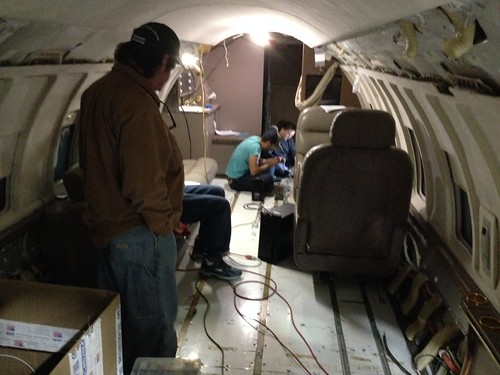
I've had the privilege of having worked on several embedded systems products for the business aviation market, products that could use the term cloud computing in a literal sense. None of those products were flight safety critical. For you aviation geeks, our processes conformed to AS9100, a quality standard, and with DO-178C DAL D, a safety standard, and were tested under DO-160. I even did some hacking with ARINC 429 (an aviation packet bus) and ARINC 717 (an aviation synchronous bus used to log to the aircraft flight data recorder). I got to make the Asterisk open source PBX work with the cockpit two-wire headsets, and with the Inmarsat and Iridium satellite constellations. That job had me crawling around in the equipment bay of a two-engine business jet, and taking short test flights.

(I took these photographs of our Bombardier Challenger 600 test aircraft at Centennial Airport (KAPA) near Denver Colorado.)

On Its Way

Interior Looking Aft

I even got to do some product integration at the Gulfstream Aerospace plant in Savannah Georgia, where I may have walked through Oprah Winfrey's new private jet on the assembly line.

It doesn't get much better than that.

Although our business aviation products were certified for DO-178C Design Assurance Level D - the least safety critical level for which the U.S. Federal Aviation Administration requires certification - we had to have our software certified by an FAA Designated Engineering Representative (DER), essentially an FAA licensed contracted inspector. That turned out to be no small thing. From what I've read, the processes for DAL A - flight safety critical - aviation products were like software development processes dialed up past eleven. The amount of scrutiny and testing that every single line of code receives makes you wonder how the MCAS debacle ever happened. Although it's interesting to note that, like many large aviation companies, Boeing had its own DERs on their payroll.

The cautionary tale of the disastrous cultural evolution of Boeing is a remarkable one, from both a safety and a product development point of view.

Friday, January 14, 2022

Human-Machine Teaming and Autonomous Lethal Weapons Systems

I've been doing a lot of reading - and thinking - lately about autonomous lethal weapons systems. I've never helped develop one, but certainly the skills required to do so are in my wheelhouse. I'm philosophically opposed to them; I'm a fan of Isaac Asimov's Three Laws of Robotics. Yet I also believe that autonomous weapons systems are inevitable, and probably necessary. Such systems - e.g. armed autonomous flying drones used in land or sea battles - can go-where and do-what humans cannot. Physics is ruthless.

If our adversaries use them, I don’t see that we will have any choice but to do so as well in order to remain competitive on the battlefield. There’s a strong economic (and possibly even humanitarian, if they can reduce human error and danger to civilian populations) incentive to use autonomous lethal weapons. They will be particularly attractive to smaller first-world states, or any organization exploiting asymmetric warfare. Such systems may be fully autonomous, partially autonomous, or optionally autonomous. Combining a human operator with automation (a term I prefer to "artificial intelligence") is a form of human-machine teaming (HMT).

Lots of people in other domains are thinking about this. In its SAE J3016 standard, the Society of Automotive Engineers defines six levels of driving automation for vehicles, ranging from 0 (fully manual) to 5 (fully autonomous).

(Click on the image to see a larger version.)

It occurs to me that this might be applied to weapons systems as well. Here are some ways J3016 might be adapted to apply to weapons systems.

  • 0 - the human operator has full control over the weapon system at all times.
  • 1 - automation may assist the human operator with targeting, stabilization, etc.
  • 2 - the human operator may relinquish control to the automation but can override its decisions.
  • 3 - the automation may take control if it detects the human operator is impaired.
  • 4 - the automation operates the weapon but a human operator is still required to approve a kill decision.
  • 5 - the automation makes the kill decision without any human guidance or approval.

(H/T to John Stuckey for the inspiration for this.)

Friday, January 07, 2022

Test What You Detonate, Detonate What You Test

Another great article from the national security blog War On The Rocks: "When Software Bugs Go Nuclear: Testing A Digital Arsenal" by Laura Epifanovskaya, a researcher formerly in the U.S. Department of Energy's nuclear weapons program.

Motivated by the fact that the U.S. nuclear weapons stockpile is transitioning from analog to digital control systems - so as to interface with the digital systems in the latest generation of strategic weapons delivery platforms - she writes about the need for formal methods, Design For Test (a design methodology that applies to software as well as hardware), and NASA's motto "Test what you fly, fly what you test", in critical reliability systems.

There is a lot here that is applicable, not just to nuclear weapons, but to any complex high-technology system that absolutely, positively has to work right the first time - and never work when it's not supposed to. Her article also has some interesting tidbits into how nuclear weapons are tested without actually setting off a fusion reaction. Fascinating stuff.

Wednesday, January 05, 2022

Unintended Consequences of the Information Economy IV

Daniel Kim, CTO of Geosite, a company that provides geospatial tools, wrote an eye-opening essay in the national security blog War on the Rocks. In "Startups and the Defense Department's Compliance Labyrinth", he describes what companies have to go through to comply with the enormous, complex, and often redundant, conflicting, and changing requirements to deal with the U.S. federal government, and especially with the its Department of Defense. Total initial cost for Geosite: US$300,000. Compare this with the typical size of contract that start-ups in the U.S. government's Small Business Innovation Research (SBIR) program receive: about US$1,000,000; the cost of compliance could be more than a quarter of the entire budget.

Much of the overhead is in the realm of cybersecurity. No one can fault the DoD for requiring stringent security mechanisms. But it does place contracting with the DoD out of the scope of many small- to medium-sized companies. And even for large companies, it is an incentive for the business to seek revenue elsewhere where it is more easily made in the commercial sector.

Furthermore, the technical work necessary for compliance either takes time away from the core technical team in smaller organizations, or requires hiring (and paying) additional staff with the most hard to come by (and expensive) skill sets. As I am constantly reminded when I chat with a friend of mine who makes her living as a cybersecurity engineer, there is not a lot of overlap between the skill sets of folks that do the kinds of work I do and the folks that do the kinds of work she does. Kim cites a slew of standards, many from the National Institute of Standards and Technology, that document the processes and infrastructure necessary for compliance. Just being familiar with these tomes would be a significant effort.

I've mentioned before that my tiny one-man corporation has done its share of work over the years in the defense domain, but always as a sub-contractor to a far larger organization that provided all the infrastructure and process that was required to comply with the customers' requirements. Kim also mentions the U.S. Air Force's Platform One and its concept of a "Software Factory": a kind of pre-laid infrastructure surround that temporarily assimilates a start-up and provides it with a much simpler set of requirements. (If you have the kind of LinkedIn network that I have, you have already heard a lot about this.)

Alas, without the kind of support provided by these kinds of organizations, the DoD is not able to innovate in the same way, and at the same speed, as the commercial sector. Nor even easily take operational advantage of new and shiny technology that comes out of successful commercial start-ups. Which means, for the most part, it's another windfall for the handful of existing huge defense prime contractors.

Friday, December 24, 2021

Unintended Consequences of the Information Economy III

In "Unintended Consequences of the Information Economy II" (2021), I mentioned an Executive Order issued in May of this year (2021) by the Biden White House: "Executive Order on Improving the Nation's Cybersecurity". This morning over a leisurely Christmas Eve breakfast I read the fifty-four page EO from start to finish. (It's not that onerous; the way it is formatted on the White House web site, with very short lines, it was expeditious to print it two web pages per physical page.)

I'm tempted to say that I've never read an EO before, so I didn't know what to expect. I've read so much stuff over the past decades,  I can't say for certain. (I once found myself having to read U.S Department of State International Traffic in Arms Regulations in regards to a commercial product I was helping develop for the business aviation space.) But for sure, I didn't expect the EO to be as interesting (or as readable) as it was. Here are some of the things I consider highlights:

  • There was a a lot of verbiage about the need for federal agencies to share information with one another on malicious cyber campaigns. This may seem obvious, but in many organizations - government and commercial - this might be a hard sell. There is little incentive for organizations to admit they've been hacked, for lots of reasons. So an EO which requires federal agencies to do so is probably a good thing.
  • There was also a lot of talk about the need for vendors who sell into the federal government space, especially cloud service providers (CSP), to share information on malicious cyber campaigns. Good idea, especially since they may detect such campaigns in their commercial environments as well. Same disincentives apply as above.
  • The EO requires federal agencies using cloud services to adopt Zero Trust Architecture "as practicable". Also a good idea, and (if I am to be honest) something I haven't been that great about in some of my own work. I need to do better, and so does the U.S. Government.
  • There is a section on the need for vendors that sell into the federal space to use a secure software development environment. It recommended such actions as administratively separate build environments, and automated tools to demonstrate conformance to secure development processes. There was a lot of text about the need for products to provide a verifiable software bill of materials (SBOM). Keep in mind this was written back in May of this year, months before the Log4J vulnerability came to light. If software products in use today that depend on Log4J had such an SBOM, a lot of IT folks might be having a much more relaxed Christmas holiday.
  • Really an eye opener for me: there is a section proposing a cybersecurity labeling standard for consumer internet-connected (i.e. Internet of Things) devices. I very much look forward to seeing what happens with this. As a cybersecurity engineer friend of mine quips: "the 'S' in 'IoT' stands for 'Security'". I confess to still be grappling with security concerns - and the tradeoff between security and real-time behavior - in my own IoT projects.
  • Most unexpected: a long section explaining the use and value of system log files. Preaching to the choir, President Biden. It requires federal agencies and their IT service providers to save such logs in a secure manner, and to periodically verify the logs against hashes to insure they haven't been modified. Such logs are crucial for post-hoc analysis of lots of stuff, not just malicious cyber incidents.
  • The EO contains the usual caveats and exceptions for the Department of Defense and the Intelligence Community, but at the same time requires cooperation and leadership across the DoD and IC for this effort.
  • Several requirements mention the use of automated software tools to audit, verify, and analyze the security of government IT systems. This is going to attract a lot of tool vendor attention. It will be interesting to see how those vendors address this, since the tools themselves - which are likely to be large and complex - will also be recursively subject to these same requirements. (I find myself reminiscing about the Gödel Incompleteness Theorems from graduate school.)

I still think the major impact of this will be more revenue for the small handful of ginormous prime contractors in the defense space. But I'd like to believe it's a step in the right direction.

Tuesday, December 21, 2021

Unintended Consequences of the Information Economy II

In "Unintended Consequences of the Information Economy" (2014) I cited an article in Foreign Affairs (2014), the journal of the Council on Foreign Relations, by former Deputy Secretary of Defense William Lynn. He talked in part about how companies in the technology sector typically invest far more of their revenue in research and development than do the handful of prime defense contractors in the United States.

What I didn't mention is how we arrived at the situation we currently find ourselves in: with just handful of big prime defense contractors.

In 1993, during the Clinton administration, then-Deputy Secretary of Defense William Perry convened defense industry executives into a meeting that came to be called "The Last Supper". He informed them that due to a huge reduction in the defense budget, there would have to be a consolidation of the defense industry.

John Mintz wrote about this and its consequences in "How a Dinner Led To A Feeding Frenzy" in the Washington Post (1997).
Perry's warnings helped set off one of the fastest transformations of any modern U.S. industry, as about a dozen leading American military contractors folded into only four. And soon it's likely only three will remain, with Lockheed Martin Corp.'s announcement yesterday that it plans to buy Northrop Grumman Corp. for $11.6 billion.
The unintended side-effect of the consolidation of the defense industry into just a handful of prime contractors was that there is now far less competition in the defense sector. If the Pentagon wants to buy a new major weapons system, there may only be a single contractor capable of delivering it.

Since this happened, the U.S. Departments of Defense and Justice and the Federal Trade Commission have tried to reverse this process by opposing further mergers in the defense industry.

John Deutch, also a former Deputy Secretary of Defense as well as Director of Central Intelligence, argued, in "Consolidation of the U.S. Defense Industrial Base", published by the Defense Acquisition University's Acquisition Review Quarterly (2001), that the consolidation also led to far less stability in the companies that did survive this process
In the 1993–1998 period of euphoria, defense companies experienced significant increases in equity prices based on the expectation of revenue growth and margin improvement from cost savings. In 1998, the outlook for the industry began to darken for several reasons. First, DoD reversed the consolidation policy. Second, expected cost savings were not shared with the companies, and hence margins were squeezed, especially from increasing interest payments on debt required to fund acquisitions. Third, defense companies making acquisitions were overly optimistic about the expected growth in top-line revenues from DoD, foreign military sales, and commercial spin-offs of defense technology. The anticipated increase in defense outlays had not materialized.

Finally, some key companies found it difficult to manage their expanded enterprises effectively in all respects and to meet their optimistic financial targets. The capital markets quickly shifted to more glamorous (at that time) dot.com and high-tech stocks not associated with defense.
My tiny one-man corporation has done its share of government contracting over the years, but always as a subcontractor to a far larger organization that had all the infrastructure, people, and processes in place to deal with the federal bureaucracy. The overhead involved is a significant barrier to entry for smaller organizations. And, remarkably, to larger organizations.

In my original article cited above, I related the story of Boston Dynamics, the spin-off of MIT that designs the human- and dog-shaped robots we all watch on YouTube. After the Defense Advanced Research Projects Agency (DARPA) poured a bunch of funding into the company, it was bought by Google in 2013, who basically said “thanks, but no thanks” to any further DoD involvement. Google went on to sell Boston Dynamics to a Japanese company, which in turn sold it to a South Korean company. All that government funding resulted in intellectual property that didn’t even stay in the United States, much less in the DoD. Many large tech firms have big revenue streams that for the most part don’t rely on the U.S. government; there are easier ways to make (lots more) money in the commercial sector.

This leaves much of the technology needs of the U.S. government in the hands of just a few big prime defense contractors.

In a recent edition of his newsletter "The Embedded Muse", embedded software and hardware technology pundit Jack Ganssle mentions that the Biden White House has issued an "Executive Order on Improving the Nation's Cybersecurity". Jack writes:
Uh oh. Do you sell to the US government? Since they buy pretty much everything, pretty much everyone does. A new executive order re security will make our lives much, much harder. Though the details are still being fleshed out, a pretty good overview here will raise your blood pressure. 

Jack references an article by a vendor who is, of course, trying to sell you something, but is none the less a pretty good overview of the EO. From that sales pitch:

This EO directs these agencies to develop new security requirements for software vendors selling into the U.S. government. These requirements will be incorporated into federal contracts for commercial software and hardware with the intent of imposing “more rigorous and predictable mechanisms for ensuring that products function securely, and as intended.”  This is a monumental shift that will have an immediate impact on global software development processes and lifecycles.

In addition to  a host of new information and operational security measures that government agencies need to implement, the new order establishes a robust approach to supply chain security. The new requirements will include security testing throughout the development process as well as a Software Bill of Materials (SBOM) to address security issues in open source components.

I expect this EO to be a huge boon for the few existing big prime defense contractors, while preventing the small-to-medium, and even large, tech companies from participating in providing innovative technology solutions to the federal government.

As both a software engineer and a taxpayer with many decades of experience doing both, I have very mixed feelings about this. I can appreciate the need to make sure that our tax dollars aren’t wasted, that expenditures are all accounted for, and that the products our government purchases are reliable and secure. But I feel pretty confident in predicting that it will mostly mean that giants like Raytheon and Lockheed-Martin will do well.

Tuesday, February 02, 2021

Anticipation

You may have read by now that the online vaccine management system that the Trump administration paid US$44M for from the consulting firm Deloitte in a no-bid contract is a disaster. Riddled with bugs like making and then randomly cancelling appointments. States are giving up and cobbling together their own solutions.

Cat Ferguson, "What went wrong with America’s $44 million vaccine data system?", MIT Technology Review, 2021-01-30
About half my career has been spent doing work funded by the U.S. government, either in Big Science or in the Military and Intelligence sector. What I found the most interesting about this mess is one of the reasons Deloitte got the non-competitive contract in the first place. Did they have any experience in large scalable distributed medical computer systems? No. Infectious diseases? Nope. Vaccination programs? Not even. What they had experience in is government contracting. And the procurement systems implemented by the feds make it difficult - not to mention less profitable, compared to other work in the commercial sector - for anyone who isn't already doing government contracting to do government contracting.

I'm reminded of when Google bought Boston Dynamics. The robot company had been mostly funded by DARPA, the U.S. DoD's advanced research arm, the folks that have a track record of bringing us things like the Internet. Once Google bought Boston Dynamics, they declined to renew the DARPA contract. The DoD-related industry was surprised; I read articles in the DoD trade and national security press about this at the time. But I doubt many in the high tech industry even batted an eye. Selling to the Feds used to be a big thing. Now, not so much, compared to the global market. (Google eventually sold the company to Hyundai. Yet another bleeding edge albeit immature technology transferred to a foreign company.)

Another issue that occurs to me is how long it takes to design, develop, test, and deploy a product as big and complex as the proposed vaccine management system. Contrary, I suspect, to expectations in the White House at the time, a commercial effort of this type would take a year or two, all told. Regardless of the sales pitch from any consulting company, there is no fast path. That's why you have to anticipate this kind of need, and address it well in advance of it becoming a necessity. It's like insurance: you have to buy it before you need it, with the understanding - and the hope - that you never actually have to use it.

I don't know how, but we need to do better.

Wednesday, May 06, 2020

Process

I've been around long enough that I've worked under a lot of development processes: Waterfall, Agile, Kanban, etc. Over the decades I have made the following observations.
  1. No one process is going to ensure success.
  2. Some processes will work better than others for some kinds of work.
  3. What process you use isn't nearly as important as the fact that you have a process at all, everyone knows what it is, and everyone follows it.
  4. All development is fractally iterative, whether you want it to be or not.
  5. No matter what process you use, you have to have the right people; no process will make the wrong people successful.
  6. Engineers need structure, and successful ones know it; if you have the right people, but no process, those people will spontaneously adopt a process - an existing one if they're experienced - that works for them.

Thursday, April 23, 2020

Improvisational Engineering

"All development is fractally iterative, whether you want it to be or not."
- Me (Often)
The Global Positional System (GPS) - or, more generally, all Global Navigation Satellite Systems (GNSS), which includes not just the U.S. system but those of Russia, the European Union, and China, as well as the non-global systems of Japan and India - uses differences in time and multilateration to provide solutions in the problem domains of Positioning, Navigation, and Timing (PNT). Because the time stamps generated by GNSS satellites cannot be perfectly synchronized and syntonized, the positioning accuracy of such systems in typical applications is at best within meters or even tens of meters. As remarkably useful as GPS is, it is not horse shoes and hand grenades close, but more like cricket and cruise missiles close. This is one of the reasons why GPS cannot be used alone for navigation in autonomous vehicles, and why your in-dash navigation display takes a few moments to realize you have exited off the highway onto an access road.

Differential GPS - or, again more generally, Differential GNSS - takes advantage of the fact that the sources of error (typically jitter) in the received satellite signals are uncorrelated with one another. Which is to say: random, or at least not systemic. So if a GNSS receiver is stationary, it can take advantage of its fixed location to compare each successive solution with either its own predetermined location, or with its own long term weighted average positioning solution. In the latter technique, called Real Time Kinematics (RTK), the receiver's position solution can become more and more accurate over time. Depending on a number of factors like antenna placement and how many satellites it can see overhead at a time, a stationary receiver, or the Base in DGNSS parlance, can achieve an accuracy down to centimeters or better.

This sounds great, but it doesn't help the mobile receiver, or Rover. Except if the Rover is close enough to the Base - in the same neighborhood - the two receivers will see the same satellites overhead, and therefore suffer similar degradation in the signals. The Base can transmit its corrections to one or more Rovers, and each mobile Rover can then potentially achieve a similar level of accuracy.

But how DGNSS works isn't what this article is about.

DGNSS products have been around for decades, costing on the order of thousands of dollars. Late in 2018, u-blox, the well known Swiss-based manufacturer of excellent (in my professional experience) PNT solutions, introduced their ninth-generation of GNSS receiver chips, the ZED-F9. This family of high-precision GNSS chips support DGNSS RTK directly, in the form of messaging conforming to the Radio Technical Commission for Maritime Services (RTCM) Special Committee (SC) 104 standard. This brings a DGNSS capability down to a price range of hundreds of dollars, potentially affordable to hobbyists, enthusiasts, experimenters, and consumers of applications like non-military drones and remotely piloted or autonomous vehicles.

Untitled

Affordable, in fact, to PNT enthusiasts like me.

This article is about the iterations I went through to establish my own permanent Differential GNSS base station, and to cobble together a Rover that I could use in the field for precision geolocation. I leveraged and significantly modified my existing Hazer GPS software (com-diag-hazer on GitHub), but most of that was just bookkeeping and glue code; the firmware in the u-blox chip does all of the heavy lifting, including sending and receiving the RTCM messages. I make use of old stuff I had at hand at the Palatial Overclock Estate, new but mundane consumer-level stuff I bought off the shelf at my local office supply and hardware stores, and some special purpose stuff I bought online.

This is an approach to building prototypes I call improvisational engineering and what some folks refer to as Macgyvering. But all development is iterative, even building proof-of-concepts.

I code-named this project Tumbleweed.

Iteration 1

I have been using u-blox PNT solutions for years professionally. And the National Center for Atmospheric Research (NCAR) in Boulder Colorado had an R&D group decades ago when I worked there that was using DGNSS that was good enough that they could measure the swinging of instrument packages tethered to high altitude weather balloons. So when I first read about the ZED-F9 on the Time Nuts mailing list, my ears perked up. It took just a little Google Fu to discover that the start-up Ardusimple was selling a relatively inexpensive board, the simpleRTK2B, that used the ZED-F9P chip. The board included the capability to incorporate any one of a variety of tiny Digi XBee radios for the Base to communicate with one or more Rovers. In the spring of 2019, I wielded my credit card.

ArduSimple SimpleRTK2B

This shows the bare simpleRTK2B board. You can plainly see the u-blox ZED-F9P chip on the board. At the top of the board is a socket for an Xbee radio, and a micro-USB connection to the serial port on the radio. At the bottom left is an SMA RF connector for the multi-band GNSS antenna. At the bottom right is a micro-USB connection to the ZED-F9P serial port.
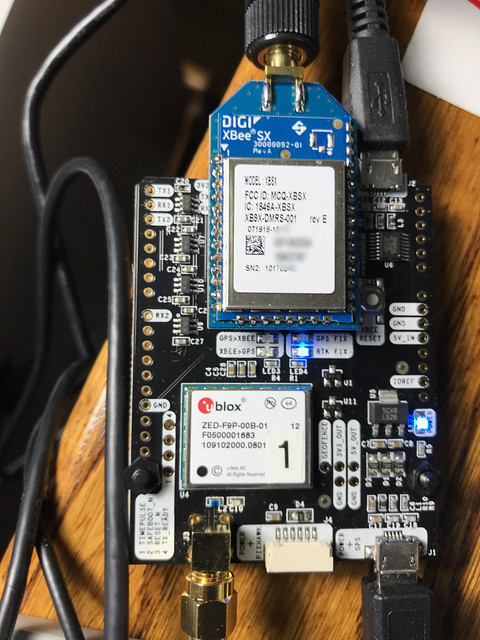
Ardusimple SimpleRTK2B

Here is the same board with a socketed 900MHz Xbee radio with an antenna attached to its own SMA connector.

Two simpleRTK2B boards connected to a couple of Raspberry Pi Single Board Computers (SBCs) running Raspbian Linux (based on Debian) made it possible for me to adapt and test my Hazer software, to figure out how to configure the ZED-F9P chips for Base and Rover mode, and to verify that the chips did indeed exchange RTCM messages. I ran the Base and the Rover initially in my home office, the GNSS antennas sitting in my office window. But for the Base to converge to an accurate solution - or, at least the accuracy I was shooting for, which I arbitrarily set at 2.5cm or about 1 inch - antenna placement is crucial. I was going to have to move the Base, or at least its antenna, outside in the long term.

Untitled

This is my first "field" test. The simpleRTK2B boards are inside a couple of plastic organization boxes from the local office supply store, just to keep dust and weather and maybe the errant finger off of exposed PCBs. I used a Dremel tool to make holes for the RF and USB connections. The two Raspberry Pis were inside standard Pi cases. Trying to emulate how I thought things would work in the long run, I used my MacBook to SSH through my home WiFi network into the Pi being used as the Base, and used an old Asus ChromeBook as a serial console to the Rover as I expected to in the field. You can see the multi-band GNSS antennas for the Base and the Rover set up on tripods to the right of my driveway. Note that the 900MHz antennas that connected the Base to the Rover are just inches apart on the cart. Everything was powered from mains; you can see the power cord snaking off to the left.

With this set up, the Base was able at times to see as many as thirty-two GNSS satellites - the limit of the RF section of the receiver -  in some combination of the U.S., Russian, European, and Chinese systems. It was able to achieve my target accuracy (according to, it must be said, its own estimates) in just a few hours of running. The next step was to move the Base and the Rover further apart.

Iteration 2

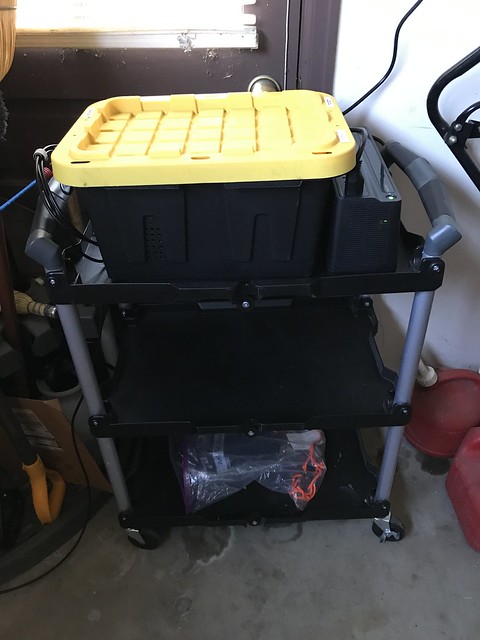
I purchased a couple of cheap but remarkably sturdy plastic tubs with lids from my local hardware store, one for the Base and one for the Rover. I used my Dremel tool to make holes for RF, serial, and power cables.
Untitled

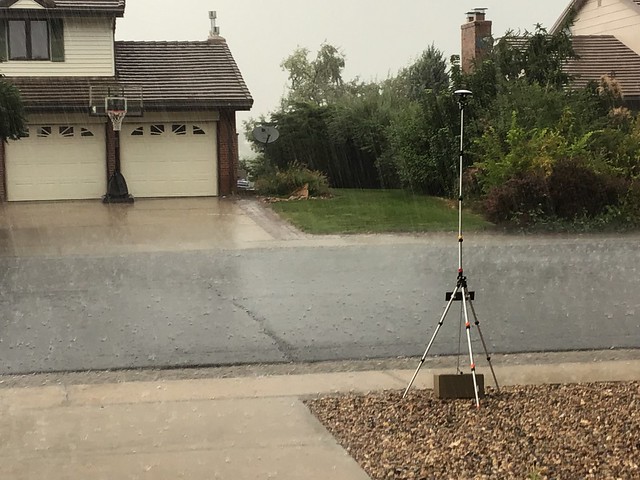
The Base stayed safely tucked into a corner of my garage out of the weather. It was powered off the mains, but with a Uninterruptible Power Supply (UPS), visible to the right of the tub. The coaxial cable to the antenna, visible on the floor on the left, ran underneath the garage door.
Untitled

The Base antenna was at the edge of my front yard on an old camera tripod. Fortunately the survey antenna was rated for water resistance. In this photograph it is surviving a hail storm.
Untitled

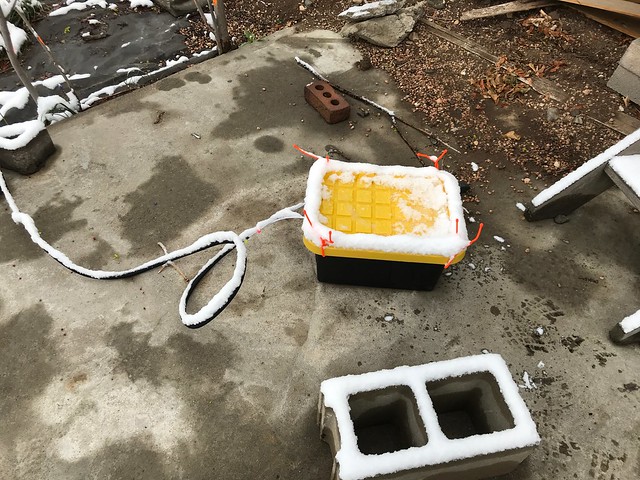
The Rover was in my back yard. The tub holding all the electronics plus a big lithium battery pack was situated on an old concrete slab. Here it is surviving an early spring snow.

Untitled

You can see the Rover antenna on another old camera tripod, during the same snow storm. The multi-band antenna has an inch or two of snow on top of it. You can see the 900MHz antenna fastened to the tripod handle just to the left.

This iteration taught me that while 900MHz radios may have a theoretical range of several kilometers, they are strictly line of sight devices. They may work for communication between, for example, a Base on the ground and a Rover on a drone in the sky, but they didn't work for me with my two-story suburban house in the way. Since it was my goal to have my Base at home while testing the Rover at nearby U.S. National Geodetic Survey (NGS) markers in the neighborhood, I would have to solve this problem.

Iteration 3

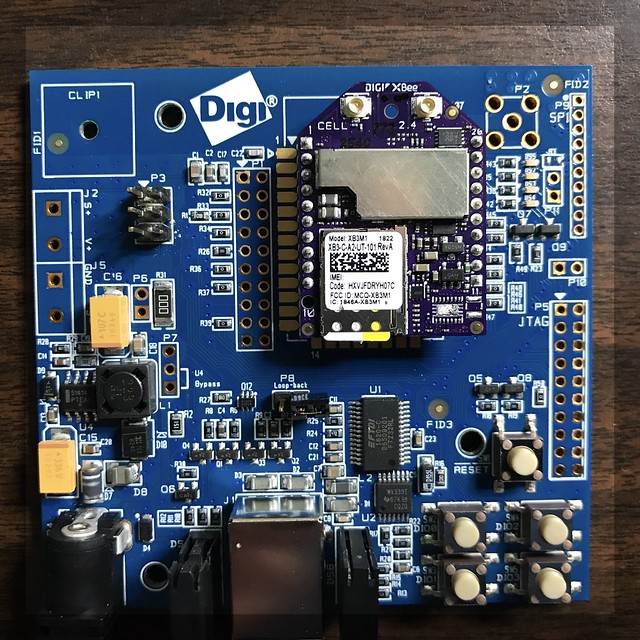
I replaced the Xbee 900MHz radios with Xbee LTE-M radios made specifically for embedded Internet of Things (IoT) applications. The advantage of these radios is they have the same pin-out and form factor of the 900MHz radios and would have worked on the simpleRTK2B boards. I used data-only AT&T SIMs intended expressly for IoT machine-to-machine (M2M) applications like this one.
40838358853_a39f23723f_o

Here you can see one of the LTE-M radios socketed on a Digi evaluation board that I used to play with it independently of the simpleRTK2B board.

What I learned is that in configuring an LTE-M radio for UDP connectivity, I had to provide it with a fixed IP address of the destination, not a domain name. (The configuration tool allowed a domain name for TCP connections, probably because the domain name only needs to be resolved once per connection.) My home network doesn't have a fixed IP address. I use a Dynamic Domain Name System (DDNS) provider that conspires with my access point router to map my fixed domain name to the variable IP address supplied by my internet service provider via DHCP every time my access point router connects to the Internet.

I couldn't find a way around this. I'd like to be proven wrong, since these devices were not cheap. I talk about why I use UDP for PNT applications like this in the article Better Never Than Late.

Update (2021-04-30): A year later I've revisited these devices and am using them successfully with UDP in a different project. While what I said here was true, it was only true when using the devices in their "API" mode, which was necessary at the time for the project I am describing to delineate datagrams when using binary protocols like RTK and when serially connecting the radio directly to a GNSS device. Now I'm using them in a different application in "transparent" mode with UDP, delineating datagrams containing JSON messages using a newline character, and in this mode they resolve my domain name just fine. I'm using SIMs for the AT&T "One Rate" LTE-M plan.

Iteration 4

About this time I had found some nice 3D printed cases specifically for the simpleRTK2B boards on eBay (I don't find them now). So I dispensed with the clear plastic pencil boxes from the office supply store. That was the simplest part of this iteration.

Fortunately, I already had a Verizon USB-attached LTE modem that I had used in other projects (in fact, in the project I discussed in Better Never Than Late). I decided to try using that for the network connection of the mobile Rover to the fixed Base.

But the LTE modem enumerates as a USB Ethernet dongle, providing an IP address to the Raspberry Pi via an embedded DHCP server once it connects to the Verizon mobile network. That meant completely rethinking the configuration of ZED-F9P chips in both the Base and the Rover, so that the RTCM messages were not routed out to the on-board radio (which was removed now), but back up through the USB connection to the Raspberry Pi.

This required a substantial amount of work in the Hazer software to recognize and route the incoming RTCM messages from the ZED-F9P on the Base, out to the Internet via my home network service provider, to the Verizon mobile network, to the LTE modem, and finally to the Raspberry Pi in the Rover.

But like the Base on the DDNS-serviced home network, the Rover also does not have a fixed IP address on the Verizon network. So I had to add a third component to the Base and Rover: the Router (not related to my access point router for my home network).

In this architecture, the Base and Router sit on my home network, and can in fact run on the same Raspberry Pi. The Base sends RTCM corrections to the Router. The Rover in the field connects to the Router via my home network's fixed DDNS domain name, which gets translated into whatever IP address my internet service provider assigns my home network. The Rover sends periodic keep-alive messages to the Router, and Router forwards the RTCM corrections to the Rover. As long as the Rover sends keep-alive, it keeps getting RTCM corrections.

I was also concerned about the power draw of both the LTE modem and the simpleRTK2B board from the Raspberry Pi. So I added a powered USB hub to the Rover, which would itself be powered separately from the ginormous lithium battery pack that was in the Rover plastic tub.
Untitled

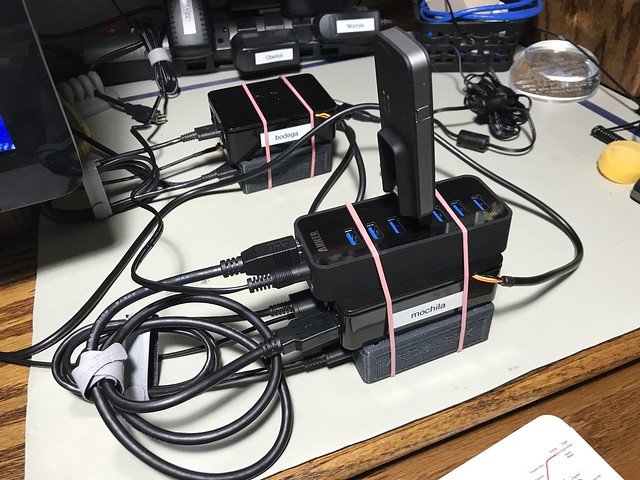
Here you can see the Base (in the background) with its Raspberry Pi and simpleRTK2B in its 3D printed plastic case, and the Rover (in the foreground) with its LTE modem, USB hub, Raspberry Pi, serial console cable, and simpleRTK2B with case, all stacked up for testing on my lab bench.

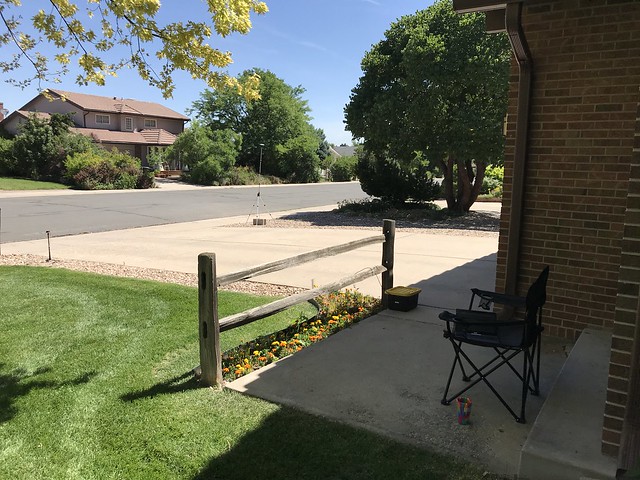
Despite the photographs above, some of my test days had sunny, hot weather.
Untitled

Here, you can see the Rover tub and its antenna to the left of my driveway, and the antenna for the Base to the right of my driveway (the Base still tucked safely away in the garage). I was situated in the folding camping chair in the shade of my front porch with a cool drink.

3D printed PLA parts at 152F (67C)

In this iteration, I learned that the PLA plastic used in hobbiest-grade 3D printers have a glass transition temperature (i.e. melting point) of 140F (60C). And that 140F is easily achievable on a hot summer day and when you have a busy Raspberry Pi bundled up against the 3D printed simpleRTK2B case. Both the Raspberry Pi and the simpleRTK2B boards survived this ordeal, but the 3D printed case for the simpleRTK2B in the Rover did not. Concerned about damage to what was now a significant investment of time and money, I realized I'd have to solve this problem.

Iteration 5

Step one to solving the heating problem was to put both Raspberry Pi 3b+ SBCs into cases that included a fan. Step two was use velcro to mount the Raspberry Pis in their new cases, the simpleRTK2B in their 3D printed cases, and the powered USB hubs (which by now had been added to the Base as well as the Rover), side-by-side on a sheet of Lexan, with some air space between them. Step three was to drill some extra ventilation holes in the tubs near where the Raspberry Pi would be located.

Untitled

Step four was to add a USB-powered exhaust fan to both the Base and the Router tubs to keep air flowing. These USB fans were powered from the USB hubs in each tub.

Untitled

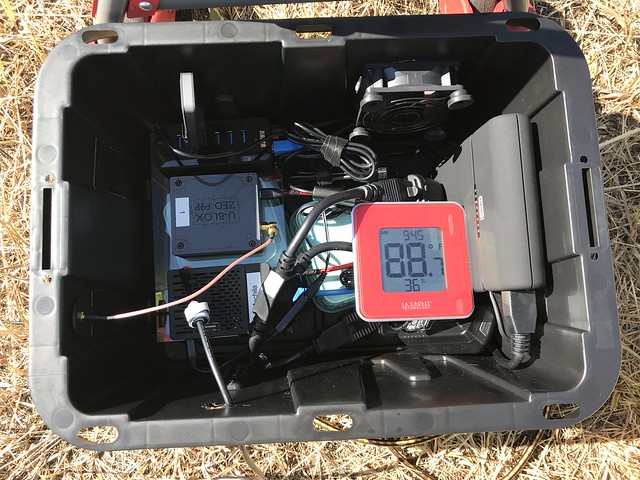
This is the inside of the Base tub. On the left you can see, top to bottom: the USB hub with an LTE modem (for testing, not needed in production, since the Base sits on my home WiFi network); the simpleRTK2B in its 3D printed case; and the Raspberry Pi in its case with its own fan. Top right, you can see the USB fan. In the middle, you can see the battery powered thermometer with a min/max function I added to both tubs so that I could keep track of how hot things were getting. (There's also a command line tool you can use on the Raspberry Pi to access its own internal temperature sensor; a script to access that sensor is included in Hazer.)
Untitled

Similarly, this is the inside of the Rover tub. In addition to all the same stuff as above, there is the ginormous lithium battery pack on the right.

Untitled

I got the bright idea of looking up nearby NGS markers on their NGS Data Explorer web site and using them to test against. For example, above is marker KK1446, a.k.a. "Dover", established in 1977. It set the positioning standard against which the housing development all around it, and the cell tower right next to it, were established.

I continue to use such survey markers for testing even though I eventually learned that the latitude/longitude produced by the various GNSS systems is not the same as the latitude/longitude used by the NGS. That's because the two systems use different datums: abstract models of the shape of the Earth. They cannot be directly compared.

Oh no! Not another learning experience! (But more on that in a later article.)

Untitled

This is the Rover that I used for actual field testing at the survey markers. The Asus Chromebook I used as a serial console is under the silver and black sunshade. That's sitting on top of the yellow and black Rover tub. The GNSS antenna is in the background left, right over the survey marker. The entire affair is large and unwieldy enough that I carted it to and from my car with a folding hand truck.

It was this iteration - which included testing at several different survey markers, some of which were right up against busy roads - that convinced me that simplifying and reducing the amount of gear I had to tote around for the Rover would be a good thing.

Iteration 6

Antenna placement for the base station is crucial. All my testing that led to a successful position fix that converged to my desired level of accuracy within a reasonable amount of time (hours) were done placing the Base antenna outside. My goal then was to have a multi-band GNSS survey antenna permanently mounted outside but with the Base indoors.

My plan was to mount the multi-band GNSS survey antenna on a mast on my chimney, run the coax though an existing path through the outside wall used decades ago by the previous owners of my house for an antenna for broadcast television (seriously, that used to be a thing, kids).

Untitled

I went so far as to remove the old television coaxial cable and run the GNSS coax through the existing hole in the wall and attach it to a grounded lightning arrestor.
Untitled

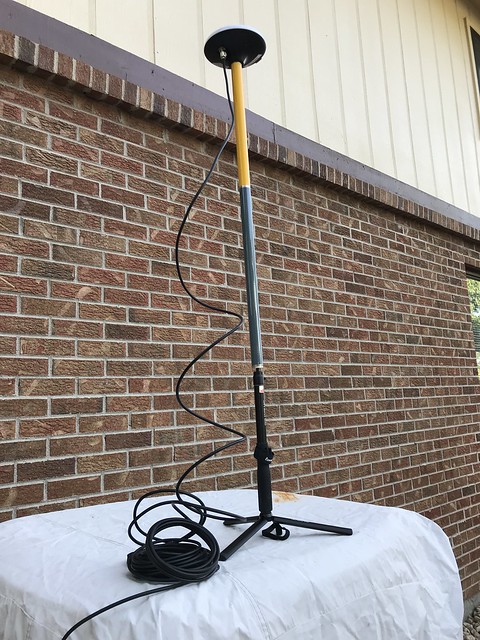
I temporarily attached the antenna I was going to mount outside to the other end of the lightning arrestor. That tripod that it is on, also visible in other photographs, is actually a inexpensive selfie-stick, with some extension poles attached to it. I attached a spare ZED-F9P to the other end of the coax inside the house and verified that I was able to receive GNSS signals.

I had several email exchanges with a professional consumer antenna and satellite dish installer about installing the GNSS antenna. Because of the orientation of my house on my lot, and the nature of my roof, the task got more and more complicated - not to mention expensive. I spent a lot of time looking for alternatives. Eventually, I found a great one.

Iteration 7

For some time now, in the timeline of this project, I had been using the Ardusimple simpleRTK2B boards because they were equipped with the u-blox ZED-F9P chip. But ultimately I ended up not using any of the additional features of the board. I began using my Google Fu to find an alternative. I was delighted to find that since I had started working on Tumbleweed, one of my favorite maker parts suppliers, SparkFun Electronics, just up the road from me in Boulder, had started marketing a smaller, simpler, less-expensive GPS-RTK2 board that incorporated the ZED-F9P. I purchased one of the boards to evaluate, and eventually, once I discovered that my software worked flawlessly on the GPS-RTK2 with absolutely no changes, I purchased a second one.

IMG_3929

Here are the two GPS-RTK2 boards on my lab bench. Both are once again encapsulated in little plastic boxes from the local office supply store, modified with a Dremel tool to provide holes for the USB and RF cables. The board on the left is connected to a multi-band GNSS antenna off screen in my office window. The board on the right is connected to a multi-band GNSS helical antenna.

I made the decision to move to the GPS-RTK2 boards for my "production" Base and Rover. (I'm still using the Ardusimple simpleRTK2B boards for testing and other projects.)

Iteration 8

Part - maybe the major part - of any project is its engineering economics: deciding where and how to best spend a limited budget of both money and time. The idea of putting a GNSS antenna on the roof of my home was looking more and more like a non-starter, even though its location would be ideal in terms of its view of the sky, where bigger is better.

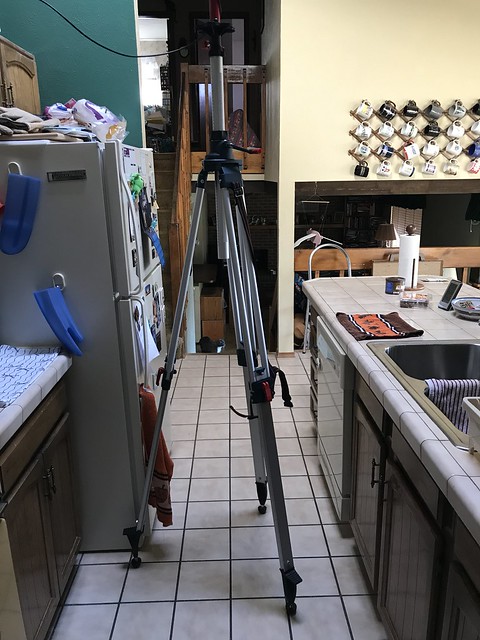
One day while in the kitchen (probably making a sandwich), I glanced up and realized that the skylight above my head was near the peak of the roof of that part of the house. An antenna in the skylight wouldn't have a completely unobstructed view of the sky, but it would be close. And it would be inside, protected from the weather, and relatively easily connected to the Base.
Untitled

Conveniently, Mrs. Overclock (a.k.a. Dr. Overclock, Medicine Woman) was out of town at the time. I set up a tripod in the kitchen underneath the skylight.

Untitled

I mounted a couple of extension poles to the tripod and at the top put the survey antenna. I slowly adjusted the center post on the tripod until the antenna was right against the plexiglass of the skylight. I attached the Base to the antenna and let it conduct its survey. At its peak, the ZED-F9P in the Base was able to see thirty-two satellites, the limit of the RF stage of the receiver. In a few hours it had achieved my target level of accuracy.
Untitled

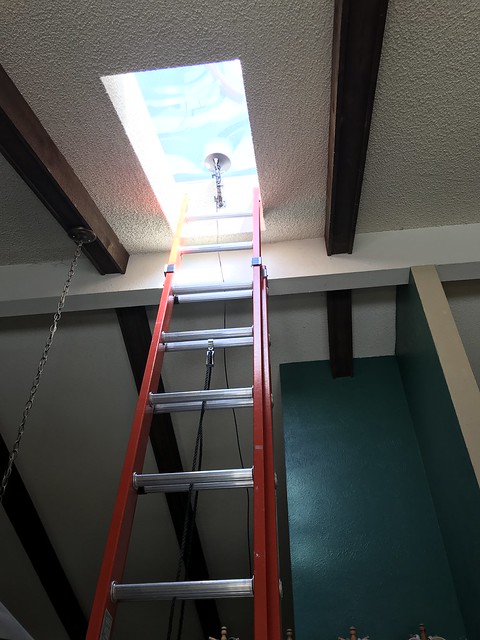
A few days later, Mrs. Overclock returned home, and after some discussion (we haven't been married for thirty-six years for no reason) she agreed to let me permanently place a gimbaled mount, intended for a security camera, in the skylight. I attached the survey antenna to it, and ran the coax over the low kitchen wall into a conveniently located corner of the living room, tucked away between the wall and an existing piece of furniture.

Untitled

I used a stylish little end table from a local speciality retailer to hold a Raspberry Pi and one of my new GPS-RTK2 boards. This was my new permanent Base. It connects via WiFi to my home network.

Untitled

Some time ago, I had separated the Base and the Router software functions onto two separate Raspberry Pis. (They had always been two separate programs in Hazer, so this was easy.) This is the Router, hidden inside the A/V cabinet in the family room, connecting directly to my access point router via a CAT5 cable.

Tumbleweed

The Base transmits its RTCM correction messages to the Router, and the Router forwards them to any and all registered Rovers.

My current thinking is that this is the final incarnation of the Base and the Router.

Iteration 9

There are a slew of Linux systems that run 24x7 at the Palatial Overclock Estate (POE) in a western suburb of Denver. Ten of them are Raspberry Pis, all but one of them running headless. Three of the Linux systems are Intel boxes I use as servers and development systems, also running headless. But none of them are laptops. I do occasionally run Ubuntu Linux in a VM on my one Windows laptop (because several proprietary embedded software tools I use at clients from time to time only run under Windows). But I have often felt that having a Linux laptop would be a useful thing; I've just never needed it badly enough to warrant spending the money, even on an inexpensive laptop.

Untitled

It occurred to me that somewhere in the bowels of the basement of the POE - imagine if you will the scene at the end of the movie Citizen Kane, or the homage to that scene at the end of Raiders of the Lost Ark - I had - not a sled named "Rosebud", nor the Ark of the Covenant - but an ancient HP Mini 110 netbook, with an equally ancient version of Windows on it. These small laptops ran a 32-bit Intel Atom i686-class processor and, even when they were new, they were, as my friend The Deacon described them, "dirt cheap and dead slow", so underpowered that, as cheap as they were, they failed in the marketplace. Their niche was replaced for the most part by smartphones, tablets, Chromebooks, and Moore's Law. I wondered if I could scare up a version of Linux that would run on the Mini and resurrect it as a useful piece of kit.

Untitled

A few hours later I had the Mini running Mint, a stripped down Debian-based distribution of Linux. Here you can see it configured as a Rover: running my Hazer software, connected to the Internet using the Verizon LTE modem, and using one of my Ardusimple simpleRTK2B boards, geolocating like a boss.

I was tempted to call this my production Rover. But the success of this inspired me to take one more step, one that would keep the Rover running on a Raspberry Pi, my SBC of choice because its ARM processor was similar to what I would expect to be used in a real product.

Iteration 10

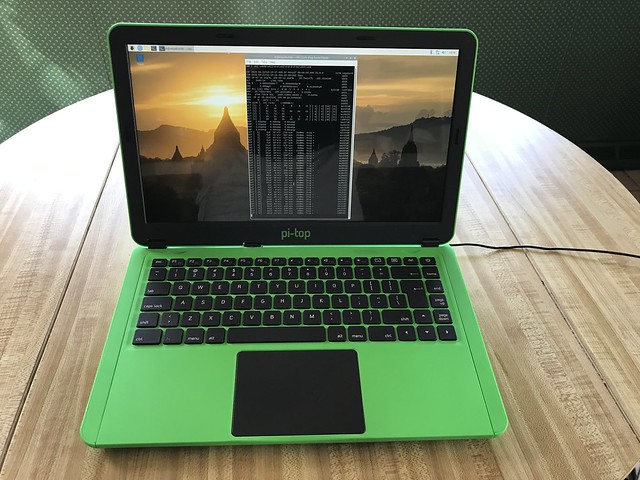
I had been aware of Pi-Top, and especially their Pi-Top [3], for some time. The Pi-Top [3] is, in the words of the company, a "maker's laptop", intended primarily for use by STEM students, hobbyists, and maker enthusiasts. In other words, people like me.
Untitled

But the [3] isn't really a laptop; it's a laptop shell. There's no main processor inside. But there is slot into which you can plug a Raspberry Pi 3B+ and have access to the Pi's various ports and pins. The result won't win any competitions with laptops like my MacBook Pro or my Lenovo ThinkPad. But it has something those devices don't have: space.
Untitled

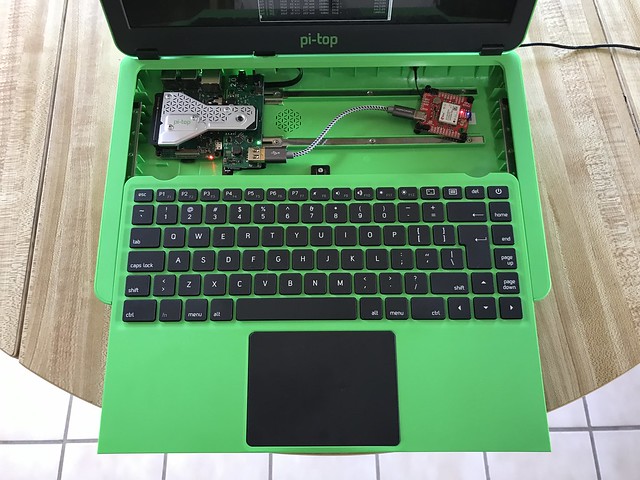
Sliding the entire keyboard facia forward reveals the Raspberry Pi 3B+, hidden underneath the silver heat sink and system connector on the far left. Just to the right of the Pi is the glue board or Hub that connects the Pi to the display, keyboard, trackpad, and internal battery of the [3]. And connected to the convenient USB port on the glue board, held in place magnetically to the built-in project rail, is one of my GPS-RTK2 boards with its ZED-F9P chip.

Untitled

I drilled a hole in the rear of the [3] and mounted the SMA connector to the GPS-RTK2 for the GNSS antenna. I added the right angle swivel connector to reduce the stress on the plastic shell.
Untitled

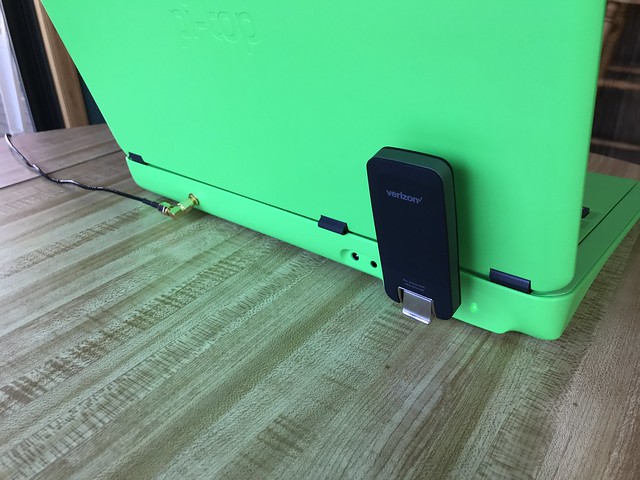
The Verizon LTE modem now lives at the rear of of the [3], where the Pi's other USB ports and Ethernet port are located.

After some experimentation, I chose not to use the native pi-topOS Linux, but instead run the same version of Raspbian Linux I ran on the earlier Rover. It works just fine.

Untitled

Here is my latest incarnation of the Rover, running on its internal battery, attached to the multi-band antenna, and connected to the Internet via LTE. It is far simpler, lighter, and less cumbersome than its predecessor.
IMG_3522

I am just now testing this new Rover outside the house. I still have a few things to work out (a better sunshade so I can see the display on a typical brilliantly sunny day in Colorado). And I am somewhat delayed by a combination of nine inches of late April snow and a pandemic.

But I'm beginning to think there won't be another iteration.

Update (2020-05-04)

The backlighting on the Pi-Top [3] display failed during Rover testing. I briefly fell back to using the HP Mini 110 until an extremely helpful email reply arrived from a tech support engineer at CEED (the company that make the Pi-Tops). It walked me through disassembling the Hub and making sure the ribbon cables from the display were firmly seated in the connectors on the backside of the board. About thirty minutes of careful work later, I was up and running on the [3] again.

I used that effort as an excuse to upgrade from the Polaris release to the Sirius release of pi-topOS. I had not found Polaris (the version that came with the [3] that I bought) stable, and had reverted to running with straight Raspbian, the standard Linux/GNU distribution for the Raspberry Pi, which worked fine. (Raspbian is based on Debian Linux, and both Polaris and Sirius are in turn based on Raspbian.) The very recent Sirius release seems much improved over Polaris; since my software worked on it (subject to the necessary additions to the /lib/udev/rules.d directory and to the /etc/hosts and /etc/services files in support of Hazer), my current plan is to stick with it.

A useful - and very inexpensive, at US$7 - accessory for the [3] is the pi-topPROTO, a small prototyping board that fits in the cavity under the keyboard and plugs into the expansion connector on the Hub board. This accessory exposes the standard set of Raspberry Pi General Purpose Input/Output (GPIO) pins using a connector identical to that of the Pi itself. This allowed me to enable the serial console on the Pi using the standard Pi configuration tool which is available in Sirius, and then use an FTDI USB-to-serial adaptor made especially for the Pi to access the serial console port. It is obviously a very useful debugging tool; Amazon helpfully tells me I've purchased eight of them over the years.

With the Pi-Top [3] back in action, and the HP Mini 110 set up too, I now have two Rovers with which to test.

Saturday, March 21, 2020

Product Specifications

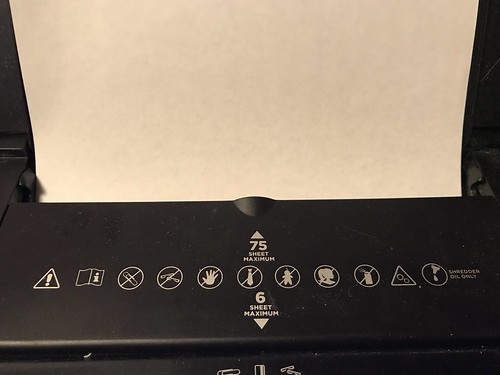
This is a photograph of a piece of paper going into the kind of paper shredder you would buy at your office supply store.

Untitled

This model has two slots: the regular intake slot labelled "6 SHEET MAXIMUM" and the auto-feed slot labeled "75 SHEET MAXIMUM". I am in the process of destroying this shredder - which was brand new just a few days ago - or at least certainly violating its warranty, by exceeding its duty cycle: over the span of a couple of weeks, I'll be reducing several decades of financial paperwork to tiny bits of paper.

It occurred to me, as I spend hours feeding paper into this device, stopping occasionally to let it cool down, clearing jams, lubricating it, and cleaning some components using a procedure for sure not covered in the owner manual, that some folks might not know the real meaning of those "SHEET MAXIMUM" notations. As a professional product developer with more than four decades of experience, let me enlighten you.

Decades ago I worked at a national lab in Boulder Colorado. My boss, who had a Ph.D. in physics, used to say that any claims a supercomputer manufacturer made for the ginormous systems they sold were in effect guarantees that those systems could under no circumstances exceed those specifications. It didn't matter whether they were for instructions per second, floating point operations per second, disk I/Os per second, and so forth.

In the fullness of time, I, as a product developer, came to understand this was much more broadly applicable than just supercomputers. Applicable to both the devices I was trying to use in the products I was helping my clients develop and ship, and to those products themselves. In this latter capacity, I may have played a role in determining a product specification or two. It is even possible you have used some of those products.

Let's focus on the auto feed specification for my paper shredder: "75 SHEET MAXIMUM". What does this really mean?

(Disclaimer: what follows is a completely fictional but probably highly accurate portrayal.)
At some point in time, an engineer, who probably had at least a master's degree in mechanical engineering, took one of these shredders and ran some tests on it. It was likely it was a laboratory mule used for prototyping and early firmware development, many months before the first production model came off the assembly line, since such a machine would have already had to have the manufacturing process established to print this label on the unit. This was done in a climate-controlled clean room environment, carefully cleaned and scrubbed, and devoid of any food or drink. The engineer - and indeed everyone in the lab - wore clean-room "bunny" suits, meticulously free of any foreign matter.
The engineer carefully installed brand new hand-sharpened blades; lovingly hand adjusted all the tolerances of all the moving parts, running bearings far more expensive than what would be used in the actual production unit, and carefully lubricated all the parts using the most expensive lubricant from his lab supplies. 
The engineer used brand new paper, right out of the box, devoid of any toner, perfectly flat, and as thin as was available commercially, but not too thin. The engineer cleaned the paper with aerosol canned air, fanned the stack of paper out to make sure none of the pages stuck together, and checked that each page was momentarily grounded to eliminate any static electricity. 
The engineer carefully started testing the printer, using a pair of calibers and a stainless steel ruler to make sure the stack of paper in the input bin of the shredder was precisely aligned. The engineer tested stack after stack, adding one single page to each test. For each test, the engineer took the temperature of the electric motors in the shredder, making sure they were not overtaxed, allowing the shredder to cool down completely, probably overnight, in between each test. Each morning, the engineer relubricated and realigned all the mechanical bits in the prototype, possibly replacing any parts that showed the most minuscule amounts of wear when viewed under a laboratory microscope costing tens of thousands of dollars. 
When the engineer reached seventy-six pages, the shredder exploded. The shrapnel killed everyone in the room. The shredding blades were especially lethal. 
The engineer's supervisor, who had an MBA, came into the room, read the final number off the engineer's laboratory notebook, and notified manufacturing what the limit was: seventy-five sheets.
"75 SHEET MAXIMUM" means seventy-five is the limit under the most optimal, controlled conditions that are humanly possible in the most optimistic of all conceivable circumstances.

In my basement, feeding ancient reports that had been folded, spindled, and mutilated, having sat all that time in a filing cabinet, with no climate control other than the nearby furnace which runs from time to time, reports from which I had just violently removed the staples I had inserted years ago, and having one of our beloved feline overlords supervising my efforts, I find that seven sheets sometimes works. And sometimes not.

IMG_3914

That's what a product specification means.

Monday, March 09, 2020

When Learning By Doing Goes To Eleven

There are different modes of learning, and each modality works best for different people. I am always envious of my friends and colleagues who can learn by reading a book. That never worked for me. I can only learn by doing, albeit sometimes with a book or web page propped up in front of me. This explains why I have over thirty repositories on GitHub. And why I have a GPS-disclipined stratum-0 NTP server with a cesium chip-scale atomic clock in my living room.

Astrolabe (O-2)

Some of my repos on GitHub are standalone projects, like the stratum-0 server or my learning experiences with Go and Rust. But some of them follow a pattern: my project implements a Linux/GNU-based framework implemented in C as a library and a set of header files, then some unit tests, then some functional tests, then maybe some tools I found useful. Why C? Because for the past few decades, most of my income has come from working on embedded and real-time systems, close to bare metal, in C and sometimes C++. C and C++ have been very very good to me. Although I do admit to some hacking now and then in Java, Python, and occasionally even in JavaScript (although I couldn't write a line of JavaScript from scratch even if my life depended on it).

While more or less wrapping up my most recent C-based learning project, it occurred to me that maybe there was an overall pattern to these C frameworks. I had incorporated decades of experience working in ginormous C and C++ code bases into their architecture and the design of their APIs, being careful to make sure they could be used together. I started to wonder if I was subconsciously working towards some greater goal. So I decided to list these frameworks here, all in one place, for the first time, mostly for my own benefit, in the hope the bigger picture would reveal itself.

So here they are, in no particular order. Some of these projects have been around long enough that I have ported them through four different source code control systems. All of them have been cloned, built, tested, and used on
  • x86_64 i7-7567U,
  • x86_64 i7-5557U, and
  • ARMv7 BCM2835
targets and with
  • Ubuntu 18.04 "bionic",
  • Ubuntu 19.04 "disco", and
  • Raspbian 10 "buster"
platforms, among others (but be sure to read the README files for each repo to see what issues there may be with specific platforms). All of them are licensed by default under version 2.1 of the Lesser GNU Public License (LGPL). Most have associated with them a list of articles I have written about it here in this same blog, and all have - seriously - a playlist of music videos.

Hazer

Description: Parse NMEA and other typical output from GNSS devices.
Inception: 2017
Repository: https://github.com/coverclock/com-diag-hazer
Playlist: https://www.youtube.com/playlist?list=PLd7Yo1333iA9FMHIG_VmuBCVTQUzB-BZF

Hazer started out as a way for me to learn the National Marine Equipment Association (NMEA) standard used to describe the output of virtually all GPS, and later GNSS, devices. I had encountered NMEA with GPS in many embedded projects over the years, but had never dealt with it from scratch. Hazer was so useful, it evolved into a tool to test GPS/GNSS devices, then to implement other more specific projects like a moving map display and vehicle tracker when integrated with Google Earth, GPS-disciplined NTP servers, and most recently a differential GNSS system with a fixed base station and a mobile rover.

Articles:
Assay

Description: Parse INI-format configuration files using bison and flex. 
Inception: 2015
Playlist: https://www.youtube.com/playlist?list=PLd7Yo1333iA-YIyldvOB56QS-HZed_4g1

Having written parsers and lexical scanners when I was in graduate school (one in Prolog, if you can believe it), long before I ever had access to a UNIX system, I was naturally interested in learning how to use yacc and lex. In some of my commercial work I routinely encountered INI-format configuration files. Those seemed to be generally useful things, with a format that was easier for humans to grok than the XML or JSON files I routinely dealt with too. So I implemented an INI file parser using the GNU counterparts bison and flex, using a syntax that was more or less based on the countless INI implementation I found in the field. The parser includes the ability to run a process and collect its output as the value of the property, which makes for some entertaining capabilities.

Articles:
Codex

Description: Provide a slightly simpler C API to OpenSSL and BoringSSL.
Inception: 2018

I had never written C code to directly use the various libraries that each implement the Secure Socket Layer (SSL). And I knew I was in for a lengthy learning experience, as I learned about all the stuff that came along with it: keys and their generation, certificate verification and revocation, encryption algorithms and methods, and so forth. I was fortunate to have a native guide: my old office mate from my Bell Labs days was deeply into all of this, and was generous to a fault with his time and expertise. In the end I not only learned the basics of effectively using OpenSSL and its variants, but also came up with a slightly simplified API that I was confident that I could use in other applications.

Articles:
Placer

Description: Automate C-based schema generation for the SQLite 3 RDBMS.
Inception: 2020

My most recent project entailed my getting back into SQLite, the embeddable server-less SQL relational database management system. SQLite is used in every iOS device, every Android device, and (rumor has it) Windows 10. It is said to be the most widely deployed DBMS in the world, and it seems likely that this is true. Many Linux-based embedded products I've worked on in the past used SQLite to manage persistent data. But I'd never coded up an SQLite application myself from scratch. So: yet another learning experience. I always try to accomplish more than one goal with every project; in this one, it was to leverage x-macros - perhaps the most twisted use of the C preprocessor outside of the International Obfuscated C Code Contest - to automate the generation of C structures, functions, and variables to implement user-defined schemas for database tables. I still have a lot to learn about SQLite, but there is a lot of useful knowledge encapsulated in the library, unit tests, and functional tests for this project.

Articles: (none yet)

Diminuto

Description: Implement commonly useful C systems programming capabilities.
Inception: 2008

All of the other projects in this list rely on Diminuto to provide common underlying facilities. Diminuto started out as a project to build a minimal Linux 2.4 system on top of an ARMv4 processor. Over time, the framework and library became far more important than the original goal. Portions of Diminuto are now shipping in at least four different products manufactured by various clients (whether they realize it or not). When I implement a feature in any C-based project, I pause and consider whether it might be more generally useful. If I decide that it is, I implement it in Diminuto instead of the root project. Diminuto has thus grown organically to include a bunch of useful stuff, only a small portion of which is listed here.
  • a simple mechanism to debounce digital I/O pins;
  • a demonization function;
  • an API to handle time and data stamps, time and duration measurement, and time delays;
  • functions to expand and collapse C-style escape sequences in strings;
  • a socket API that supports outgoing and incoming IPv4 and IPv6 connections;
  • a logging API that writes to the system log if the caller is a daemon, or to standard error if not;
  • a simplified API for socket and file descriptor multiplexing;
  • an API to configure serial ports;
  • a traffic shaping API based on the virtual scheduling algorithm;
  • a red-black tree implementation;
  • a simple unit test framework;
  • a file system walker.
Articles:
Update (2020-03-11)

If you install the doxygen, TeX, and LaTeX packages documented in the Makefile comments for the documentation make target for each of these projects, you can generate HTML and PDF documentation for each library via make documentation readme manuals. The build artifacts will be in subdirectories under out/host/doc in each build directory (with host being replaced with whatever you used for TARGET if you changed it).