Showing posts with label Supercomputing. Show all posts

Monday, April 08, 2024

Ancient History

I bought a four terabyte (4TB) SSD the other day at the local big box store. A Samsung T7 Shield (which I think just means it comes with a rubberlike case around it). It was substantially discounted, probably because the new T9 model is out. Easily fits in my shirt pocket. Hooked it up via the included USB cable to our network-attached storage box, and I'm now using it to automatically back up two Mac laptops and a Mac desktop at the Palatial Overclock Estate.

Mind blown.

Because I am ancient almost beyond belief - it's a miracle I'm still alive, especially considering my hobbies - I remember thirty years ago helping to write a proposal to DARPA to build a one terabyte (1TB) hierarchical storage system that would have included rotating disks and a robotic tape library. It would have taken up an entire room. Can't blame them for not funding it. Someone smarter than me (which could have been just about anyone) probably saw this all coming.

That same organization, the National Center for Atmospheric Research (NCAR) in Boulder Colorado, had the only CRAY-3 supercomputer outside of Seymour Cray's Cray Computer Corporation. Today, your Raspberry Pi Single Board Computer (SBC) - and not even the latest Pi model 5 - has more horsepower than that CRAY-3. And the SBC would fit in your shirt pocket as well.

Don't bet against Moore's Law.

Although as I am always quick to point out, what exactly Moore's Law implies has changed over the past few years. Which is why I was tickled when someone who is using my Diminuto C systems programming library passed along a command line to build the software by running make across sixteen parallel threads of execution - taking advantage of the trend towards multicore processors, now that it's become difficult to make individual processors faster. Between much of the build process being I/O bound, and having four processor cores on the Raspberry Pi 5, this approach really speeds up the makefile.

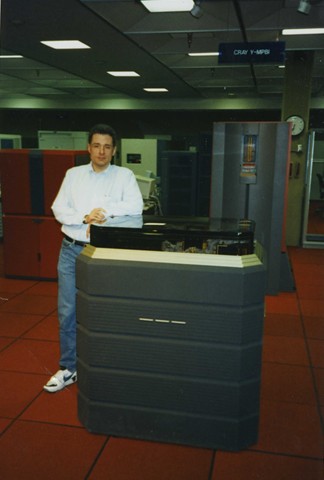
CRAY-3

That's me, about thirty years ago, leaning against the world's most expensive aquarium; the CRAY-3 logic modules were visible under the transparent top, fully immersed in Fluorinert.

Wednesday, January 27, 2021

1995

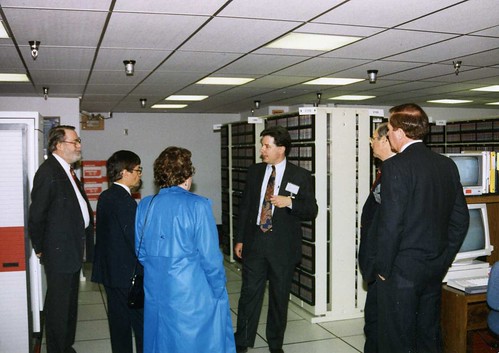
 Back around 1995 I was a section head in the Scientific Computing Division at the National Center for Atmospheric Research (NCAR) in Boulder Colorado, a national lab sponsored by the U.S. National Science Foundation. Besides leading VIPs around on tours, at that time I was involved in helping write proposals, papers (one of which was the featured article in the Proceedings of the IEEE), patent applications, and design documents for a terabyte hierarchical Mass Storage System, the next generation of NCAR's groundbreaking data storage architecture. The existing NCAR MSS had a floor-full of offline tapes and tape drives, several robotic tape silos, and a pile of disk drives. That is what it took to feed data to NCAR's several supercomputers and to soak up the results. A terabyte was an almost unbelievable amount of storage at the time.

Manager

This morning I'm continuing to work on my latest project, which incorporates a two terabyte Solid State Disk - no moving parts - so small it would easily fit in my shirt pocket. I bought it off Amazon because our local office supply store only had the one terabyte model of the same drive, and I needed something larger. The SSD is USB attached to an equally pocket-sized US$75 Raspberry Pi 4B Single Board Computer, which also provides all of the SSD's power.

Untitled

1995 just doesn't seem that long ago.

Monday, May 22, 2017

The Cost of Doing Business

My software development career over the past forty-plus years has been all over the map: supercomputers, eight-bit micro controllers, vast distributed telecommunications systems, multi-core microprocessors. The one thing they all have in common - at least at the level I work at near bare metal - is that the skill sets are all basically the same. But one thing that isn't the same is the cost of the tools to debug, functionally test, and validate my work.

Perhaps twenty years ago, I was writing firmware in C and C++ for optical networking products based on ATM and SONET. One night I found myself working late in a lab trying to debug some recalcitrant real-time code. I was surrounded by an H-P broadband analyzer, two H-P ATM protocol analyzers, and a tangle of multimode optical fiber. I realized I had maybe US$300,000 worth of test equipment dedicated to this one task, never mind my high-end workstation and the room-filling racks of telecommunications equipment. I paused for a moment to realize that an organization smaller than Bell Labs might have had a tough time tackling this product development effort, the investment in infrastructure was so significant.

Untitled

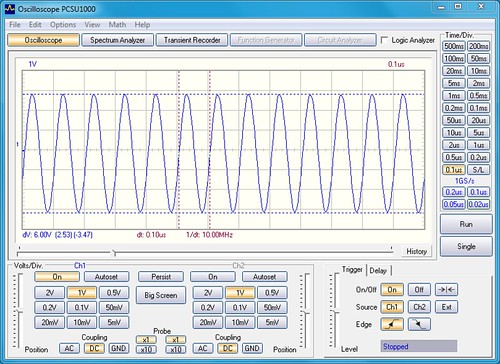
Moore's Law hasn't really changed things that much, because as the tools got cheaper, the systems we develop and debug have gotten larger and more powerful right along with them. Just the other day I was working on my stratum-0 atomic clock project and I realized that my little hobbyist oscilloscope - one of the most useful tools I have ever purchased - was completely inadequate for doing any kind of jitter analysis on the output of the device. After some reflection, I decided I probably didn't know anyone that had an oscilloscope that could measure the jitter of my chip-scale atomic clock. Any jitter that might be detected would surely be in the oscillator used by the measurement instrument itself.

Capture

See, our measurement of time is a funny thing. It is a completely synthetic artifact, a singularly human invention. Thanks to natural variation in the Earth's rotation and in its orbit, time isn't even tied to the movement of the Sun any longer. It's defined, in the International System of Units, to the beat of an oscillator based on the cesium-133 time standard. And the thing I was trying to measure was itself an oscillator based on the cesium-133 time standard. The only way we can measure the precision and accuracy of a clock is by using a more precise and more accurate clock. I'm not likely to ever have one of those.

The larger lesson here is this: before you decide to tackle a project, make sure you can get the tools you need for the entire life-cycle of the product. You may find out that the economics of developing a product are substantially different from the economics of debugging, testing, validating, and supporting that product.

Saturday, September 20, 2014

The Very Big and the Very Small

In
K. Asanovic at al., The Landscape of Parallel Computing Research: A View from Berkeley, EECS Department, U. C. Berkeley, UCB/EECS 2006-183, December 2006
(a paper I've cited here before) its authors, which include David Patterson (as in Patterson and Hennesy), remark
Note that there is a tension between embedded and high performance computing, which surfaced in many of our discussions. We argue that these two ends of the computing spectrum have more in common looking forward than they did in the past. [Page 4]
That's been my experience too, although perhaps for different reasons than the authors cite. I’ve made an excellent living flipping back and forth between the high performance and embedded domains. It turns out the skill sets are mostly the same. In particular, developers in both domains are constantly concerned about very low level details in the realm where software runs close to bare metal, and are always dealing with issues of real-time, asynchronicity, parallelism, and concurrency. These are relatively rare skills that are hard to come by for both the employer and the employee.

I was reminded of this as my tiny one-man company, Digital Aggregates Corporation, buys its fourth Android tablet to use as a development system. These tablets contain powerful multi-core ARM-based processors as well as other embedded microcontrollers and devices. And increasingly I am seeing the embedded and mobile device domains adopt technologies originally developed for large-scale systems, like Security Enhanced Linux (SELinux) and OS-level containerization like Linux Containers (LXC).

I’ve seen large development organizations axe their firmware developers as the company decided to get out of the hardware business to focus on large multi-core server-side software applications. What a remarkable lack of insight into the nature of the technologies on which their businesses depend.

Monday, September 08, 2014

Yellowstone

When I decided that it would be fun to ride my BMW R1100RT motorcycle from Denver Colorado to Cheyenne Wyoming to get a personalized tour of the new NCAR Wyoming Supercomputer Center (NWSC), it was 90°F, dry, and sunny. When the day came to actually do the ride, it was 48°F, raining, and dismal. At least I got to test my cold and wet weather riding gear.

The NWSC was built to house the latest supercomputers dedicated to climate research that are operated by the National Center for Atmospheric Research (NCAR), a national laboratory based in Boulder Colorado that is sponsored by the U.S. National Science Foundation (NSF). The Boulder Mesa Laboratory, where I worked for several years, still houses its own supercomputer center. But both space and electricity in Boulder is precious. So when the time came for NCAR to expand its supercomputing resources, a new facility was constructed about two hours north of Boulder and just a few minutes west of Cheyenne Wyoming. My old friend and colleague Marla Meehl was good enough to talk Assistant Site Manager Jim Vandyke into giving me a tour of the new facility. It's nice to have friends in high places (the NCAR Mesa Lab being at an altitude of 6109 feet above sea level).

The NWSC houses Yellowstone, an IBM iDataPlex compute cluster and the latest in a lengthy series of computers managed by NCAR for the use of climate scientists. NCAR has a long history of providing supercomputers for climate science, going all the way back to a CDC 3600 in 1963, and including the first CRAY supercomputer outside of Cray Research, the CRAY-1A serial number 3.

Yellowstone represents a long evolution from those early machines.  It is an IBM iDataPlex system consisting of (currently) 72,576 2.6GHz processor cores. Each Intel Xeon chip has eight cores, each pizza box-sized blade server compute node has two chips, each column has at most (by my count) thirty-six pizza boxes, and each cabinet has at most two columns. There are one hundred cabinets, although not all cabinets are compute nodes. Each compute node uses Infiniband in a fat-tree topology (like the old Connection Machines, which NCAR also used at one time) as an interconnect fabric, Fibre Channel to reach the disk and tape storage subsystem, and ten gigabit Ethernet for more mundane purposes. Yellowstone has an aggregate memory capacity of more than 144 terabytes, eleven petabytes of disk space, and (my estimate) at least a hundred petabytes of tape storage organized into two StorageTek robotic tape libraries.

It all runs on Redhat Linux. Major software subsystems include the IBM General Parallel File System (GPFS), the High Performance Storage System (HPSS), and IBM DB2.

The NWSC computer room runs, for the most part, dark. There is a full time 24x7 staff at the NWSC of perhaps twenty people, although that includes those who man NCAR's Network Operation Center (NOC). This is cloud computing optimized for computational science and climate research. Not only Yellowstone's large user community of climate scientists and climate model developers, but its system administrators, all access the system remotely across the Internet.

This is remarkable to an old (old) hand like me who worked for years at NCAR's Mesa Lab and was accustomed to its computer room being a busy noisy place full of operators, administrators, programmers, and even managers, running to and fro. But the NWSC facility has none of that. It is clean, neat, orderly, even quiet (relatively speaking), and mostly uninhabited. This is the future of computing (until, you know, it changes).

The infrastructure around Yellowstone was, for me, the real star of the tour. The NWSC was purpose built to house massive compute clusters like Yellowstone (which currently takes up a small portion of the new facility; lots of room for expansion).

Below are a series of photographs that I was graciously allowed to take with my iPhone 5 during my tour. I apologize for the photo quality. Better photographs can be found on the NWSC web site. All of these photographs, along with the comments, can be found on Flickr. Some of the photographs were truncated by Blogger; you can click on them to see the original. For sure, any errors or omissions are strictly mine.

* * *

Compute Node Cabinet (Front Side)

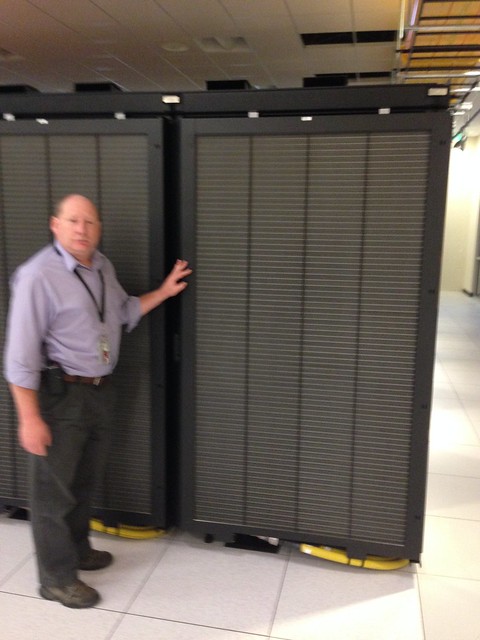
Yellowstone Cabinet - Front Side - Open

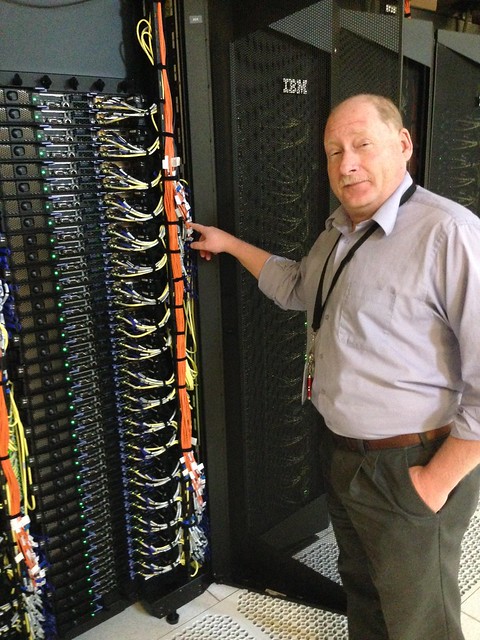
I told Jim Vandyke, assistant site manager, to "point to something". I count thirty-six pizza box "compute nodes" in each column, two columns, each node with dual Intel Xeon chips, each chip with eight 2.6 GHz execution cores, in this particular cabinet. There are also cabinets of storage nodes crammed with disk drives, visualization/graphics nodes with GPUs, and even login nodes where users ponder their work and submit jobs.

Compute Node Cabinet (Back Side)

Yellowstone Cabinet - Back Side - Open

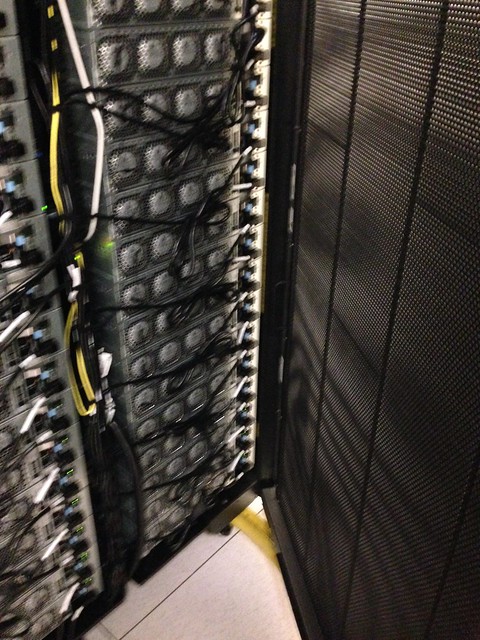
Each pair of pizza boxes looks to have four fans. But what's interesting is the door to the cabinet on the right: that's a big water cooled radiator. You can see the yellow water lines coming up from under the floor at the lower right.

Radiator

Yellowstone Cabinet - Back Side - Closed

This is what the radiator door looks like closed. Again, note the yellow water lines at the bottom.

Interconnects

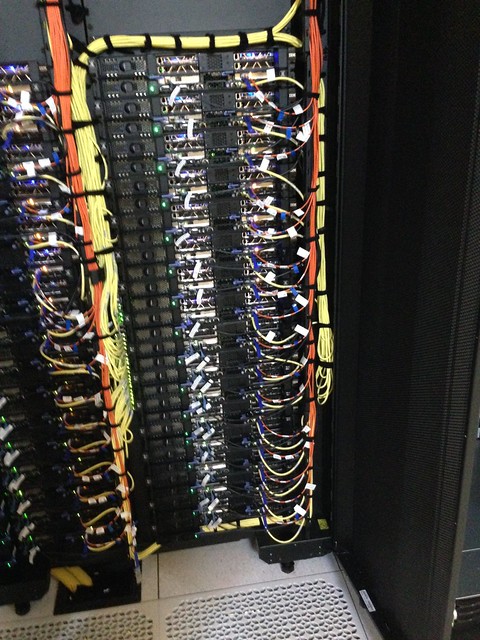
Yellowstone Cabinet - Front Side - Interconnects

Classic separation of control and data: the nodes use an Infiniband network in a Connection Machine-like fat-tree topology for the node interconnect, Fibre Channel to access the storage farm, and ten gigabit Ethernet for more mundane purposes.

Sticky Mat

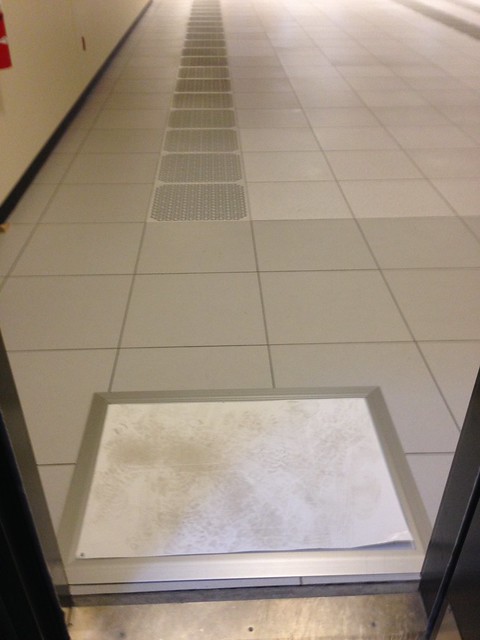
Sticky Mats

You walk over a sticky mat when you enter any portion of the computer room. The tape libraries are in an even more clean room environment (which is why I didn't get to see them); tape densities (five terabytes uncompressed) are so high that a speck of dust poses a hazard.

Bug Zapper

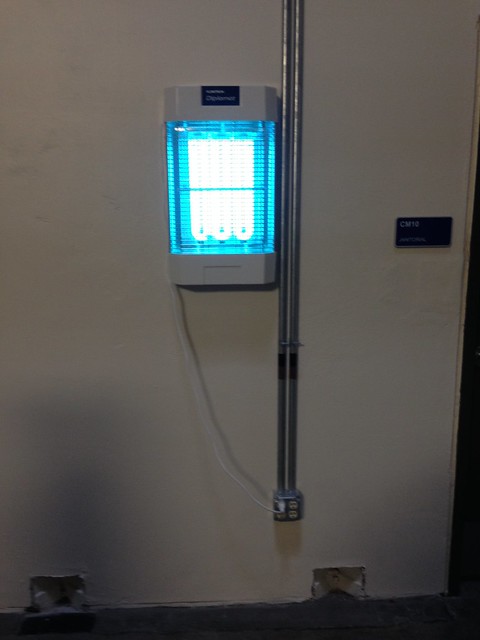
Bug Zapper

Here's a detail you wouldn't expect: I saw several bug zappers in the infrastructure spaces. And they were zapping every few seconds. As they built the building out in an undeveloped area west of Cheyenne, where land and energy is relatively cheap compared to NCAR's Boulder supercomputer center location, all sorts of critters set up housekeeping.

Cooling Tower

Cooling Tower

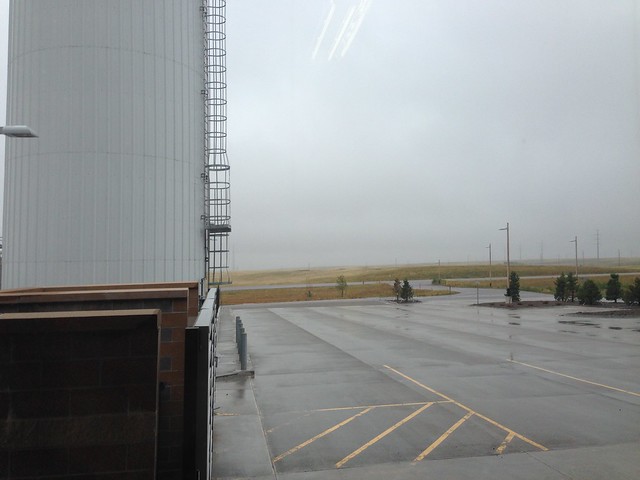
This is looking out from the loading dock. There are a number of heat exchanges in the computer room cooling system. Ultimately, the final stages goes out to a cooling tower, but not before it is used to heat the LEED Gold-certified building.

Loading Dock

Loading Dock

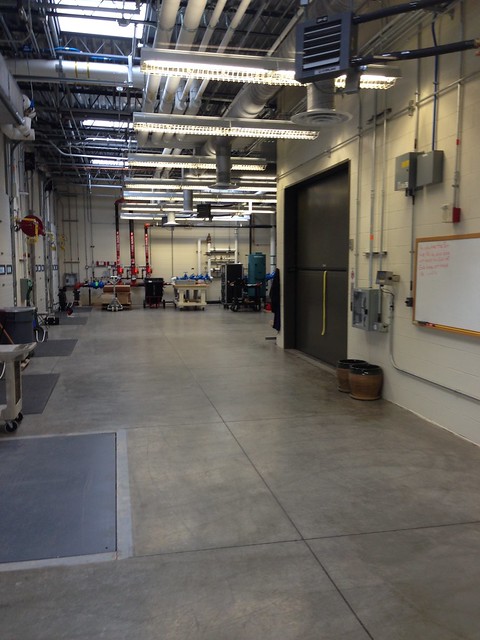
The loading dock, the hallway outside (big enough to assemble and stage equipment being installed), and the computer room are all at one uniform level, making it easy to roll in equipment right off the semi-trailer. I dimly recall being told that Yellowstone took 26 trailers to deliver. You can see a freight elevator on the right to the lower infrastructure space. The gray square on the floor on the lower left is a built-in scale, you can verify that you are not going to exceed the computer room floor's load capacity.

Heat Exchanger

Heat Exchanger

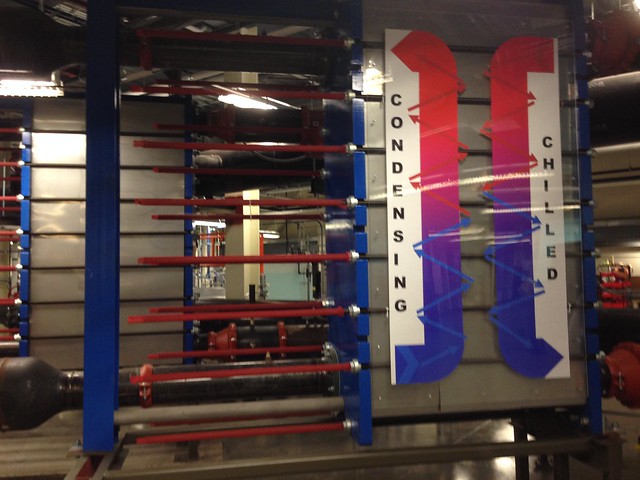
There are a number of heat exchanges in the cooling system. This is the first one, for water from the computer room radiators. I had visions of the whole thing glowing red, but the volume of water used in the closed system, and the specific heat index of water, is such that the temperature going into this heat exchanges is only a few degrees hotter than that of the water leaving it. It wouldn't be warm enough for bath water.

Fan Wall

Fan Wall

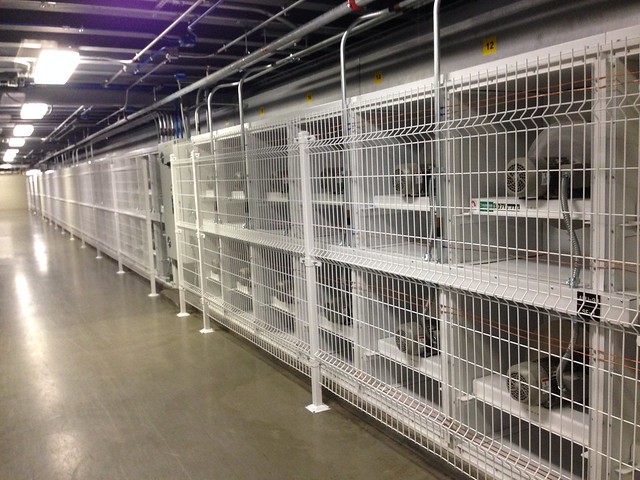
This is a wall o' fans inside a room that is part of the cooling system.These fans pull air from space above the computer room through a vertical plenum and down to this space below the computer room where it is cooled through what is effectively gigantic swamp coolers. All of the air conditioning in the building is evaporative. Each fan has a set of louvers on the front that close if the fan stops running to prevent pressure loss.

Power

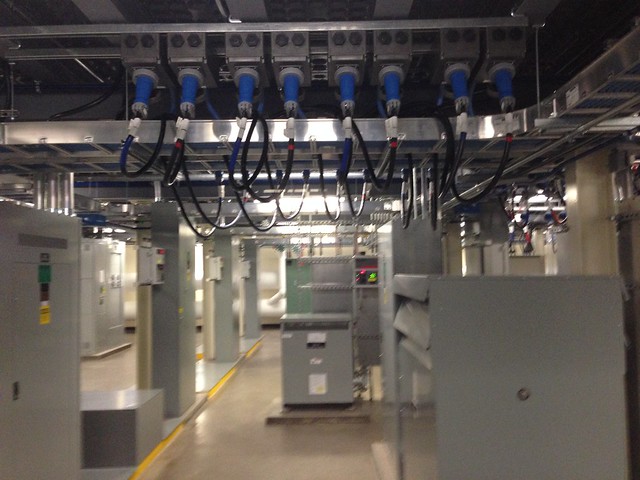
Power and Power Conditioning

This is right below a row of Yellowstone compute node racks in the computer room above. If you lifted a floor tile in the computer room, you would be looking twelve feet down into this area.

Filter Ceiling

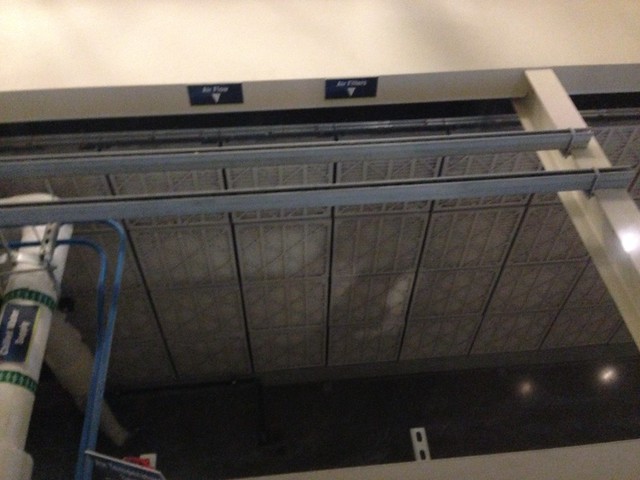
Ceiling of Air Filters

If you want to run a supercomputer, everything has to be super: networking, interconnect, storage, power, HVAC. This is part of the air filtration system, sitting right below the computer room floor into which the clean cool air flows.

Vertical Air Plenum

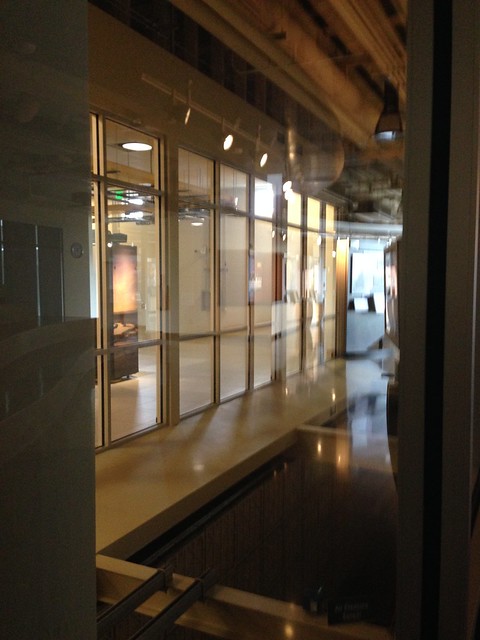
Air Plenum

This photograph was taken from a window in the visitors area, looking into a vertical air plenum big enough to drive an automobile through. The wall of fans is directly below. The computer room is visible though a second set of windows running along the left. Through them one of the Yellowstone cabinets is just visible. Air moves from the enormous space (another story of the building, effectively) above the computer room, down through this vertical plenum, through the fan wall, through the cooling system, up into the ceiling of filters and through the computer room floor. I didn't get a photograph of it, but the enormous disk farm generates so much heat that its collection of cabinets are glassed off in the computer room with dedicated air ducts above and below.

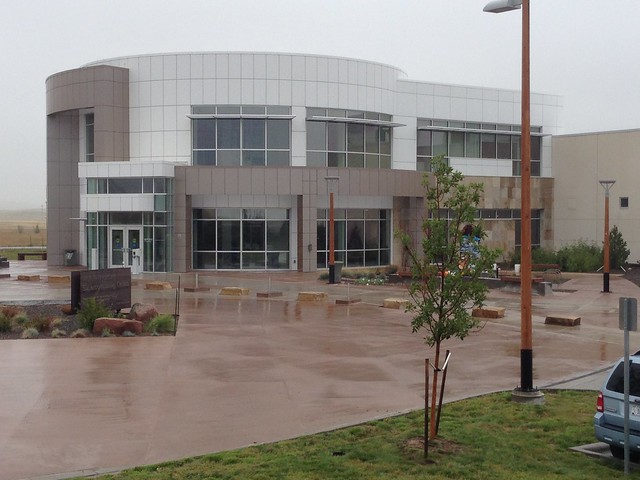
Visitor Center

Visitors Center

This is where you walk in and explain to the security folks who you are and why you are here. Before I got three words out of my mouth the guard was handing me my name badge. It's nice to be expected. There's a quite nice interactive lobby display. The beginning of the actual computer facility is visible just to the right.

Warehouse of Compute Cycles

Computer Facility

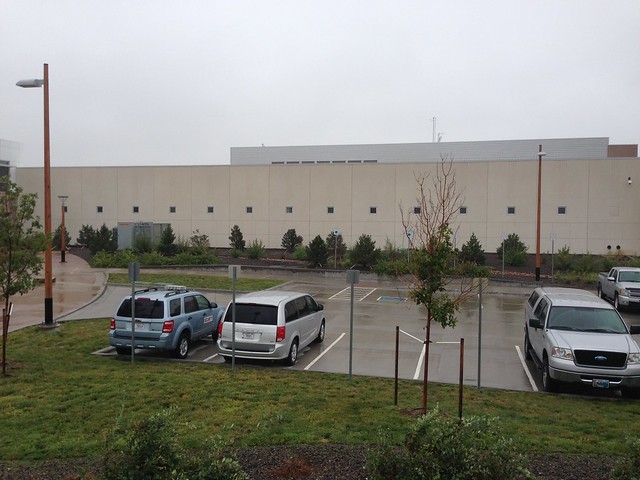
Typical: simple and unassuming, looks like a warehouse. You'd never know that it contains what the TOP500 lists as the 29th most powerful computer in the world, according to industry standard benchmarks.

* * *

A big Thank You once again to Jim Vandyke, NWSC assistant site manager, for taking time out of his busy schedule for the tour (Jim is also the only network engineer on site), and a Hat Tip to Marla Meehl, head of NCAR's networking and telecommunications section, for setting it all up for me.

Friday, April 20, 2012

All the Interesting Problems Are Scalability Problems

In "It's Not Just About Moore's Law" [2006] I presented this graph based on research I had done while I was working in the computing division at the National Center for Atmospheric Research in Boulder Colorado.

Power Curves

The vertical logarithmic axis shows how technologies change over linear time on the horizontal axis. Here are some of the assumptions I used which were believed to be true at the time I mined the data [1997].

Microprocessor speed doubles every 2 years.
Memory density doubles every 1.5 years.

Bus speed doubles every 10 years.

Bus width doubles every 5 years.

Network connectivity doubles every year.

Network bandwidth increases by a factor of 10 every 10 years.
Secondary storage density increases by a factor of 10 every 10 years.
CPU cores per microprocessor chip double every 1.5 years.

This is old enough now that I probably need to revisit it. For example, microprocessor speed has stalled in recent times. But the basic idea is sound: all things change, but they do not change at the same rate. This means that over time the architectural decisions you made based on the technology at hand at the time are probably no longer correct for the technology you have today. The balanced design you started with eventually no longer makes sense. The scalable solution you came up with five years ago may only scale up if every thing you built it from scales up at the same rate. But over time, it doesn't. And it's just going to get worse.

It has been my experience that all the interesting problems are scalability problems. This graph shows that there is a temporal component to scalability.

People that don't work in technology have this idea that artifacts like hardware and software are somehow frozen in time. Those people are running Windows 98 on a 300MHz desktop with Office 97. People that work in technology know nothing could be further from the truth. Technology changes so quickly (see above) that it's a Red Queen's Race just to stay in one place and keep everything running.

In "The Total Cost of Code Ownership" [2006] I presented yet another graph, based mostly on data from Stephen Schach's book Object-Oriented and Classical Software Engineering [McGraw-Hill, 2002], which he in turn based on surveys of actual software development projects.

Software Life-Cycle Costs - Schach 2002

Notice that the by far the largest share of the cost of the software development life cycle is maintenance, that is, making changes to the software code base after initial development has been completed. It amounts to two-thirds of the entire cost of the software base over its life cycle. If you could somehow completely eliminate the entire cost of all the initial development and testing, you would have reduced your software life cycle cost by only a third.

Surprised? Do you think that number is too high or too low? Most people that have never worked with a large code base that supported a broad product line think it's too high. Those are usually the same people that don't have processes with which to measure their actual software life cycle costs. But organizations that do have to support multi-million line code bases that are part of product lines that generate tens of millions of dollars in revenue annually think that number is too low. Way too low. I've heard the number 80% bandied about.

Les Hatton has observed that software maintenance can be broadly classified into three categories: corrective (fixing code that doesn't work), perfective (improving some aspect of working code, such as performance or even cost of maintenance), and adaptive. It's this latter category that brings these two graphs together. Adaptive maintenance is when you have to change your code because something outside of your control changed.

In my work in the embedded domain, adaptive maintenance frequently occurs because a vendor discontinued the manufacture of some critical hardware component on which your product depends, and there is no compatible substitute. (And by the way, for you hardware guys, pin-compatibility just means you can lay that new part down without spending hundreds of thousands of dollars to re-design, re-layout, and re-test your printed circuit board. With complex hardware components today that may have an entire microcontroller core and firmware hidden inside, that don't mean squat. Case in point: surface mount solid state disks, to pick an example completely at random.) I've seen a product abandoned because there was no cost effective solution.

In my work in the enterprise server-side domain, it's not any different. Vast amounts of software are based on commercial or open-source frameworks and libraries. You want to upgrade to the latest release to get critical bug fixes or new features upon which you've been waiting that make a difference between making or missing your ship date, only to discover that the software on which you so critically depend has been improved by the provider roto-tilling the application programming interface. This is the kind of thing that sends product managers running around like their hair was on fire.

So here's the deal. You can't get around this. It's like a law of thermodynamics: information system entropy. Because all things change, but not at the same rate, you always face a moving target. Adaptive maintenance is an eternal given. The only way to avoid it is for your product to fail in the market place. Short lived products won't face this issue.

Or you can learn to deal with it. Which is one of the reasons that I like Arduino and its eight-bit Atmel megaAVR microcontroller as a teaching and learning platform.

Wait... what now?

Close Up of JTAG Pod and EtherMega Board

This is a Freetronics EtherMega, sitting a few inches from me right now, festooned with test clips connected to a JTAG debugging pod. It's a tiny (about four inches by two inches) Arduino-compatible board with an ATmega2560 microcontroller. The ATmega2560 runs at 16MHz and its Harvard architecture features 256KB of flash memory for executable code and persistent data and 8KB of SRAM for variable data.

Mac Mini

This is my Mac Mini on which I'm writing this article right now. It smaller than a manilla file folder. It runs at 2.4GHz, and its von Neumann architecture features 4GB of RAM.

Ignoring stuff like instruction set, bus speed, and cache, my Mac Mini has a processor that runs about 150 times the speed of that on the EtherMega. But it has almost sixteen thousand times the memory. And that's ignoring the Mac's 320GB disk drive.

This means when writing code for the tiny EtherMega, any assumptions I may have been carrying around regarding space and time trade-offs based on prior experience on desktop or server platforms get thrown right out the window. For example, depending on the application, it is quite likely better to re-compute something every time you need it on the EtherMega than it is to compute it once and store it, because on the EtherMega bytes are far more precious than cycles.

I can hear my colleagues from my supercomputing days at NCAR laughing now.

NCAR Mesa Lab (looking East)

I'm not the first to have noticed that the skill sets for developing software for embedded systems are very much the same as those required to develop for high performance computing or big distributed platforms. I built a career around that very fact. There is a trend in HPC (the domain formerly known as supercomputing) to re-compute rather than compute-and-store, or compute-and-transmit, because raw computing power has grown at a much faster rate than that of memory or communications bandwidth (again: see above). It turns out that developing software for itsy bitsy microcontrollers has more in common than you might think with developing for ginormous supercomputers.

Writing software for these tiny microcontrollers forces you to consider serious resource constraints. To face time-space tradeoffs right up front. To really think about not just how to scale up, but how to scale down. To come to grips with how things work under the hood and make good decisions. There is no room to be sloppy or careless.

Working with technologies like Arduino and FreeRTOS on my Amigo project has made me a better, smarter, more thoughtful software developer. I am confident it can do the same for you, regardless of your problem domain, big or small.

Saturday, November 21, 2009

Post-Modern Deck Construction

The Palatial Overclock Estate (or what the liberal media insists on calling The Heavily-Armed Overclock Compound) is getting on in years. As a result we are faced with gradually replacing many of its three decades old features, including its rear wooden deck. This has led me to ponder the latest in deck construction techniques.

See, back in the day, maybe fifty years ago, it was traditional to build a deck using a single carpenter. Back then there were very expensive master carpenters who were affordable only to a very large pool of homeowners who needed decks. But even so, there were a lot of advantages to having even a small share of a single master carpenter. They had the benefit of coming with a complete set of detailed deck plans, and were very experienced at following those plans. They had a lot of apprentices who made sure the carpenter never ran out of nails or lumber. The carpenter and his apprentices were a tightly knit group who were used to working together and were pretty efficient at doing so. The deck plans were pretty straight forward to follow because everyone working on the deck knew their place and their role. The carpenter did all the actual deck building, and the apprentices were relegated to fairly minor roles. Guys like Thomas J. Watson built entire companies just on the training of master uni-carpenters, and did pretty well for a long time.

Not everyone could afford a master carpenter, so a single master carpenter was shared among many folks who needed decks. Since there was always some dead time while building a particular deck, due to weather or lack of materials or what not, the master carpenter could go next door and work on that deck for a while. The carpenter could slice his time up amongst several deck projects. Even so, it took longer to get your deck built because even when the weather cleared the carpenter wouldn't be immediately available to continue on your project. And of course the priorities of the other homeowners with whom you shared the master carpenter weren't always your priorities.

In time, maybe forty years ago, journeyman carpenters became available. They were cheaper but still fairly expensive, and not nearly as fast as the master carpenter. Their apprentices weren't as smart either. But a journeyman carpenter, sometimes referred to as a mini-carpenter, was cheap enough that a few neighbors could band together and hire one to share to get some of their rear decks built faster than if they had been sharing a single master carpenter among a larger pool of homeowners, even though the journeyman carpenter wasn't nearly as fast as the master carpenter. This worked pretty well for a long time, and guys like Ken Olsen made a lot of money training journeyman carpenters.

But about thirty years ago, high school shop classes started turning out wood working students. At first, they were pretty bad. They were very slow, they weren't very smart, they bent more nails than they hammered in, they didn't make very efficient use of lumber. But they were dirt cheap. So some individual homeowners started hiring these shop students to do small jobs that the master and journeyman carpenters never seemed to have time to do or care about. That worked pretty well. Shop students, or micro-carpenters, could build a fence, maybe build a small deck, maybe a set of stairs for an existing deck built by a master carpenter.

Around twenty years ago, someone got the bright idea of banding a bunch of shop students together into a large team, in a variation of the "nine woman can have a baby in a month" strategy. This is not as crazy as it sounds. Owners of very large homes, mansions and estates and resorts and such, had been doing just that for some time with master carpenters. They would band as many as eight master carpenters together, with a whole bunch of apprentices, great lots of lumber and nails, to tackle really big carpentry projects. You could think of it as a sort of super-carpenter. Guys like Seymour Cray were very good at creating these kinds of master carpenter teams.

It wasn't easy: in order to make effective use of eight very expensive master carpenters, the usual deck plans wouldn't do. You had to completely rethink the plans and the instructions so that each master carpenter could keep busy without getting in the way of another master carpenter, that each wouldn't run out of materials and have to sit idle (a very expensive proposition since you had to pay them anyway), and make sure that all the individual parts each was working on all fit together.

Designing the deck plans so that all eight master carpenters kept busy was no mean feat, and a lot of very smart people spent a lot of time coming up with those plans. Even so, there was a limit to how much parallelization could be found even in the biggest construction projects. Gene Amdahl, who started out training carpenters for Thomas Watson and went on to found his own carpenter training company, once rather famously observed that the amount by which a carpentry project could be sped up depended not just on the number of carpenters and the speed of each carpenter, but the degree to which the deck building instructions could be written to keep all of the carpenters busy at the same time. It was one of those observations that was both obvious and profound.

Some of those same smart people also designed some very specialized tools for the master carpenters to make better use of their very expensive time. My favorite was the vector hammer. The vector hammer had a single handle, so that it could be wielded by a single master carpenter, but had many heads, perhaps even dozens. A single master carpenter could, if he were careful, and everything lined up just right, drive dozens of nails at a time. So the deck architects spent a lot of time designing deck plans in which the nails all just happened to line up just right so that the vector hammer could be used.

Applying this same team idea to the high school shop students seemed like a winning proposition. But to get the same level of performance out of a group of high school shop students as you would from eight master carpenters, you would need a lot of high school shop students. How many? A lot. A guy named Danny Hillis made an ambitious attempt to harness sixty-four thousand high school shop students to build a single deck as fast as eight master carpenters.

Yeah, you see the problem now don't you? How do you rewrite your deck plans to keep sixty-four thousand high school shop students busy building a single deck? How do you even keep them supplied with lumber and nails? Keep them from stumbling over one another? It's almost impossible.

Oh, for sure, there were some successes. Some carpentry projects, like building a long picket fence, were embarrassingly parallel. If the fence were long enough, you could space the students out along the length of the fence line and have them all start building in parallel towards the next student, making sure to join the end of their fence section to the beginning of the adjacent student's. For a lot of projects, this actually worked pretty well. And you can be sure for the guy trying to get you to hire his sixty-four thousand shop students, those were the projects he used as examples in his sales pitch. But in general, no one knew how to design blueprints and write instructions to make effective use of that many high school shop students. Most of the students sat around idle, drinking energy drinks, while the few that could be kept busy slowly plodded along.

But a funny thing happened. Over time, as they got older and more experienced, the high school shop students individually got better. They started learning from their mistakes, started copying some of the techniques of the master carpenters, starting being more efficient at building decks. But remarkably there was one thing they didn't do: they didn't get more expensive.

Suddenly it became practical to use a single high school shop student to build a deck. Maybe not as fast as those eight master carpenters. But maybe almost as fast (or sometimes faster) than one of them. And the instructions for a single student to build a deck were so simple, even I could write them. As time went by, each high school shop student continued to get better and better. A guy by the name of Gordon Moore recognized that high school shop students would likely continue to get better and faster at a predictable rate for the foreseeable future.

Alas, it turns out that there were still limits to how fast a single high school shop student could build a deck. Students could only move so fast, could only drink so much energy drink (and had to take more frequent bathroom breaks). And no matter what, they didn't have the experience and knowledge of the master carpenters, so that in their haste to build a deck quickly they occasionally made a mistake, but because they were still pretty good at what they did, the mistake was sometimes subtle and hard for even the deck architects to find.

It was inevitable that someone would suggest that, just as the owners of mansions and estates did decades ago with master carpenters, a group of high school shop students be banded together as a team. First it was just a couple of students. Then four. Then eight were banded together in a team in what we might call a multi-carpenter approach. Some folks, like a guy named David Patterson and his friends who think about building decks a lot, have suggested creating teams of dozens or even hundreds of high school shop students, in what they call a many-carpenter approach.

Oh. Yeah, see, now we're back to the problem of decades ago when no one knew how to write instructions and deck plans for lots of carpenters. It's like we forgot what Amdahl said decades ago.

But the problem is even worse than it was way back then. See, using the one cheap but experienced high school shop student worked for so long and so well, that there are lots and lots of instruction books and architectural plans for how to build all sorts of cool things using a single carpenter. How detailed are these plans? One place where I once worked had an instruction book for its carpentry projects that was eight million lines long. That's a book of around 120,000 pages of instructions, all based on the assumption that a single carpenter would be working on them. This instruction book, portions of which dated back twenty years, generated this company as much as a billion dollars in revenue annually.

Where would you start breaking down eight million lines of instructions so that two carpenters, much less eight, or dozens, could all be kept busy building a deck? Oh, for sure, they've tried, but without much luck. After much effort, the carpenters still keep getting in each others way, tripping over each others lumber, accidentally hammering another carpenter's thumb.

And that's just the legacy deck plans. In fact, even if you're designing a brand new deck from scratch, no one really knows how to write deck building instructions to keep a lot of carpenters busy in parallel. Humans don't think that way. There are lots of ideas about abandoning English altogether and writing the deck building manuals in a new language better suited for expressing parallelism in carpentry. But there are an awful lot of carpenters and deck designers that already know English. And that doesn't do anything for all the myriad of English-language plans, blueprints, and instruction books that already exist.

As a homeowner, I think it is an interesting problem.

Acknowledgements

Thanks to Ken Mulvihill, Robert Gallegos, and Ken Howard for the inspiration.

Tags

IBM mainframe supercomputer DEC minicomputer microprocessor multiprocessor Amdahl's Law Moore's Law Thinking Machines massively parallel processor MPP multi-core many-core threads multithreaded C C++ Java
Wednesday, February 14, 2007

Small is Beautiful, but Many is Scary II

Space Cowboy Steve Tarr reminds me why I miss working with him (as if I really needed any reminder). In a comment on my prior article on this topic, in which I reviewed the white paper The Landscape of Parallel Computing Research: The View from Berkeley, he points out quite rightly that the future of many-cores in the embedded world is not a thousand general purpose processing elements. Even today, many microprocessors for the embedded market have a single general purpose core and many special purpose cores targeted for functions like communications or digital signal processing. Steve's example was robotics, something he knows a bit about from working on firmware for unmanned space missions.

There are several economic drivers of this, not the least of which is the fact stated by the Berkeley researches that multiple cores are actually easier to manufacture and functionally test. They produce higher effective yields since redundant cores which are defective can be deactivated and the resulting microprocessor sold at a lower-price. Embedded guru Jack Ganssle points out in his seminar Better Firmware Faster (review) that separating large development projects onto different host processors can actually reduce time-to-market. And many real-time designs are simplified by the ability to dedicate a processor to a task; polling no longer seems like a bad thing, and jitter in hard real-time scheduling is reduced or eliminated. For sure, there are lots of reasons to like the many-core approach.

If embedded microprocessors have a thousand identical cores, embedded products will likely purpose most of these cores to specialized tasks: processing packets from demultiplexed communications channels, digital signal processing of VOIP calls, dedicating a core to controlling a particular hardware device. Even today the trend in telecommunications products seems to be handling functions like codecs, companding, and conference summing in software, and dedicating a core to handle a single channel or at most a handful of channels is very attractive. A thousand core microprocessor places a thousand universal machines on the chip. This makes a lot of specialized hardware used today obsolete.

To be fair to the white paper and its authors, one of the things that I really liked about it is that it acknowledged the common themes running through the high performance computing and the embedded camps when it comes to many-core architectures. Having lived in both camps at various times in my career, as well as the multi-core enterprise server camp, it has always troubled me that the various groups don't seem to know about each other, much less recognize the issues they have have in common. The white paper specifically mentions that an application for a many-core microprocessor may have a lot of specialized tasks communicating by message passing. I just neglected to mention it in my article. My bad.

And, of course, as the number of daemons and other background processes running on the typical Linux server continues to grow, throwing a many-core microprocessor at the problem sounds pretty good too. And although I've never lived in the database/transaction camp, or in the visualization camp, I would expect their members to have an interesting opinion on this topic as well. As will the virtualization folks, who may offer service providers many virtual servers hosted on a single many-core microprocessor chip, an attractive prospect for the software-as-a-service market.

A thousand cores? I think it's going to be fun.

Monday, February 12, 2007

Small is Beautiful, but Many is Scary

There is a danger in succumbing to the seduction of choosing reading material that agrees with your point of view. Sure, you enjoy reading it in a "look how smart I am" kind of way. But in the end, it isn't clear you've actually learned anything. So it is with some trepidation that I recommend The Landscape of Parallel Computing Research: A View from Berkeley, a recent white paper by a multidisciplinary group of researchers at University of California at Berkeley. Although maybe I like it because it supports some of my recent assertions, I prefer to think it is because I learned quite a bit from it. It includes a list of old conventional wisdom versus new conventional wisdom about microprocessor design that gave me pause. I'm tempted to just cut and paste the list here, but in the spirit of fair use, I'll just list some of the issues in my own words, in the hope that you'll be inspired to read the white paper.

  • In a reversal of what has been true in the past, power is expensive, but transistors are free; we can put more transistors on a chip than we have the power to turn on.
  • For desktops and servers, static power consumed by leakage can be forty percent of the total power.
  • The cost of chip masks for feature sizes below sixty-five nanometers are so expensive to produce that researchers can no longer afford to build physical prototypes of new designs.
  • For many technologies, bandwidth improves by at least the square of the improvement in latency.
  • Modern microprocessors may be able to do a floating-point multiply in four clock cycles, but take as many as 200 cycles to access DRAM, leading to a reversal in which loads and stores are slow, but floating point operations are fast.
  • There are diminishing returns in achieving higher degrees of instruction level parallelism using tricks like branch prediction, out of order execution, speculative execution, and the like. (And, I would add, these tricks have already broken the memory models of many popular programming languages).
  • The doubling of sequential microprocessor performance has slowed; continuing the growth in performance as per Moore's Law will require increasing degrees of parallelism.

The authors cite a chip used by Cisco in a router that incorporates 188 RISC cores using a 130 nanometer process. They go on to predict that as many as 1000 cores may be possible on a single chip using a thirty nanometer feature size. They mention the many advantages of building microprocessors from multiple cores.

  • Achieving greater performance by parallelism is energy efficient.
  • Multiple processors can be exploited in fault-tolerant or redundant designs.
  • For parallel codes, many small cores yields the highest performance per unit area.
  • Smaller processing elements are easier to design and verify.

Thankfully, they go into some detail about the difficulties one might encounter when writing software for a 1000 core microprocessor. This gives me some hope that hardware designers might have a clue about how challenging it is to write such fine-grained parallel code. Some of the issues they mention are: inefficiencies in cache-coherence protocols; the difficulty in writing reliable code using synchronization locks; the immaturity of techniques, like transactional memory, which provide higher levels of abstraction for parallelism; and the cognitive effort required to use programming models like MPI, used by my friends in the high performance computing (HPC) community, which requires that the developer explicitly map computational tasks onto specific processors.

It's not like it's a new problem. I remember back in my HPC days how researchers much preferred the eight-processor Cray Research supercomputer to the 64,000 processor Connection Machine MPP that sat right next to it. I explained it to Mrs. Overclock this way: if you want to build a deck on the back of your house, which is easier: doing it with eight master carpenters, or with 64,000 junior high schoolers taking shop? If you could figure out some way to keep all of the students productive, you might just get it done faster. But the effort involved might also lead you to conclude that you would have been better off just building the deck by yourself.

And it's also not like we aren't already facing this issue. Today's microprocessors have already broken the memory models of many programming languages; witness the fixes that had to go into Java 1.5 so that common multi-thread design patterns like double-check-locking would work reliably. There are legacy C/C++ code bases using multiple threads that cannot run reliably on a multi-core processor, or even on a hyper-threaded processor that merely pretends to have multiple cores, without a significant porting effort. Until these issues are resolved, such code bases have stepped off the Moore's Law curve. Just let me off at the corner, thanks, I'll walk from here.

I find it unlikely that developers will be able to effectively utilize a thousand-core processor using the kind of coarse-grained parallelism offered by the POSIX thread library or the Java thread model. It's more likely that languages will have to evolve, in much the way that the standard language of supercomputing, FORTRAN, has: to incorporate fine-grained parallelism in language constructs like the do-loop, as part of its syntax. Or even to implicitly define parallelism as part of the language semantics, in a way similar to the research projects I remember from graduate school when the Japanese Fifth Generation project was looming on the Eastern horizon.

Parallelism has been a running theme during my thirty-plus-year career, from writing interrupt-driven real-time code, to designing distributed systems, to supporting supercomputers, to working on embedded projects with as many as thirty separate processing units on a single board, to developing enterprise applications suitable for multi-core servers. I look forward to seeing where things will go.

Sources

K. Asanovic et al., The Landscape of Parallel Computing Research: A View from Berkeley, UCB/EECS-2006-183, Electrical Engineering and Computer Science, U. C. Berkeley, December 18, 2006