I'm passing this anecdote along not because I'm asking for help (although any insight would be welcome), but as an example of what a low-level real-time development looks like.
I spent several days troubleshooting what I still assume to be a bug in my software that deals with output from Global Navigation Satellite System (GNSS) - of which the U.S. Global Positioning System (GPS) is one example - receivers, regarding the synchronization of the NMEA, UBX, and RTCM state machines with the input stream from the U-blox UBX-ZED-F9P receiver (a U-Blox 9 device) on my development system named Nickel (Intel NUC5i7RYH, Ubuntu 18.04.1).
NMEA is the typical output of GNSS receivers, consisting of "sentences" of printable ASCII characters. UBX is a proprietary binary format used for messaging to and from GNSS receivers manufactured by U-blox. RTCM is a standard binary format used for messaging to and from GNSS receivers that support differential GNSS (DGNSS). When a receiver like the F9P generates all three types of output, your software has to be able to grok all three formats and switch between them seamlessly.
I tested the same code on Cadmium (NUC7i7BNH, Ubuntu 16.04.5) and saw the same symptom: every tens of seconds or so my software would loose sync with the input stream than regain it shortly afterwards.
I could not reproduce the problem on Gold, an ARM-based Raspberry Pi (Broadcom BCM2837B0 SoC, Raspbian 9.4) using exactly the same application software and the same receiver hardware, nor on Bodega or Mochila, also ARM-based Pis (also Broadcom BCM2837B0, Raspbian 9.8).
So I ran the standard Linux utility
socat on Nickel to save about a minute's worth of NMEA data (UBX and RTCM weren't enabled on the F9P for this test). I ran my software against the file (so: no real-time constraints) and recorded the Sync Lost messages that included the offset into the data where the errors occurred. At this point I was pretty sure I'd found a bug in the state machines in my software.
Then I did a hex dump of the original file generated by
socat, checked at those offsets, and l
o and behold the NMEA stream was corrupted: periodically a spurious handful of bytes, looking suspiciously like a fragment of an NMEA sentence, was inserted at the end of a valid NMEA sentence.
So this corruption occurs without my software being involved at all.
I ran my software on Nickel using the GlobalSat BU353W10 receiver (a U-Blox 8 device), and I saw similar occasional loss of sync due to corruption of the NMEA stream. As before, the same software and GPS hardware on a Pi worked without problems.
I updated Cadmium to Ubuntu 19.04 and observed the same misbehavior with the BU353W10. I updated the BIOS firmware on Cadmium to the latest version and it still lost sync every tens of seconds.
I built the same software and used the BU353W10 receiver on Mercury (Dell OptiPlex 7040, Ubuntu 14.04.4) and saw sync lost every tens of seconds.
The evidence points an issue either with the USB hardware or firmware on all of my Intel boxes, or with the USB software stacks in many versions of Ubuntu (even though both Ubuntu and Raspbian are based on Debian, making it likely that their USB stacks share a common provenance).
I'm not buying it. Either seem unlikely. What is the likelihood that I'm the only developer in existence to have run into this? Gotta be pretty much zero. And my search-fu has turned up nothing.
I'd like this to be a bug in my software - and I am still assuming it is, perhaps a flaw shared with
socat - because then I could fix it. But its root cause remains a mystery.
I use the Intel-based NUCs as my development systems (the one Intel-based Dell box is a legacy development system), and the Pis as test systems, typically deploying to ARM-based systems in the field.
I have no clue at this point what this is. But when I figure it out - and I hope that I do - I will have learned something useful.
Update (2019-06-19)
Just by way of providing actual evidence, here is a snippet extracted from about one minute of data collected via the command
cat /dev/ttyACM0 > FILE
running on Nickel, the Intel NUC5i7RYH running Ubuntu 18.04.1, from a BU353W10 (U-blox 8) USB-dongle GPS receiver:
$GNGSA,M,3,07,30,08,28,09,11,27,18,51,48,13,01,1.04,0.55,0.88*1D\r\n
$GNGSA,M,3,78,87,88,77,68,69,79,67,81,,,,1.04,0.55,0.88*12\r\n
7A\r\n
$GNGGA,141257.00,3947.65236,N,10509.20014,W,2,12,0.57,1715.2,M,-21.5,M,,0000*4A\r\n
$GNGSA,M,3,07,30,08,28,09,11,27,51,48,13,01,05,1.05,0.57,0.88*12\r\n
The
7A\r\n ('7', 'A', carriage return, line feed) inserted between two sentences is obvious. It has the appearance of a checksum and standard end matter of another NMEA sentence (and in fact there are several sentences following this corruption that happen have 0x7A as their checksum).
Keep in mind that these corruptions don't appear when I run the same test on an ARM-based Raspberry Pi (
Update 2019-11-11: specifically a Raspberry Pi 3B+). This makes me wonder if there is another process that runs on the NUC but not the Pi that is consuming data from the same port. This isn't as crazy as it sounds; I have inadvertently run redundant instances of my
gpstool software or the
gpsd GPS daemon and run into similar issues (yes, I already checked for that). However, running the commands
fuser /dev/ttyACM0
and
lsof | grep ttyACM0
(which displays what process has a particular file open, and all open files and the processes using them, respectively) only show the
cat command when I run this test.
An interesting difference between the Ubuntu NUC and the Raspbian Pi is that on the former it isn't necessary to configure
/dev/ttyACM0 as a serial port (baud rate, raw mode, etc.) in my application; on the latter, it is (although it doesn't seem to matter to what I set the baud rate).
Update (2019-11-11)
I reproduced this issue on a Raspberry Pi 4B running Raspbian 10 ("buster") using a ZED-F9P (U-Blox 9) receiver chip. It occurs on a regular basis, perhaps once or twice a minute.
It also occurs extremely rarely on a Raspberry Pi 3B+ running exactly the same Raspbian 10 image (but probably with different modules dynamically loaded at boot time) and with the same GPS receiver; on a long term survey that has been running just short of
sixteen days, my software has detected
two such errors
I reproduced the issue while running the
usbmon USB debugger.
usbmon allows you to capture the raw USB packets using
tcpdump (even though it has nothing to do with the TCP protocol), and then interpret the results using
wireshark or its command line equivalent
tshark.
The command line sequence I used looked something like this.
sudo modprobe usbmon
ls /dev/usbmon*
sudo tcpdump -i usbmon3 -w trace.pcap
tshark -r trace.pcap -V -x
Here is the snippet from the log file from my
gpstool showing a corrupted data fragment in between two valid NMEA sentences. My software merely notes that it was unable to detect the beginning of a valid data frame, in NMEA, UBX, or RTCM format, and had to resync to find the beginning of the next valid frame.
INP [72] $GAGSV,2,2,08,13,23,304,27,15,32,246,37,24,30,058,26,25,40,123,41,7*71\r\n
2019-11-09T21:17:06.058145Z [26254] {b6f79530} Sync Lost 0x0000000000051c5d 0x38 '8'
2019-11-09T21:17:06.058213Z [26254] {b6f79530} Sync NMEA 0x0000000000051cac
INP [72] $GAGSV,2,2,08,13,23,304,23,15,32,246,36,24,30,058,22,25,40,123,41,2*75\r\n
Here is a (very very long) snippet of the
usbmon output from
tshark for this same section of the data stream. There are a lot more USB frames than there are NMEA sentences; the trick is to find those frames for which the
Data length field is non-zero; those will be the frames actually carrying data payloads that
gpstool will see. (I have emboldened those fields so you can find them more easily. I have also emboldened the actual payload in the hexadecimal dump.)
Frame 13557: 136 bytes on wire (1088 bits), 136 bytes captured (1088 bits)
Encapsulation type: USB packets with Linux header and padding (115)
Arrival Time: Nov 9, 2019 14:17:06.044367000 MST
[Time shift for this packet: 0.000000000 seconds]
Epoch Time: 1573334226.044367000 seconds
[Time delta from previous captured frame: 0.000064000 seconds]
[Time delta from previous displayed frame: 0.000064000 seconds]
[Time since reference or first frame: 180.668568000 seconds]
Frame Number: 13557
Frame Length: 136 bytes (1088 bits)
Capture Length: 136 bytes (1088 bits)
[Frame is marked: False]
[Frame is ignored: False]
[Protocols in frame: usb]
USB URB
[Source: 1.9.2]
[Destination: host]
URB id: 0x00000000ef306840
URB type: URB_COMPLETE ('C')
URB transfer type: URB_BULK (0x03)
Endpoint: 0x82, Direction: IN
1... .... = Direction: IN (1)
.... 0010 = Endpoint number: 2
Device: 9
URB bus id: 1
Device setup request: not relevant ('-')
Data: present (0)
URB sec: 1573334226
URB usec: 44367
URB status: Success (0)
URB length [bytes]: 72
Data length [bytes]: 72
[Request in: 13526]
[Time from request: 0.001832000 seconds]
[bInterfaceClass: Unknown (0xffff)]
Unused Setup Header
Interval: 0
Start frame: 0
Copy of Transfer Flags: 0x00000204
Number of ISO descriptors: 0
Leftover Capture Data: 2447414753562c322c322c30382c31332c32332c3330342c...
0000 40 68 30 ef 00 00 00 00 43 03 82 09 01 00 2d 00 @h0.....C.....-.
0010 d2 2c c7 5d 00 00 00 00 4f ad 00 00 00 00 00 00 .,.]....O.......
0020 48 00 00 00 48 00 00 00 00 00 00 00 00 00 00 00 H...H...........
0030 00 00 00 00 00 00 00 00 04 02 00 00 00 00 00 00 ................
0040 24 47 41 47 53 56 2c 32 2c 32 2c 30 38 2c 31 33 $GAGSV,2,2,08,13
0050 2c 32 33 2c 33 30 34 2c 32 37 2c 31 35 2c 33 32 ,23,304,27,15,32
0060 2c 32 34 36 2c 33 37 2c 32 34 2c 33 30 2c 30 35 ,246,37,24,30,05
0070 38 2c 32 36 2c 32 35 2c 34 30 2c 31 32 33 2c 34 8,26,25,40,123,4
0080 31 2c 37 2a 37 31 0d 0a 1,7*71..
Frame 13558: 64 bytes on wire (512 bits), 64 bytes captured (512 bits)
Encapsulation type: USB packets with Linux header and padding (115)
Arrival Time: Nov 9, 2019 14:17:06.044378000 MST
[Time shift for this packet: 0.000000000 seconds]
Epoch Time: 1573334226.044378000 seconds
[Time delta from previous captured frame: 0.000011000 seconds]
[Time delta from previous displayed frame: 0.000011000 seconds]
[Time since reference or first frame: 180.668579000 seconds]
Frame Number: 13558
Frame Length: 64 bytes (512 bits)
Capture Length: 64 bytes (512 bits)
[Frame is marked: False]
[Frame is ignored: False]
[Protocols in frame: usb]
USB URB
[Source: host]
[Destination: 1.9.2]
URB id: 0x00000000ef306840
URB type: URB_SUBMIT ('S')
URB transfer type: URB_BULK (0x03)
Endpoint: 0x82, Direction: IN
1... .... = Direction: IN (1)
.... 0010 = Endpoint number: 2
Device: 9
URB bus id: 1
Device setup request: not relevant ('-')
Data: not present ('<')
URB sec: 1573334226
URB usec: 44378
URB status: Operation now in progress (-EINPROGRESS) (-115)
URB length [bytes]: 128
Data length [bytes]: 0
[bInterfaceClass: Unknown (0xffff)]
Unused Setup Header
Interval: 0
Start frame: 0
Copy of Transfer Flags: 0x00000204
Number of ISO descriptors: 0
0000 40 68 30 ef 00 00 00 00 53 03 82 09 01 00 2d 3c @h0.....S.....-<
0010 d2 2c c7 5d 00 00 00 00 5a ad 00 00 8d ff ff ff .,.]....Z.......
0020 80 00 00 00 00 00 00 00 00 00 00 00 00 00 00 00 ................
0030 00 00 00 00 00 00 00 00 04 02 00 00 00 00 00 00 ................
Frame 13559: 64 bytes on wire (512 bits), 64 bytes captured (512 bits)
Encapsulation type: USB packets with Linux header and padding (115)
Arrival Time: Nov 9, 2019 14:17:06.044479000 MST
[Time shift for this packet: 0.000000000 seconds]
Epoch Time: 1573334226.044479000 seconds
[Time delta from previous captured frame: 0.000101000 seconds]
[Time delta from previous displayed frame: 0.000101000 seconds]
[Time since reference or first frame: 180.668680000 seconds]
Frame Number: 13559
Frame Length: 64 bytes (512 bits)
Capture Length: 64 bytes (512 bits)
[Frame is marked: False]
[Frame is ignored: False]
[Protocols in frame: usb]
USB URB
[Source: 1.9.2]
[Destination: host]
URB id: 0x00000000ef306780
URB type: URB_COMPLETE ('C')
URB transfer type: URB_BULK (0x03)
Endpoint: 0x82, Direction: IN
1... .... = Direction: IN (1)
.... 0010 = Endpoint number: 2
Device: 9
URB bus id: 1
Device setup request: not relevant ('-')
Data: present (0)
URB sec: 1573334226
URB usec: 44479
URB status: Success (0)
URB length [bytes]: 0
Data length [bytes]: 0
[Request in: 13528]
[Time from request: 0.001918000 seconds]
[bInterfaceClass: Unknown (0xffff)]
Unused Setup Header
Interval: 0
Start frame: 0
Copy of Transfer Flags: 0x00000204
Number of ISO descriptors: 0
0000 80 67 30 ef 00 00 00 00 43 03 82 09 01 00 2d 00 .g0.....C.....-.
0010 d2 2c c7 5d 00 00 00 00 bf ad 00 00 00 00 00 00 .,.]............
0020 00 00 00 00 00 00 00 00 00 00 00 00 00 00 00 00 ................
0030 00 00 00 00 00 00 00 00 04 02 00 00 00 00 00 00 ................
Frame 13560: 64 bytes on wire (512 bits), 64 bytes captured (512 bits)
Encapsulation type: USB packets with Linux header and padding (115)
Arrival Time: Nov 9, 2019 14:17:06.044490000 MST
[Time shift for this packet: 0.000000000 seconds]
Epoch Time: 1573334226.044490000 seconds
[Time delta from previous captured frame: 0.000011000 seconds]
[Time delta from previous displayed frame: 0.000011000 seconds]
[Time since reference or first frame: 180.668691000 seconds]
Frame Number: 13560
Frame Length: 64 bytes (512 bits)
Capture Length: 64 bytes (512 bits)
[Frame is marked: False]
[Frame is ignored: False]
[Protocols in frame: usb]
USB URB
[Source: host]
[Destination: 1.9.2]
URB id: 0x00000000ef306780
URB type: URB_SUBMIT ('S')
URB transfer type: URB_BULK (0x03)
Endpoint: 0x82, Direction: IN
1... .... = Direction: IN (1)
.... 0010 = Endpoint number: 2
Device: 9
URB bus id: 1
Device setup request: not relevant ('-')
Data: not present ('<')
URB sec: 1573334226
URB usec: 44490
URB status: Operation now in progress (-EINPROGRESS) (-115)
URB length [bytes]: 128
Data length [bytes]: 0
[bInterfaceClass: Unknown (0xffff)]
Unused Setup Header
Interval: 0
Start frame: 0
Copy of Transfer Flags: 0x00000204
Number of ISO descriptors: 0
0000 80 67 30 ef 00 00 00 00 53 03 82 09 01 00 2d 3c .g0.....S.....-<
0010 d2 2c c7 5d 00 00 00 00 ca ad 00 00 8d ff ff ff .,.]............
0020 80 00 00 00 00 00 00 00 00 00 00 00 00 00 00 00 ................
0030 00 00 00 00 00 00 00 00 04 02 00 00 00 00 00 00 ................
Frame 13561: 64 bytes on wire (512 bits), 64 bytes captured (512 bits)
Encapsulation type: USB packets with Linux header and padding (115)
Arrival Time: Nov 9, 2019 14:17:06.044502000 MST
[Time shift for this packet: 0.000000000 seconds]
Epoch Time: 1573334226.044502000 seconds
[Time delta from previous captured frame: 0.000012000 seconds]
[Time delta from previous displayed frame: 0.000012000 seconds]
[Time since reference or first frame: 180.668703000 seconds]
Frame Number: 13561
Frame Length: 64 bytes (512 bits)
Capture Length: 64 bytes (512 bits)
[Frame is marked: False]
[Frame is ignored: False]
[Protocols in frame: usb]
USB URB
[Source: 1.9.2]
[Destination: host]
URB id: 0x00000000ef3069c0
URB type: URB_COMPLETE ('C')
URB transfer type: URB_BULK (0x03)
Endpoint: 0x82, Direction: IN
1... .... = Direction: IN (1)
.... 0010 = Endpoint number: 2
Device: 9
URB bus id: 1
Device setup request: not relevant ('-')
Data: present (0)
URB sec: 1573334226
URB usec: 44502
URB status: Success (0)
URB length [bytes]: 0
Data length [bytes]: 0
[Request in: 13530]
[Time from request: 0.001579000 seconds]
[bInterfaceClass: Unknown (0xffff)]
Unused Setup Header
Interval: 0
Start frame: 0
Copy of Transfer Flags: 0x00000204
Number of ISO descriptors: 0
0000 c0 69 30 ef 00 00 00 00 43 03 82 09 01 00 2d 00 .i0.....C.....-.
0010 d2 2c c7 5d 00 00 00 00 d6 ad 00 00 00 00 00 00 .,.]............
0020 00 00 00 00 00 00 00 00 00 00 00 00 00 00 00 00 ................
0030 00 00 00 00 00 00 00 00 04 02 00 00 00 00 00 00 ................
Frame 13562: 64 bytes on wire (512 bits), 64 bytes captured (512 bits)
Encapsulation type: USB packets with Linux header and padding (115)
Arrival Time: Nov 9, 2019 14:17:06.044508000 MST
[Time shift for this packet: 0.000000000 seconds]
Epoch Time: 1573334226.044508000 seconds
[Time delta from previous captured frame: 0.000006000 seconds]
[Time delta from previous displayed frame: 0.000006000 seconds]
[Time since reference or first frame: 180.668709000 seconds]
Frame Number: 13562
Frame Length: 64 bytes (512 bits)
Capture Length: 64 bytes (512 bits)
[Frame is marked: False]
[Frame is ignored: False]
[Protocols in frame: usb]
USB URB
[Source: host]
[Destination: 1.9.2]
URB id: 0x00000000ef3069c0
URB type: URB_SUBMIT ('S')
URB transfer type: URB_BULK (0x03)
Endpoint: 0x82, Direction: IN
1... .... = Direction: IN (1)
.... 0010 = Endpoint number: 2
Device: 9
URB bus id: 1
Device setup request: not relevant ('-')
Data: not present ('<')
URB sec: 1573334226
URB usec: 44508
URB status: Operation now in progress (-EINPROGRESS) (-115)
URB length [bytes]: 128
Data length [bytes]: 0
[bInterfaceClass: Unknown (0xffff)]
Unused Setup Header
Interval: 0
Start frame: 0
Copy of Transfer Flags: 0x00000204
Number of ISO descriptors: 0
0000 c0 69 30 ef 00 00 00 00 53 03 82 09 01 00 2d 3c .i0.....S.....-<
0010 d2 2c c7 5d 00 00 00 00 dc ad 00 00 8d ff ff ff .,.]............
0020 80 00 00 00 00 00 00 00 00 00 00 00 00 00 00 00 ................
0030 00 00 00 00 00 00 00 00 04 02 00 00 00 00 00 00 ................
Frame 13563: 72 bytes on wire (576 bits), 72 bytes captured (576 bits)
Encapsulation type: USB packets with Linux header and padding (115)
Arrival Time: Nov 9, 2019 14:17:06.044519000 MST
[Time shift for this packet: 0.000000000 seconds]
Epoch Time: 1573334226.044519000 seconds
[Time delta from previous captured frame: 0.000011000 seconds]
[Time delta from previous displayed frame: 0.000011000 seconds]
[Time since reference or first frame: 180.668720000 seconds]
Frame Number: 13563
Frame Length: 72 bytes (576 bits)
Capture Length: 72 bytes (576 bits)
[Frame is marked: False]
[Frame is ignored: False]
[Protocols in frame: usb]
USB URB
[Source: 1.9.2]
[Destination: host]
URB id: 0x00000000efa68780
URB type: URB_COMPLETE ('C')
URB transfer type: URB_BULK (0x03)
Endpoint: 0x82, Direction: IN
1... .... = Direction: IN (1)
.... 0010 = Endpoint number: 2
Device: 9
URB bus id: 1
Device setup request: not relevant ('-')
Data: present (0)
URB sec: 1573334226
URB usec: 44519
URB status: Success (0)
URB length [bytes]: 8
Data length [bytes]: 8
[Request in: 13532]
[Time from request: 0.001553000 seconds]
[bInterfaceClass: Unknown (0xffff)]
Unused Setup Header
Interval: 0
Start frame: 0
Copy of Transfer Flags: 0x00000204
Number of ISO descriptors: 0
Leftover Capture Data: 382c322a37300d0a
0000 80 87 a6 ef 00 00 00 00 43 03 82 09 01 00 2d 00 ........C.....-.
0010 d2 2c c7 5d 00 00 00 00 e7 ad 00 00 00 00 00 00 .,.]............
0020 08 00 00 00 08 00 00 00 00 00 00 00 00 00 00 00 ................
0030 00 00 00 00 00 00 00 00 04 02 00 00 00 00 00 00 ................
0040 38 2c 32 2a 37 30 0d 0a 8,2*70..
Frame 13564: 64 bytes on wire (512 bits), 64 bytes captured (512 bits)
Encapsulation type: USB packets with Linux header and padding (115)
Arrival Time: Nov 9, 2019 14:17:06.044527000 MST
[Time shift for this packet: 0.000000000 seconds]
Epoch Time: 1573334226.044527000 seconds
[Time delta from previous captured frame: 0.000008000 seconds]
[Time delta from previous displayed frame: 0.000008000 seconds]
[Time since reference or first frame: 180.668728000 seconds]
Frame Number: 13564
Frame Length: 64 bytes (512 bits)
Capture Length: 64 bytes (512 bits)
[Frame is marked: False]
[Frame is ignored: False]
[Protocols in frame: usb]
USB URB
[Source: host]
[Destination: 1.9.2]
URB id: 0x00000000efa68780
URB type: URB_SUBMIT ('S')
URB transfer type: URB_BULK (0x03)
Endpoint: 0x82, Direction: IN
1... .... = Direction: IN (1)
.... 0010 = Endpoint number: 2
Device: 9
URB bus id: 1
Device setup request: not relevant ('-')
Data: not present ('<')
URB sec: 1573334226
URB usec: 44527
URB status: Operation now in progress (-EINPROGRESS) (-115)
URB length [bytes]: 128
Data length [bytes]: 0
[bInterfaceClass: Unknown (0xffff)]
Unused Setup Header
Interval: 0
Start frame: 0
Copy of Transfer Flags: 0x00000204
Number of ISO descriptors: 0
0000 80 87 a6 ef 00 00 00 00 53 03 82 09 01 00 2d 3c ........S.....-<
0010 d2 2c c7 5d 00 00 00 00 ef ad 00 00 8d ff ff ff .,.]............
0020 80 00 00 00 00 00 00 00 00 00 00 00 00 00 00 00 ................
0030 00 00 00 00 00 00 00 00 04 02 00 00 00 00 00 00 ................
Frame 13565: 136 bytes on wire (1088 bits), 136 bytes captured (1088 bits)
Encapsulation type: USB packets with Linux header and padding (115)
Arrival Time: Nov 9, 2019 14:17:06.045116000 MST
[Time shift for this packet: 0.000000000 seconds]
Epoch Time: 1573334226.045116000 seconds
[Time delta from previous captured frame: 0.000589000 seconds]
[Time delta from previous displayed frame: 0.000589000 seconds]
[Time since reference or first frame: 180.669317000 seconds]
Frame Number: 13565
Frame Length: 136 bytes (1088 bits)
Capture Length: 136 bytes (1088 bits)
[Frame is marked: False]
[Frame is ignored: False]
[Protocols in frame: usb]
USB URB
[Source: 1.9.2]
[Destination: host]
URB id: 0x00000000dbf6b180
URB type: URB_COMPLETE ('C')
URB transfer type: URB_BULK (0x03)
Endpoint: 0x82, Direction: IN
1... .... = Direction: IN (1)
.... 0010 = Endpoint number: 2
Device: 9
URB bus id: 1
Device setup request: not relevant ('-')
Data: present (0)
URB sec: 1573334226
URB usec: 45116
URB status: Success (0)
URB length [bytes]: 72
Data length [bytes]: 72
[Request in: 13534]
[Time from request: 0.002069000 seconds]
[bInterfaceClass: Unknown (0xffff)]
Unused Setup Header
Interval: 0
Start frame: 0
Copy of Transfer Flags: 0x00000204
Number of ISO descriptors: 0
Leftover Capture Data: 2447414753562c322c322c30382c31332c32332c3330342c...
0000 80 b1 f6 db 00 00 00 00 43 03 82 09 01 00 2d 00 ........C.....-.
0010 d2 2c c7 5d 00 00 00 00 3c b0 00 00 00 00 00 00 .,.]....<.......
0020 48 00 00 00 48 00 00 00 00 00 00 00 00 00 00 00 H...H...........
0030 00 00 00 00 00 00 00 00 04 02 00 00 00 00 00 00 ................
0040 24 47 41 47 53 56 2c 32 2c 32 2c 30 38 2c 31 33 $GAGSV,2,2,08,13
0050 2c 32 33 2c 33 30 34 2c 32 33 2c 31 35 2c 33 32 ,23,304,23,15,32
0060 2c 32 34 36 2c 33 36 2c 32 34 2c 33 30 2c 30 35 ,246,36,24,30,05
0070 38 2c 32 32 2c 32 35 2c 34 30 2c 31 32 33 2c 34 8,22,25,40,123,4
0080 31 2c 32 2a 37 35 0d 0a 1,2*75..
You can see, as far as
usbmon is concerned anyway, that in between the two valid NMEA sentences, the USB stack is processing a payload consisting of
8,2*70\r\n. This seems pretty obviously to be the last eight bytes of an NMEA sentence, including the checksum, carriage return, and line feed.
Whether this is a hardware or firmware issue with the USB devices on either the U-blox chip or the Raspberry Pi, or some incompatibility between the two, or a software issue in the Linux USB stack, is hard to say. Perhaps only a USB hardware analyzer could say for sure, by examining the USB packets passing between the two devices on the wire. But if this were an issue commonly occurring on devices that express the USB ACM interface as these GPS receivers do, you would think it would be common knowledge.
One colleague suggested I enable modem control (RTS/CTS handshake) in the Linux serial port driver, since a modem is what the USB Abstract Control Model interface looks like to the application. That was easily done since that capability is already supported in my application. It didn't make any difference.
Update (2019-11-11 again)
For purposes of my own documentation, here is the output of the
lsusb command on the same Raspberry Pi 4B.
Bus 003 Device 001: ID 1d6b:0002 Linux Foundation 2.0 root hub
Bus 002 Device 001: ID 1d6b:0003 Linux Foundation 3.0 root hub
Bus 001 Device 009: ID 1546:01a9 U-Blox AG
Bus 001 Device 002: ID 2109:3431 VIA Labs, Inc. Hub
Bus 001 Device 001: ID 1d6b:0002 Linux Foundation 2.0 root hub
And then from a subsequent
lsusb -s 1:9 -v command.
Bus 001 Device 009: ID 1546:01a9 U-Blox AG
Couldn't open device, some information will be missing
Device Descriptor:
bLength 18
bDescriptorType 1
bcdUSB 1.10
bDeviceClass 2 Communications
bDeviceSubClass 0
bDeviceProtocol 0
bMaxPacketSize0 64
idVendor 0x1546 U-Blox AG
idProduct 0x01a9
bcdDevice 1.00
iManufacturer 1
iProduct 2
iSerial 0
bNumConfigurations 1
Configuration Descriptor:
bLength 9
bDescriptorType 2
wTotalLength 0x003e
bNumInterfaces 2
bConfigurationValue 1
iConfiguration 0
bmAttributes 0xc0
Self Powered
MaxPower 0mA
Interface Descriptor:
bLength 9
bDescriptorType 4
bInterfaceNumber 0
bAlternateSetting 0
bNumEndpoints 1
bInterfaceClass 2 Communications
bInterfaceSubClass 2 Abstract (modem)
bInterfaceProtocol 1 AT-commands (v.25ter)
iInterface 0
CDC Header:
bcdCDC 1.10
CDC ACM:
bmCapabilities 0x02
line coding and serial state
CDC Call Management:
bmCapabilities 0x03
call management
use DataInterface
bDataInterface 1
Endpoint Descriptor:
bLength 7
bDescriptorType 5
bEndpointAddress 0x83 EP 3 IN
bmAttributes 3
Transfer Type Interrupt
Synch Type None
Usage Type Data
wMaxPacketSize 0x0040 1x 64 bytes
bInterval 255
Interface Descriptor:
bLength 9
bDescriptorType 4
bInterfaceNumber 1
bAlternateSetting 0
bNumEndpoints 2
bInterfaceClass 10 CDC Data
bInterfaceSubClass 0
bInterfaceProtocol 255 Vendor specific
iInterface 0
Endpoint Descriptor:
bLength 7
bDescriptorType 5
bEndpointAddress 0x01 EP 1 OUT
bmAttributes 2
Transfer Type Bulk
Synch Type None
Usage Type Data
wMaxPacketSize 0x0040 1x 64 bytes
bInterval 0
Endpoint Descriptor:
bLength 7
bDescriptorType 5
bEndpointAddress 0x82 EP 2 IN
bmAttributes 2
Transfer Type Bulk
Synch Type None
Usage Type Data
wMaxPacketSize 0x0040 1x 64 bytes
bInterval 0
Update (2019-11-19)
I went full in and purchased something I should have had a long time ago: a USB analyzer, specifically a
Total Phase Beagle USB 12 protocol analyzer. It took about ten minutes of learning how to use it while reproducing this problem to verify that what my software sees, and what
usbmon reports, is what is indeed coming over the wire: many valid NMEA sentences followed by what appears to be a partial NMEA sentence consisting of its last few bytes, in this example
8,2*7E.

This is distinct from the case in which an NMEA sentence is split into two successive USB frames, which also occurs and seems to work fine.
I also see an example of a botched NMEA sentence. The sentence starts out correctly,
$GLGSV,3, then the rest of the data payload is non-printable characters which seem to have some pattern (but that might be my imagination). The analyzer flags the frame as invalid with an error identified as
P7C (no clue, yet).
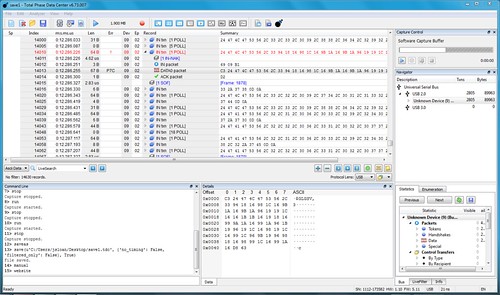
Then there is a frame with another partial sentence ending after that, and then a complete NMEA sentence split across two frames.
Testing with three ZED-F9P receivers, all on SparkFun GPS-RTK2 boards, I see this problem with corrupted output over the USB interface more frequently the faster processor I use; on an Intel Core i7-5557U @ 3.10GHz x 2 x 2 ("Nickel"), it happens every few seconds; on a Raspberry Pi 4B ARM Cortex-A72 @ 1.5GHz x 4 ("Rhodium"), it happens a few times a minute; on a Raspberry Pi 3B+ ARM Cortex-A53 @ 1.4GHz x 4 ("Gold"), it happens rarely, like once in many hours.
Investigation continues.
Update (2019-11-22)
I see this data corruption about once every five minutes when running on Ubuntu 19.10 inside VMware Workstation 15 Pro on an Lenovo ThinkPad T430s (Intel Core i7-3520M @ 2.90GHz) running Windows 10. Hard to say how the frequency jives with prior results given that it is running inside a virtual machine.